INPUT Statement: Named
Reads data values that appear after a variable name that is followed by an equal sign and assigns the values to corresponding SAS variables.
| Valid in: | DATA step |
|---|---|
| Category: | File-Handling |
| Type: | Executable |
| Restriction: | This statement is not supported in a DATA step that runs in CAS. |
Table of Contents
Syntax
Arguments
pointer-control
moves the input pointer to a specified line or column in the input buffer.
| See | Column Pointer Controls and Line Pointer Controls |
|---|
variable=
specifies a variable whose value is read by the INPUT statement. In the input data record, the field has this form:
variable=value| Tip | Use the INFORMAT statement to associate an informat with a variable. |
|---|---|
| See | SAS Informats in SAS Formats and Informats: Reference |
| Example | Using Named Input with Another Input Style |
$
indicates to store a variable value as a character value rather than as a numeric value.
| Tip | If the variable is previously defined as character, $ is not required. |
|---|---|
| Example | Using Named Input with Another Input Style |
start-column
specifies the column that the INPUT statement uses to begin scanning in the input data records for the variable. The variable name does not have to begin here.
–end-column
determines the default length of the variable.
@
holds an input record for the execution of the next INPUT statement within the same iteration of the DATA step. This line-hold specifier is called trailing @.
| Restriction | The trailing @ must be the last item in the INPUT statement. |
|---|---|
| Tip | The trailing @ prevents the next INPUT statement from automatically releasing the current input record and reading the next record into the input buffer. It is useful when you need to read from a record multiple times. |
| See | Using Line-Hold Specifiers |
@@
holds an input record for the execution of the next INPUT statement across iterations of the DATA step. This line-hold specifier is called double trailing @.
| Restriction | The double trailing @ must be the last item in the INPUT statement. |
|---|---|
| Tip | The double trailing @ is useful when each input line contains values for several observations. |
| See | Using Line-Hold Specifiers |
Details
When to Use Named Input
Named input reads the input data records that contain a variable name followed by an equal sign and a value for the variable. The INPUT statement reads the input data record at the current location of the input pointer. If the input data records contain data values at the start of the record that the INPUT statement cannot read with named input, use another input style to read the values. However, once the INPUT statement starts to read named input, SAS expects that all the remaining values are in this form. See Using Named Input with Another Input Style.
You do not have to specify the variables in the INPUT statement in the same order that they occur in the data records. Also, you do not have to specify a variable for each field in the record. However, if you do not specify a variable in the INPUT statement that another statement uses (for example, ATTRIB, FORMAT, INFORMAT, or LENGTH statement) and it occurs in the input data record, the INPUT statement automatically reads the value. SAS writes a note to the SAS log that the variable is uninitialized.
When you do not specify a variable for all the named input data values, SAS sets _ERROR_ to 1 and writes a note to the SAS log.
data list;
   input name=$ age=;
   datalines;
name=John age=34  gender=M
;
The note that SAS writes to the SAS log states that GENDER is not defined and _ERROR_ is set to 1.
Restrictions
- After you start to read with named input, you cannot switch to another input style or use pointer controls. All the remaining values in the input data record must be in the form variable=value. SAS treats the values that are not in named input form as invalid data.
- If named input values
continue after the end of the current input line, use a slash (/)
at the end of the input line. The slash tells SAS to move the pointer
to the next line and to continue to read with named input. Here is
an example of an input record that is split across two input lines.
name=John / age=34 - If you use named input to read character values that contain embedded blanks, put two blanks before and after the data value, as you would with list input. See Reading Character Variables with Embedded Blanks.
- You cannot reference an array with an asterisk or an expression subscript.
Examples
Example 1: Using List and Named Input
This DATA step uses list input with named input to read input data records.
The INPUT statement uses list input to read the ID variable. The remaining variables NAME, GENDER, AGE, and DOB are read with named input. The LENGTH statement prevents the INPUT statement from truncating the character values for the variable name to a length of 8.
data list;
   length name $ 20 gender $ 1;
   informat dob ddmmyy8.;
   input id name= gender= age= dob=;
   datalines;
4798 name=COLIN gender=m age=23 dob=16/02/75
2653 name=MICHELE gender=f age=46 dob=17/02/73
;
proc print data=list; run;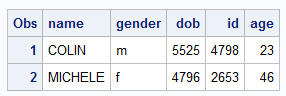
Example 2: Using Named Input with Variables in Random Order
Using the same data as in the previous example, this DATA step also uses list input and named input to read input data records. However, in this example, the order of the values in the input data is different for the two rows, except for the ID value, which must come first.
data list;
   length name $ 20 gender $ 1;
   informat dob ddmmyy8.;
   input id dob= name= age= gender=;
   datalines;
4798 gender=m name=COLIN age=23 dob=16/02/75
2653 name=MICHELE dob=17/02/73 age=46 gender=f
;
proc print data=list; run;
Example 3: Using Named Input with Another Input Style
This DATA step uses list input and named input to read input data records. In this example, the length and type of the NAME and GENDER variables are specified directly in the INPUT statement.
The INPUT statement uses list input to read the first variable, ID. The remaining variables NAME, GENDER, and DOB are read with named input. These variables are not read in order. The $20. informat with NAME= prevents the INPUT statement from truncating the character value to a length of 8. The INPUT statement reads the DOB= field because the INFORMAT statement refers to this variable. The statement skips the AGE= field altogether. SAS writes notes to the SAS log that DOB is uninitialized, AGE is not defined, and _ERROR_ is set to 1.
data list;
   input id name=$20. gender=$;
   informat dob ddmmyy8.;
   datalines;
4798  gender=m name=COLIN age=23 dob=16/02/75
2653 name=MICHELE age=46 gender=f
;
proc print data=list; run;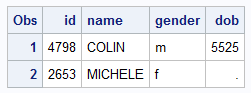
Example 4: Reading Character Variables with Embedded Blanks
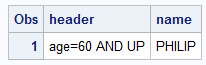
This DATA step reads character variables that contain embedded blanks with named input.
Two spaces precede and
follow the value of the variable HEADER, which is AGE=60
AND UP. The field also contains an equal sign.
data list2;
   informat header $30. name $15.;
   input header= name=;
   datalines;
header=  age=60 AND UP  name=PHILIP
;
proc print data=list2; run;
See Also
-
Statements: