The BGLIMM Procedure
ESTIMATE Statement
ESTIMATE 'label' estimate-specification <(divisor=n)></ options>;
The ESTIMATE statement provides a mechanism for computing custom linear combination of the parameters. The basic element of this statement is the estimate-specification, which consists of MODEL statement effects, random effects, and their coefficients. Specifically, an estimate-specification takes the form
< fixed-effect values …> < | random-effect values …>
You can estimate the linear combination of the parameters  , where
 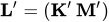 and
and  . Based on the estimate-specification in your ESTIMATE statement, PROC BGLIMM constructs the vector
 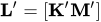 , where
  is associated with the fixed effects and
  is associated with the G-side random effects.
PROC BGLIMM then produces for an estimate (by using the posterior mean), the standard deviation (by using the posterior standard deviation), and the HPD intervals. Results from all ESTIMATE statements are combined in the ODS table named Estimates.
The ESTIMATE statement has the following arguments:
- label
identifies the ESTIMATE statement in the table. A label is required for every ESTIMATE statement that you specify. Labels can be up to 32 characters and must be enclosed in quotation marks.
- fixed-effect
identifies an effect that appears in the MODEL statement. You can use the keyword INTERCEPT as an effect when you are fitting an intercept in the model. You do not need to include all effects that are specified in the MODEL statement.
- random-effect
identifies an effect that appears in the RANDOM statement. The first random effect must follow a vertical bar (|); however, you are not required to specify random effects.
- values
are constants that are elements of the
 vector that are associated with the fixed and random effects.
The vector of is specified in order. The  component of is specified on the left side of the vertical bars (|). The
  component of is specified on the right side of the vertical bars. The estimability checking is necessary.
If PROC BGLIMM finds a portion of the specified estimate statement to be nonestimable, then it displays a message in the log.
In the following program, the first ESTIMATE statement compares the first level with the second level for the effect A, and the second ESTIMATE statement compares the first level with the third level for the effect A in a split-plot study where A has three levels and B has two levels:
estimate 'A 1 vs 2' A  1 -1 0   A*B  .5 .5 -.5 -.5 0 0;
estimate 'A 1 vs 3' A  1 0 -1   A*B  .5 .5 0 0 -.5 -.5;
Note that no random effects are specified in the preceding statement. The following statements make the same comparison for A when Block and A*Block are random effects:
estimate 'A 1 vs 2'
          A        1 -1 0
          A*B     .5 .5 -.5 -.5 0 0 |
          A*Block .25  .25  .25  .25
                 -.25 -.25 -.25 -.25
                   0    0    0    0 ;
estimate 'A 1 vs 3'
          A        1 0 -1
          A*B     .5 .5 0 0 -.5 -.5 |
          A*Block .25  .25  .25  .25
                   0    0    0    0
                 -.25 -.25 -.25 -.25 ;
The preceding statements do not contain coefficients for B and Block, because they cancel out in estimated differences between levels of A. Coefficients for B and Block are necessary to estimate the mean of one of the levels of A.
Table 2 summarizes the options available in the ESTIMATE statement after a slash (/).
Table 2: ESTIMATE Statement Options
| Option | Description |
|---|---|
| BYCAT= | Reports estimates for each category of the response in the generalized logit model |
| DIVISOR= | Specifies a value to divide the coefficients |
| E | Prints the matrix |
| EXP | Displays exponentiated estimates |
| GROUP | Sets up random-effects contrasts between different groups |
| ILINK | Computes and displays estimates on the inverse linked scale |
| SUBJECT | Sets up random-effects contrasts between different subjects |
-
BYCATEGORY
BYCAT -
reports estimates for each category of the response variable in the multinomial model for nominal data with the generalized logit link. The BYCATEGORY option has no effect unless your model is a generalized (mixed) logit model.
In this example, the response variable
Styleis multinomial with three categories. The following statements fit a generalized logit model relating the response to the two covariates:SchoolandProgram:proc bglimm data=school; class School Program; model Style = School Program / dist=multinomial link=glogit; freq Count; estimate 'School 1 vs. 2' School 1 -1 / bycat; estimate 'School 1 vs. 2' School 1 -1; run;The first ESTIMATE statement compares the
Schooleffects separately for each nonredundant response category because of the BYCAT option. The second ESTIMATE statement compares theSchooleffects for the first non-reference category only. - DIVISOR=value
specifies a value by which to divide the coefficients so that fractional coefficients can be entered as integer numerators. By default, DIVISOR=1.0.
-
EST
E - EXP | ODDSRATIO | OR
requests the exponentiated version of the linear combination of the parameters. When you model data by using the logit link function, the estimate of the linear combination of the parameters represents a log odds ratio, and the EXP option produces an odds ratio. Based on the number of iterations in the main simulation loop, PROC BGLIMM takes the exponential of the linear combination of the parameters for each of the posterior samples and then calculates the posterior mean.
- GROUP coeffs
-
sets up random-effects contrasts between different groups when you include a GROUP= variable in the RANDOM statement, as in the following example:
estimate 'Trt 1 vs 2 @ x=0.4' trt 1 -1 0 | x 0.4 / group 1 -1;By default, ESTIMATE statement coefficients on random effects are distributed equally across groups.
- ILINK
-
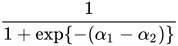
reports the parameter estimates on the scale of the mean (the inverse linked scale). PROC BGLIMM computes the value on the mean scale by applying the inverse link to the linear combination of the parameters for each of the posterior samples and then calculating the posterior mean. The interpretation of this quantity depends on the fixed-effect values and random-effect values that you specify in the ESTIMATE statement and on the link function. In a model for binary data with a logit link, for example, the following statements compute
proc bglimm data=Sales seed=9988;
   class A;
   model y = A / dist=binary link=logit;
   estimate 'A one vs. two' A 1 -1 / ilink;
run;
Here
 and
and  are the fixed-effects solutions that are associated with the first two levels of the classification effect
 A. This quantity is not the difference of the probabilities associated with the two levels,
- SUBJECT coeffs
sets up random-effects contrasts between different subjects when you include a SUBJECT= variable in the RANDOM statement. By default, ESTIMATE statement coefficients on random effects are distributed equally across subjects.
