The CAUSALMED Procedure
PROC CAUSALMED Statement
PROC CAUSALMED <options>;
The PROC CAUSALMED statement invokes the CAUSALMED procedure. Table 1 summarizes the options available in the PROC CAUSALMED statement.
Table 1: Options Available in the PROC CAUSALMED Statement
| Option | Description |
|---|---|
| Data Set and Variable Options | |
| DATA= | Specifies the input SAS data set |
| DESCENDING | Reverses the order of levels of binary outcome and mediator variables |
| NAMELENGTH= | Specifies the length of effect names |
| ORDER= | Specifies the ordering method for the levels of the classification variable |
| RORDER= | Specifies the ordering method for the levels of the outcome variable |
| Estimation and Analysis | |
| ALPHA= | Specifies the level for confidence intervals |
| CASECONTROL | Requests an analysis for a case-control study |
| CIRATIO= | Specifies the scale for confidence interval construction of ratio-type effects |
| DECOMP | Requests various decompositions of the total effect |
| VARDEF= | Specifies the divisor to use in calculating variances or standard deviations |
| Displayed Output | |
| NOPRINT | Suppresses display of all output |
| PALL | Displays all output |
| PMEDMOD | Displays mediator model parameter estimates |
| POUTCOMEMOD | Displays outcome model parameter estimates |
| PSHORT | Displays only the basic modeling information and effects summary |
| PSUMMARY | Displays only the effects summary |
| Technical Details | |
| NLOPTIONS | Specifies the optimization options for model fitting |
| SINGULAR= | Specifies the singularity criterion |
| THREADS= | Specifies the number of threads to use |
You can specify the following options:
- ALPHA=p
specifies the level 1 – p for constructing confidence intervals. By default, p = 0.05, which corresponds to 1 – p = 95% confidence intervals. If p is greater than 1, it is interpreted as a percentage and divided by 100. When multiple confidence intervals are constructed, this level is applied to each interval one at a time. This will not control the coverage probability of the intervals simultaneously. To control familywise coverage probability, you might consider supplying a value of p that is precomputed based on a method such as Bonferroni adjustment.
- CASECONTROL
-
requests an analysis for a case-control study. When you specify this option, PROC CAUSALMED fits a mediator model by using only observations for subjects in the control group (VanderWeele and Vansteelandt 2010).
In case-control studies, a group of subjects is identified with a target outcome condition (for example, a disease). This group is called the case group. A second group, known as the control group, is formed by identifying subjects who are known to be absent of the target outcome, but whose background characteristics are the same as those of the case group. The values of the hypothesized exposure or treatment variable of the case and control groups are then compared to see whether the outcome can be attributed to the exposure or treatment variable.
-
CIRATIO=ALL | LOG | NONTRANS
CIRATIO=(ALL | LOG | NONTRANS) -
computes the confidence intervals (CIs) for ratio-type causal mediation effects on the log scale, original (nontransformed) scale, or both. These ratio-type effects include the odds ratio, mean ratio, and hazard ratio effects, which are all nonnegative and have null (no-effect) values at 1. The z-value and the p-value for testing null hypothesis of no effect are also affected by the choice of these scales. By default, CIRATIO=ALL.
By using the parentheses, you can specify more than one keyword for the CIRATIO= option. Otherwise, you can specify only one of the following keywords for the scale:
- ALL
computes the CIs, z-values, and p-values of the ratio-type effects that are based on the log scale and the original effect scale, separately.
- LOG
computes the Wald-type CIs of ratio-type effects on the log scale and then back-transforms to the confidence limits on the original effect scale by exponentiation. Hence, the constructed CIs for effects are generally asymmetrical around the corresponding point estimates. The z-value and p-value for testing the null effect hypothesis of no effect on the log scale are also computed.
- NONTRANS
computes the Wald-type CIs of ratio-type effects on the original scale. Hence, the constructed CIs for effects are always symmetrical around the corresponding point estimates. The z-value and p-value for testing the null effect hypothesis of no effect on the original (nontransformed) scale are also computed.
The computations of confidence intervals, z-values, and p-values of estimates for the difference-type effects, excess ratios, or percentages are always based on the original (nontransformed) scale and would not be affected by this option.
- DATA=SAS-data-set
specifies an input data set that contains the raw data. If the DATA= option is omitted, the most recently created SAS data set is used.
- DECOMP<=i>
-
requests various decompositions of the total effect. By default, several two- and three-way decompositions and a four-way decomposition are computed. When you specify 2, 3, or 4 for i, decompositions up to an i-way decomposition are computed.
For continuous outcomes, the decomposition of the total effect is on the original continuous scale. For binary responses, the decomposition of the total effect is on the excess relative risk scale (VanderWeele 2014). In addition, PROC CAUSALMED displays the corresponding decompositions as percentages.
The four-way decomposition is described in the section Causal Mediation Effects: Theory, Definitions, and Effect Decompositions. It contains the following four components:
CDE (controlled direct effect): the component effect that is not due to interaction or mediation
IRF (reference interaction): the component effect that is due to interaction but not mediation (IRF is denoted as
 in VanderWeele (2014))
 IMD (mediated interaction): the component effect that is due to both interaction and mediation (IMD is denoted as
 in VanderWeele (2014))
 PIE (pure indirect effect): the component effect that is due to mediation but not interaction
PROC CAUSALMED computes the following three-way decompositions:
NDE + PIE + IMD: natural direct effect, pure indirect effect, and mediated interaction
CDE + PIE + PAI: controlled direct effect, pure indirect effect, and portion attributed to interaction
PROC CAUSALMED computes the following two-way decompositions:
NDE + NIE: natural direct effect and natural indirect effect
CDE + PE: controlled direct effect and portion eliminated
TDE + PIE: total direct effect and pure indirect effect
For more information about the logic and interpretations of these decompositions, see VanderWeele (2014) and VanderWeele (2015).
-
DESCENDING
DESCEND
DESC sorts the levels of the binary outcome and the binary mediator variables in reverse of the specified order.
- NAMELENGTH=n
specifies the maximum length of effect names in tables to be n characters, where n is a value between 20 and 128. By default, NAMELEN=20.
- NLOPTIONS(nlo-options)
-
specifies options for the nonlinear optimization methods that are used for fitting the specified models. You can specify one or more of the following nlo-options separated by spaces:
-
ABSCONV=r
ABSTOL=r specifies an absolute function convergence criterion by which minimization stops when
 , where
  is the vector of parameters in the optimization and
  is the objective function. The default value of r is the negative square root of the largest double-precision value.
 -
ABSFCONV=r
ABSFTOL=r -
specifies an absolute function difference convergence criterion. Termination requires a small change of the function value in successive iterations,

where
denotes the vector of parameters that participate in the optimization and is the objective function. By default, ABSFCONV=0. -
ABSGCONV=r
ABSGTOL=r -
specifies an absolute gradient convergence criterion. Termination requires the maximum absolute gradient element to be small,
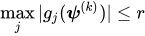
where
denotes the vector of parameters that participate in the optimization and  is the gradient of the objective function with respect to the jth parameter. By default, ABSGCONV=1E–7.
 -
FCONV=r
FTOL=r -
specifies a relative function convergence criterion. Termination requires a small relative change of the function value in successive iterations,
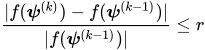
where
denotes the vector of parameters that participate in the optimization and is the objective function. By default, FCONV= , where by default FDIGITS is
  , where
  is the machine precision.
 -
GCONV=r
GTOL=r -
specifies a relative gradient convergence criterion. For all values of the TECHNIQUE= suboption except CONGRA, termination requires the normalized predicted function reduction to be small,
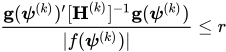
where
denotes the vector of parameters that participate in the optimization, is the objective function, and  is the gradient. When TECHNIQUE=CONGRA (for which a reliable Hessian estimate
  is not available), the following criterion is used:
By default, GCONV=1E–8.
-
MAXFUNC=n
MAXFU=n -
specifies the maximum number of function calls in the optimization process. The default values depend on the value of the TECHNIQUE= suboption as follows:
TRUREG, NRRIDG, and NEWRAP: 125
QUANEW and DBLDOG: 500
CONGRA: 1,000
The optimization can terminate only after completing a full iteration. Therefore, the number of function calls that are actually performed can exceed n.
-
MAXITER=n
MAXIT=n -
specifies the maximum number of iterations in the optimization process. The default values depend on the value of the TECHNIQUE= suboption as follows:
TRUREG, NRRIDG, and NEWRAP: 50
QUANEW and DBLDOG: 200
CONGRA: 400
These default values also apply when n is specified as a missing value.
- MAXTIME=r
specifies an upper limit of r seconds of CPU time for the optimization process. Because the time is checked only at the end of each iteration, the actual run time might be longer than r. By default, CPU time is not limited.
- TECHNIQUE=CONGRA | DBLDOG | NEWRAP | NRRIDG | QUANEW | TRUREG
-
specifies the optimization technique to obtain maximum likelihood estimates. You can specify the following values:
- CONGRA
performs a conjugate-gradient optimization.
- DBLDOG
performs a version of double-dogleg optimization.
- NEWRAP
performs a Newton-Raphson optimization that combines a line-search algorithm with ridging.
- NRRIDG
performs a Newton-Raphson optimization with ridging.
- QUANEW
performs a dual quasi-Newton optimization.
- TRUREG
performs a trust-region optimization.
By default, TECHNIQUE=NRRIDG.
For more information about these optimization methods, see the section Choosing an Optimization Algorithm in Chapter 20, Shared Concepts and Topics.
-
ABSCONV=r
- NOPRINT
suppresses all displayed output. For more information about the options for controlling output display, see the section ODS Table Names.
- ORDER=DATA | FORMATTED | FREQ | INTERNAL
-
specifies the sort order for the levels of CLASS variables. This ordering determines which parameters in the model correspond to each level in the data.
You can specify the following values:
- DATA
sorts the levels in their order of appearance in the input data set.
- FORMATTED
sorts the levels by external formatted values, except for numeric variables that have no explicit format, which are sorted by their unformatted (internal) values. The sort order is machine-dependent.
- FREQ
sorts the levels by descending frequency count. Levels that have more observations come earlier in the order.
- INTERNAL
sorts the levels by an unformatted value. The sort order is machine-dependent.
By default, ORDER=FORMATTED. For more information about sort order, see the chapter on the SORT procedure in the Base SAS Procedures Guide and the discussion of BY-group processing in SAS Programmers Guide: Essentials.
-
PALL
ALL displays all output tables. For more information about the options for controlling output display, see the section ODS Table Names.
- PMEDMOD
displays parameter estimates for the mediator model. For more information about the options for controlling output display, see the section ODS Table Names.
- POUTCOMEMOD
displays parameter estimates for the outcome model. For more information about the options for controlling output display, see the section ODS Table Names.
- PSHORT
displays only the basic modeling information and the summary of effects. When you specify this option, you can also display the effect decomposition table by specifying the DECOMP option. For more information about the options for controlling output display, see the section ODS Table Names.
- PSUMMARY
displays only a summary of effects. When you specify this option, you can also display the effect decomposition table by specifying the DECOMP option. For more information about the options for controlling output display, see the section ODS Table Names.
-
RORDER=DATA | FORMATTED | FREQ | INTERNAL
RESPORDER=DATA | FORMATTED | FREQ | INTERNAL -
specifies the sort order for the levels of the outcome variable. In order for this option to apply, either the outcome variable must be specified in the CLASS statement or the DIST=BIN option must be specified in the MODEL statement. The following table shows how PROC CAUSALMED interprets values of the RORDER= option.
Value of RORDER= Levels Sorted By DATA Order of appearance in the input data set. FORMATTED External formatted value, except for numeric variables that have no explicit format, which are sorted by their unformatted (internal) value. The sort order is machine-dependent. FREQ Descending frequency count. Levels that have the most observations come first in the order. INTERNAL Unformatted value. The sort order is machine-dependent. By default, RORDER=FORMATTED. The DESCENDING option in the PROC CAUSALMED statement causes the response variable to be sorted in reverse of the order displayed in the previous table. For more information about sort order, see the chapter on the SORT procedure in the Base SAS Procedures Guide.
- SINGULAR=tolerance
specifies the tolerance for testing the singularity of a matrix, where tolerance must be between 0 and 1. The default tolerance is 1E7 times the machine precision.
-
THREADS=n
NTHREADS=n specifies the number of threads (n) for analytic computations and overrides the SAS system option THREADS | NOTHREADS. If you do not specify the THREADS= option or if you specify THREADS=0, the number of threads is determined from the number of CPUs in the host on which the analytic computations execute.
- VARDEF=DF | N | WDF | WEIGHT | WGT
-
specifies the divisor to use in calculating the variance and standard deviation. By default, VARDEF=DF. With n denoting the total number of observations and
 denoting the weight for observation i, the values and associated divisors are displayed in the following table.
 Value Description Divisor DF Degrees of freedom 
N Number of observations n WDF Sum of weights DF 
WEIGHT | WGT Sum of weights 
You can use the WEIGHT statement to specify the variable that contains weights. If the WEIGHT statement is not used, each
has a value of 1.