The GAM Procedure
MODEL Statement
MODEL dependent <(options)> = <PARAM(effects)> <smoothing-effects> </ options>;
MODEL event/trials = <PARAM(effects)> <smoothing-effects> </ options>;
The MODEL statement specifies the dependent variable and the independent effects you want to use in the model. Specify the independent parametric variables inside the parentheses of PARAM( ). The parametric variables can be either classification variables or continuous variables. Classification variables must be declared in a CLASS statement. Interactions between variables can also be included as parametric effects. Multiple PARAM() specifications are allowed in the MODEL statement. The syntax for the specification of effects is the same as for the GLM procedure (Chapter 53, The GLM Procedure).
Only continuous variables can be specified in smoothing-effects. Any number of smoothing-effects can be specified, as follows:
| Smoothing Effect | Meaning |
|---|---|
| SPLINE(variable <, DF=number>) | Fits a smoothing spline with the variable and with DF=number |
| LOESS(variable <, DF=number>) | Fits a local regression with the variable and with DF=number |
| SPLINE2(variable1, variable2 <,DF=number>) | Fits a bivariate thin-plate smoothing spline with variable1 and variable2 and with DF=number |
The number specified in the DF= option must be positive. If you specify neither the DF= option nor the METHOD=GCV in the MODEL statement, then the default is DF=4. Note that for univariate spline and loess components, a degree of freedom is used by default to account for the linear portion of the model, so the value displayed in the "Fit Summary" and "Analysis of Deviance" tables will be one less than the value you specify.
Both parametric effects and smoothing effects are optional. If none are specified, a model that contains only an intercept is fitted.
If only parametric variables are present, PROC GAM fits a parametric linear model by using the terms inside the parentheses of PARAM( ). If only smoothing effects are present, PROC GAM fits a nonparametric additive model. If both types of effect are present, PROC GAM fits a semiparametric model by using the parametric effects as the linear part of the model.
Table 2 shows how to specify various models for a dependent variable y and independent variables x, x1, and x2. 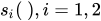 are nonparametric smooth functions.
Table 2: Syntax for Common GAM Models
| Type of Model | Syntax for model |
Mathematical Form |
|---|---|---|
| Parametric | y=param(x1 x2) |
 |
| Nonparametric | y=spline(x) |
 |
| Nonparametric | y=loess(x) |
|
| Semiparametric | y=spline(x1) param(x2) |
 |
| Additive | y=spline(x1) spline(x2) |
 |
| Thin-plate spline | y=spline2(x1,x2) |
 |
Table 3 summarizes the options available in the MODEL statement.
Table 3: MODEL Statement Options
| Option | Description |
|---|---|
| Response Variable Options | |
| DESCENDING | Reverses the order of the response categories |
| EVENT= | Specifies the event category for the binary response model |
| ORDER= | Specifies the sort order for the response variable |
| REFERENCE= | Specifies the reference category for the binary response model |
| Model Options | |
| ALPHA= | Specifies the significance level |
| ANODEV= | Specifies the method used to analyze smoothing effects |
| DIST= | Specifies the distribution family |
| EPSILON= | Specifies the convergence criterion for the backfitting algorithm |
| EPSSCORE= | Specifies the convergence criterion for the local scoring algorithm |
| ITPRINT | Produces an iteration summary table for the smoothing effects |
| MAXITER= | Specifies the maximum number of iterations for the backfitting algorithm |
| MAXITSCORE= | Specifies the maximum number of iterations for the local scoring algorithm |
| METHOD= | Specifies the method for selecting the value of the smoothing parameter |
| OFFSET= | Specifies an offset for the linear predictor |
Response Variable Options
Response variable options determine how the GAM procedure models probabilities for binary data.
You can specify the following options by enclosing them in parentheses after the response variable. See the section CLASS Statement for more detail.
-
DESCENDING
DESC reverses the order of the response categories. If both the DESCENDING and ORDER= options are specified, PROC GAM orders the response categories according to the ORDER= option and then reverses that order.
- EVENT=‘category’ | keyword
-
specifies the event category for the binary response model. PROC GAM models the probability of the event category. You can specify the value (formatted, if a format is applied) of the event category in quotes, or you can specify one of the following keywords. The default is EVENT=FIRST.
One of the most common sets of response levels is
 , with 1 representing the event for which the probability is to be modeled. Consider the example where
 Ytakes the value 1 and 0 for event and nonevent, respectively, andXis the explanatory variable. By default, PROC GAM models the probability thatY= 0. To model the probability thatY= 1 , specify the following MODEL statement:model Y (event='1') = X; - ORDER=DATA | FORMATTED | FREQ | INTERNAL
-
specifies the sort order for the levels of the response variable. By default, ORDER=FORMATTED. When ORDER=FORMATTED, the values of numeric variables for which you have supplied no explicit format (that is, for which there is no corresponding FORMAT statement in the current PROC GAM run or in the DATA step that created the data set), are ordered by their internal (numeric) value. If you specify the ORDER= option in the MODEL statement and the ORDER= option in the CLASS statement, the former takes precedence. The following table shows the interpretation of the ORDER= values:
Value of ORDER= Levels Sorted By DATA Order of appearance in the input data set FORMATTED External formatted value, except for numeric variables with no explicit format, which are sorted by their unformatted (internal) value FREQ Descending frequency count; levels with the most observations come first in the order INTERNAL Unformatted value For the FORMATTED and INTERNAL values, the sort order is machine-dependent.
For more information about sort order, see the chapter on the SORT procedure in the Base SAS Procedures Guide and the discussion of BY-group processing in SAS Programmers Guide: Essentials.
-
REFERENCE=’category’ | keyword
REF=’category’ | keyword -
specifies the reference category for the binary response model. Specifying one response category as the reference is the same as specifying the other response category as the event category. You can specify the value (formatted if a format is applied) of the reference category in quotes, or you can specify one of the following keywords:
- FIRST
designates the first ordered category as the reference.
- LAST
designates the last ordered category as the reference. This is the default.
The REFERENCE= option is ignored when the EVENT= option is present.
Model Options
- ALPHA=number
specifies the significance level
 of the confidence limits on
the final nonparametric component estimates when you request confidence limits to be included in the output data set. Specify number as a value between 0 and 1. The default value is 0.05. See the section OUTPUT Statement for more information about the OUTPUT statement.
of the confidence limits on
the final nonparametric component estimates when you request confidence limits to be included in the output data set. Specify number as a value between 0 and 1. The default value is 0.05. See the section OUTPUT Statement for more information about the OUTPUT statement. - ANODEV=type
-
specifies the type of method to be used to produce the "Analysis of Deviance" table for smoothing effects. The available choices are as follows:
- REFIT
specifies that PROC GAM perform
 tests by fitting nested GAM models. This is the default choice if you do not specify the ANODEV= option. This choice requires fitting separate GAM models where one smoothing term is omitted from each model.
 - NOREFIT
specifies that PROC GAM perform approximate tests of smoothing effects. To test each smoothing effect, a weighted least squares model is fitted to the remaining parametric part of the model while keeping other nonlinear smoothers fixed. For details, see Hastie (1991). This choice requires only a single GAM fitting to be performed, which reduces the time of the procedure.
- NONE
requests that the procedure not produce the "Analysis of Deviance" table for smoothing effects.
-
DIST=distribution-id
LINK=distribution-id -
specifies the distribution family used in the model. The choices for distribution-id are displayed in Table 4. See Distribution Family and Canonical Link for more information.
Table 4: Distribution Families for GAM Models
DIST= Distribution Link Function Response Data Type GAUSSIAN | GAUS | NORM Normal (Gaussian) Identity Continuous variables BINOMIAL | LOGI | BIN Binomial Logit Binary variables POISSON | POIS | LOGL Poisson Log Nonnegative discrete variables GAMMA | GAMM Gamma Negative reciprocal Positive continuous variables IGAUSSIAN | IGAU | INVG Inverse Gaussian Squared reciprocal Positive continuous variables
Canonical link functions are used with those distributions. Although alternative links are possible theoretically, the final fit of nonparametric regression models is relatively insensitive to the precise choice of link functions. Therefore, only the canonical link for each distribution family is implemented in PROC GAM. The loess smoother is not available for DIST=BINOMIAL when the number of trials is greater than 1.
- EPSILON=number
specifies the convergence criterion for the backfitting algorithm. The default value is 1E–8.
- EPSSCORE=number
specifies the convergence criterion for the local scoring algorithm. The default value is 1E–8.
- ITPRINT
produces an iteration summary table for the smoothing effects when doing backfitting and local scoring.
- MAXITER=number
specifies the maximum number of iterations for the backfitting algorithm. The default value is 50.
- MAXITSCORE=number
specifies the maximum number of iterations for the local scoring algorithm. The default value is 100.
- METHOD=GCV
specifies that the value of the smoothing parameter should be selected by generalized cross validation. If you specify both METHOD=GCV and the DF= option for some smoothing effects, the user-specified DF values are used for those effects in which the DF= option is specified. The GCV criterion is used for determining smoothness of the remaining effects. See the section Selection of Smoothing Parameters for more details on the GCV method.
- OFFSET=variable
specifies an offset for the linear predictor. An offset plays the role of a predictor whose coefficient is known to be 1. For example, you can use an offset in a Poisson model when counts have been obtained in time intervals of different lengths. With a log link function, you can model the counts as Poisson variables with the logarithm of the time interval as the offset variable. The offset variable cannot appear in the CLASS statement or elsewhere in the MODEL statement.