The ROBUSTREG Procedure
High Breakdown Value Estimation
The breakdown value of an estimator is the smallest contamination fraction of the data that can cause the estimates on the entire data to be arbitrarily far from the estimates on only the uncontaminated data. The breakdown value of an estimator can be used to measure the robustness of the estimator. Rousseeuw and Leroy (1987) and others introduced the following high breakdown value estimators for linear regression.
LTS Estimate
The least trimmed squares (LTS) estimate that was proposed by Rousseeuw (1984) is defined as the p-vector

where  are the ordered squared residuals
  ,
,  , and h is defined in the range
  .
.
You can specify the parameter h by using the H= option in the PROC ROBUSTREG statement. By default, 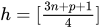 . The breakdown value is
  for the LTS estimate.
The ROBUSTREG procedure computes LTS estimates by using the FAST-LTS algorithm of Rousseeuw and Van Driessen (2000). The estimates are often used to detect outliers in the data, which are then downweighted in the resulting weighted LS regression.
Algorithm
Least trimmed squares (LTS) regression is based on the subset of h observations (out of a total of n observations) whose least squares fit possesses the smallest sum of squared residuals. The coverage h can be set between  and n. The LTS method was proposed by Rousseeuw (1984, p. 876) as a highly robust regression estimator with breakdown value
  . The ROBUSTREG procedure uses the FAST-LTS algorithm that was proposed by Rousseeuw and Van Driessen (2000). The intercept adjustment technique is also used in this implementation. However, because this adjustment is expensive to compute, it is optional. You can use the IADJUST= option in the PROC ROBUSTREG statement to request or suppress the intercept adjustment. By default, PROC ROBUSTREG does intercept adjustment for data sets that contain fewer than 10,000 observations. The steps of the algorithm are described briefly as follows. For more information, see Rousseeuw and Van Driessen (2000).
The default h is
 , where p is the number of independent variables. You can specify any integer h with
  by using the H= option in the MODEL statement. The breakdown value for LTS, , is reported. The default h is a good compromise between breakdown value and statistical efficiency.
 If p = 1 (single regressor), the procedure uses the exact algorithm of Rousseeuw and Leroy (1987, p. 172).
If
 , PROC ROBUSTREG uses the following algorithm. If n < 2 ssubs, where ssubs is the size of the subgroups (you can specify ssubs by using the SUBGROUPSIZE= option in the PROC ROBUSTREG statement; by default, ssubs = 300), PROC ROBUSTREG draws a random p-subset and computes the regression coefficients by using these p points (if the regression is degenerate, another p-subset is drawn). The absolute residuals for all observations in the data set are computed, and the first h points that have the smallest absolute residuals are selected. From this selected h-subset, PROC ROBUSTREG carries out nsteps C-steps (concentration steps; for more information, see Rousseeuw and Van Driessen 2000). You can specify nsteps by using the CSTEP= option in the PROC ROBUSTREG statement; by default, nsteps = 2. PROC ROBUSTREG redraws p-subsets and repeats the preceding computation nrep times, and then finds the nbsol (at most) solutions that have the lowest sums of h squared residuals. You can specify nrep by using the NREP= option in the PROC ROBUSTREG statement; by default, NREP=
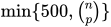 . For small n and p, all
  subsets are used and the NREP= option is ignored (Rousseeuw and Hubert 1996). You can specify nbsol by using the NBEST= option in the PROC ROBUSTREG statement; by default, NBEST=10. For each of these nbsol best solutions, C-steps are taken until convergence and the best final solution is found.
 If
 , construct five disjoint random subgroups with size ssubs. If
  , the data are split into at most four subgroups with ssubs or more observations in each subgroup, so that each observation belongs to a subgroup and the subgroups have roughly the same size. Let nsubs denote the number of subgroups. Inside each subgroup, PROC ROBUSTREG repeats the step 3 algorithm nrep / nsubs times, keeps the nbsol best solutions, and pools the subgroups, yielding the merged set of size
  . In the merged set, for each of the
  best solutions, nsteps C-steps are carried out by using and
  and the nbsol best solutions are kept. In the full data set, for each of these nbsol best solutions, C-steps are taken by using n and h until convergence and the best final solution is found.
Note: At step 3 in the algorithm, a randomly selected p-subset might be degenerate (that is, its design matrix might be singular). If the total number of p-subsets from any subgroup is greater than 4,000 and the ratio of degenerate p-subsets is higher than the threshold that is specified in the FAILRATIO= option, the algorithm terminates with an error message.
R Square
For models with the intercept term, the robust version of R square for the LTS estimate is defined as
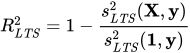
For models without the intercept term, it is defined as

For both models,
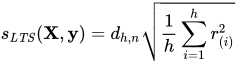
Note that  is a preliminary estimate of the parameter
  in the distribution function
  .
.
Here  is chosen to make consistent, assuming a Gaussian model. Specifically,
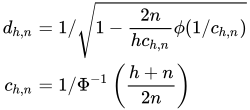
where  and
and  are the distribution function and the density function of the standard normal distribution, respectively.
Final Weighted Scale Estimator
The ROBUSTREG procedure displays two scale estimators, and Wscale. The estimator Wscale is a more efficient scale estimator based on the preliminary estimate ; it is defined as
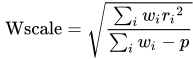
where
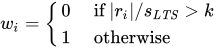
You can specify k by using the CUTOFF= option in the MODEL statement. By default, k = 3.
S Estimate
The S estimate that was proposed by Rousseeuw and Yohai (1984) is defined as the p-vector
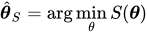
where the dispersion  is the solution of
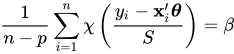
Here  is set to
  such that
  and
and  are asymptotically consistent estimates of
  and for the Gaussian regression model. The breakdown value of the S estimate is

The ROBUSTREG procedure provides two choices for  : Tukey’s bisquare function and Yohai’s optimal function.
Tukey’s bisquare function, which you can specify by using the option CHIF=TUKEY, is

The constant  controls the breakdown value and efficiency of the S estimate. If you use the EFF= option to specify the efficiency, you can determine the corresponding . The default is 2.9366, such that the breakdown value of the S estimate is 0.25, with a corresponding asymptotic efficiency for the Gaussian model of 75.9%.
The Yohai function, which you can specify by using the option CHIF=YOHAI, is
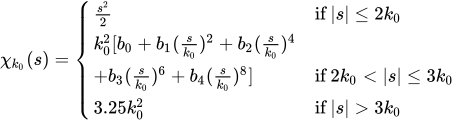
where  ,
,  ,
,  ,
,  , and
, and  . If you use the EFF= option to specify the efficiency, you can determine the corresponding . By default, is set to 0.7405, such that the breakdown value of the S estimate is 0.25, with a corresponding asymptotic efficiency for the Gaussian model of 72.7%.
Algorithm
The ROBUSTREG procedure implements the algorithm that was proposed by Marazzi (1993) for the S estimate, which is a refined version of the algorithm that was proposed by Ruppert (1992). The refined algorithm is briefly described as follows.
Initialize iter = 1.
Draw a random q-subset of the total n observations, and compute the regression coefficients by using these q observations (if the regression is degenerate, draw another q-subset), where
 can be specified by using the SUBSIZE= option. By default,
  .
. -
Compute the residuals:
 for . For the first iteration, where iter = 1, take the following substeps:
 If all
 for
for  , which means
  exactly equals
  for all , this algorithm terminates with a message for exact fit.
 Otherwise, set
 .
. If
 , update
  .
. If
 , set
, set  ; go to step 3.
If iter > 1 and
 , go to step 3; otherwise, go to step 5.
 -
Solve the following equation for s by using an iterative algorithm:

If iter > 1 and
 , go to step 5. Otherwise, set
  and
and  . If
. If  , return
  and
and  ; otherwise, go to step 5.
 If iter < NREP, set
 and return to step 1; otherwise, return and .
The ROBUSTREG procedure performs the following refinement step by default. You can request that this refinement not be performed by specifying the NOREFINE option in the PROC ROBUSTREG statement.
Let
 . Using the values and from the previous steps, compute the M estimates
  and
and  of and with the setup for M estimation that is described in the section M Estimation. If
  , give a warning and return and ; otherwise, return and .
You can specify TOLS by using the TOLERANCE= option; by default, TOLERANCE=0.001. Alternately, you can specify NREP by using the NREP= option. You can also use the option NREP=NREP0 or NREP=NREP1 to determine NREP according to Table 9. NREP=NREP0 is set as the default.
Table 9: Default NREP
| P | NREP0 | NREP1 |
|---|---|---|
| 1 | 150 | 500 |
| 2 | 300 | 1000 |
| 3 | 400 | 1500 |
| 4 | 500 | 2000 |
| 5 | 600 | 2500 |
| 6 | 700 | 3000 |
| 7 | 850 | 3000 |
| 8 | 1250 | 3000 |
| 9 | 1500 | 3000 |
| >9 | 1500 | 3000 |
Note: At step 1 in the algorithm, a randomly selected q-subset might be degenerate. If the total number of q-subsets from any subgroup is greater than 4,000 and the ratio of degenerate q-subsets is higher than the threshold specified in the FAILRATIO= option, the algorithm terminates with an error message.
R Square and Deviance
For the model with the intercept term, the robust version of R square for the S estimate is defined as
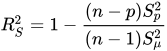
For the model without the intercept term, it is defined as
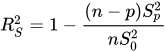
In both cases,  is the S estimate of the scale in the full model,
  is the S estimate of the scale in the regression model with only the intercept term, and
  is the S estimate of the scale without any regressor. The deviance D is defined as the optimal value of the objective function on the
  scale:

Asymptotic Covariance and Confidence Intervals
Because the S estimate satisfies the first-order necessary conditions as the M estimate, it has the same asymptotic covariance as the M estimate. All three estimators of the asymptotic covariance for the M estimate in the section Asymptotic Covariance and Confidence Intervals can be used for the S estimate. Besides, the weighted covariance estimator H4 that is described in the section Asymptotic Covariance and Confidence Intervals is also available and is set as the default. Confidence intervals for estimated parameters are computed from the diagonal elements of the estimated asymptotic covariance matrix.