The ROBUSTREG Procedure

MM Estimation

MM estimation is a combination of high breakdown value estimation and efficient estimation that was introduced by Yohai (1987). It has the following three steps:

  1. Compute an initial (consistent) high breakdown value estimate ModifyingAbove bold-italic theta With caret prime. The ROBUSTREG procedure provides two kinds of estimates as the initial estimate: the LTS estimate and the S estimate. By default, the LTS estimate is used because of its speed and high breakdown value. The breakdown value of the final MM estimate is decided by the breakdown value of the initial LTS estimate and the constant k 0 in the chi function. To use the S estimate as the initial estimate, specify the INITEST=S option in the PROC ROBUSTREG statement. In this case, the breakdown value of the final MM estimate is decided only by the constant k 0. Instead of computing the LTS estimate or the S estimate as the initial estimate, you can also specify the initial estimate explicitly by using the INEST= option in the PROC ROBUSTREG statement. For more information, see the section INEST= Data Set.

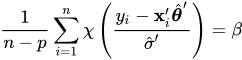
  2. Find ModifyingAbove sigma With caret prime such that

    StartFraction 1 Over n minus p EndFraction sigma-summation Underscript i equals 1 Overscript n Endscripts chi left-parenthesis StartFraction y Subscript i Baseline minus bold x prime Subscript i Baseline ModifyingAbove bold-italic theta With caret prime Over ModifyingAbove sigma With caret prime EndFraction right-parenthesis equals beta

    where beta equals integral chi left-parenthesis s right-parenthesis d normal upper Phi left-parenthesis s right-parenthesis.

    The ROBUSTREG procedure provides two choices for chi: Tukey’s bisquare function and Yohai’s optimal function.

    Tukey’s bisquare function, which you can specify by using the option CHIF=TUKEY, is

    chi Subscript k 0 Baseline left-parenthesis s right-parenthesis equals StartLayout Enlarged left-brace 1st Row 1st Column 3 left-parenthesis StartFraction s Over k 0 EndFraction right-parenthesis squared minus 3 left-parenthesis StartFraction s Over k 0 EndFraction right-parenthesis Superscript 4 Baseline plus left-parenthesis StartFraction s Over k 0 EndFraction right-parenthesis Superscript 6 Baseline 2nd Column if StartAbsoluteValue s EndAbsoluteValue less-than-or-equal-to k 0 2nd Row 1st Column 1 2nd Column otherwise EndLayout

    where k 0 can be specified by using the K0= option. The default k 0 is 2.9366, such that the asymptotically consistent scale estimate ModifyingAbove sigma With caret prime has a breakdown value of 25%.

    Yohai’s optimal function, which you can specify by using the option CHIF=YOHAI, is
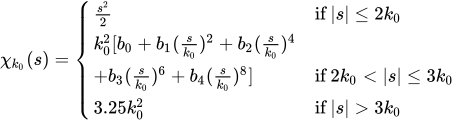
    chi Subscript k 0 Baseline left-parenthesis s right-parenthesis equals StartLayout Enlarged left-brace 1st Row 1st Column StartFraction s squared Over 2 EndFraction 2nd Column if StartAbsoluteValue s EndAbsoluteValue less-than-or-equal-to 2 k 0 2nd Row 1st Column k 0 squared left-bracket b 0 plus b 1 left-parenthesis StartFraction s Over k 0 EndFraction right-parenthesis squared plus b 2 left-parenthesis StartFraction s Over k 0 EndFraction right-parenthesis Superscript 4 Baseline 2nd Column Blank 3rd Row 1st Column plus b 3 left-parenthesis StartFraction s Over k 0 EndFraction right-parenthesis Superscript 6 Baseline plus b 4 left-parenthesis StartFraction s Over k 0 EndFraction right-parenthesis Superscript 8 Baseline right-bracket 2nd Column if 2 k 0 less-than StartAbsoluteValue s EndAbsoluteValue less-than-or-equal-to 3 k 0 4th Row 1st Column 3.25 k 0 squared 2nd Column if StartAbsoluteValue s EndAbsoluteValue greater-than 3 k 0 EndLayout

    where b 0 equals 1.792, b 1 equals negative 0.972, b 2 equals 0.432, b 3 equals negative 0.052, and b 4 equals 0.002. You can use the K0= option to specify k 0. The default k 0 is 0.7405, such that the asymptotically consistent scale estimate ModifyingAbove sigma With caret prime has a breakdown value of 25%.

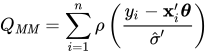
  3. Find a local minimum ModifyingAbove bold-italic theta With caret Subscript upper M upper M of

    upper Q Subscript upper M upper M Baseline equals sigma-summation Underscript i equals 1 Overscript n Endscripts rho left-parenthesis StartFraction y Subscript i Baseline minus bold x prime Subscript i Baseline bold-italic theta Over ModifyingAbove sigma With caret prime EndFraction right-parenthesis

    such that upper Q Subscript upper M upper M Baseline left-parenthesis ModifyingAbove bold-italic theta With caret Subscript upper M upper M Baseline right-parenthesis less-than-or-equal-to upper Q Subscript upper M upper M Baseline left-parenthesis ModifyingAbove bold-italic theta With caret prime right-parenthesis. The algorithm for M estimation is used here.

    The ROBUSTREG procedure provides two choices for rho: Tukey’s bisquare function and Yohai’s optimal function.

    Tukey’s bisquare function, which you can specify by using the option CHIF=TUKEY, is

    rho left-parenthesis s right-parenthesis equals chi Subscript k 1 Baseline left-parenthesis s right-parenthesis equals StartLayout Enlarged left-brace 1st Row 1st Column 3 left-parenthesis StartFraction s Over k 1 EndFraction right-parenthesis squared minus 3 left-parenthesis StartFraction s Over k 1 EndFraction right-parenthesis Superscript 4 Baseline plus left-parenthesis StartFraction s Over k 1 EndFraction right-parenthesis Superscript 6 Baseline 2nd Column if StartAbsoluteValue s EndAbsoluteValue less-than-or-equal-to k 1 2nd Row 1st Column 1 2nd Column otherwise EndLayout

    where k 1 can be indirectly specified by using the EFF= option. The default k 1 equals 3.440 for the default EFF=0.85 option such that the MM estimate has 85% asymptotic efficiency with the Gaussian distribution.

    Yohai’s optimal function, which you can specify by using the option CHIF=YOHAI, is
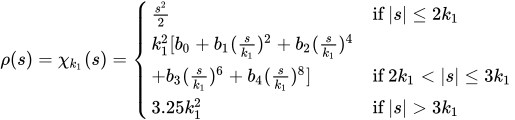
    rho left-parenthesis s right-parenthesis equals chi Subscript k 1 Baseline left-parenthesis s right-parenthesis equals StartLayout Enlarged left-brace 1st Row 1st Column StartFraction s squared Over 2 EndFraction 2nd Column if StartAbsoluteValue s EndAbsoluteValue less-than-or-equal-to 2 k 1 2nd Row 1st Column k 1 squared left-bracket b 0 plus b 1 left-parenthesis StartFraction s Over k 1 EndFraction right-parenthesis squared plus b 2 left-parenthesis StartFraction s Over k 1 EndFraction right-parenthesis Superscript 4 Baseline 2nd Column Blank 3rd Row 1st Column plus b 3 left-parenthesis StartFraction s Over k 1 EndFraction right-parenthesis Superscript 6 Baseline plus b 4 left-parenthesis StartFraction s Over k 1 EndFraction right-parenthesis Superscript 8 Baseline right-bracket 2nd Column if 2 k 1 less-than StartAbsoluteValue s EndAbsoluteValue less-than-or-equal-to 3 k 1 4th Row 1st Column 3.25 k 1 squared 2nd Column if StartAbsoluteValue s EndAbsoluteValue greater-than 3 k 1 EndLayout

    where k 1 can be indirectly specified by using the EFF= option. The default k 1 equals 0.868 for the default EFF=0.85 option such that the MM estimate has 85% asymptotic efficiency with the Gaussian distribution.

Algorithm

The initial LTS estimate is computed using the algorithm described in the section LTS Estimate. You can control the quantile of the LTS estimate by specifying the option INITH=h, where h is an integer between left-bracket StartFraction n Over 2 EndFraction right-bracket plus 1 and left-bracket StartFraction 3 n plus p plus 1 Over 4 EndFraction right-bracket. By default, h equals left-bracket StartFraction 3 n plus p plus 1 Over 4 EndFraction right-bracket, which corresponds to a breakdown value of around 25%.

The initial S estimate is computed using the algorithm described in the section S Estimate. You can control the breakdown value and efficiency of this initial S estimate by the constant k 0, which you can specify by using the K0= option.

The scale parameter sigma is solved by an iterative algorithm

left-parenthesis sigma Superscript left-parenthesis m plus 1 right-parenthesis Baseline right-parenthesis squared equals StartFraction 1 Over left-parenthesis n minus p right-parenthesis beta EndFraction sigma-summation Underscript i equals 1 Overscript n Endscripts chi Subscript k 0 Baseline left-parenthesis StartFraction r Subscript i Baseline Over sigma Superscript left-parenthesis m right-parenthesis Baseline EndFraction right-parenthesis left-parenthesis sigma Superscript left-parenthesis m right-parenthesis Baseline right-parenthesis squared

where beta equals integral chi Subscript k 0 Baseline left-parenthesis s right-parenthesis d normal upper Phi left-parenthesis s right-parenthesis.

After the scale parameter is computed, the iteratively reweighted least squares (IRLS) algorithm with fixed scale parameter is used to compute the final MM estimate.

Convergence Criteria

In the iterative algorithm for the scale parameter, the relative change of the scale parameter controls the convergence.

In the iteratively reweighted least squares algorithm, the same convergence criteria for the M estimate that are used before are used here.

Bias Test

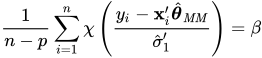
Although the final MM estimate inherits the high breakdown value property, its bias from the distortion of the outliers can be high. Yohai, Stahel, and Zamar (1991) introduced a bias test. The ROBUSTREG procedure implements this test when you specify the BIASTEST= option in the PROC ROBUSTREG statement. This test is based on the initial scale estimate ModifyingAbove sigma With caret prime and the final scale estimate ModifyingAbove sigma With caret prime Subscript 1, which is the solution of

StartFraction 1 Over n minus p EndFraction sigma-summation Underscript i equals 1 Overscript n Endscripts chi left-parenthesis StartFraction y Subscript i Baseline minus bold x prime Subscript i Baseline ModifyingAbove bold-italic theta With caret Subscript upper M upper M Baseline Over ModifyingAbove sigma With caret prime Subscript 1 EndFraction right-parenthesis equals beta

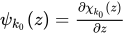
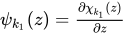
Let psi Subscript k 0 Baseline left-parenthesis z right-parenthesis equals StartFraction partial-differential chi Subscript k 0 Baseline left-parenthesis z right-parenthesis Over partial-differential z EndFraction and psi Subscript k 1 Baseline left-parenthesis z right-parenthesis equals StartFraction partial-differential chi Subscript k 1 Baseline left-parenthesis z right-parenthesis Over partial-differential z EndFraction. Compute

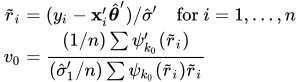
StartLayout 1st Row 1st Column r overTilde Subscript i 2nd Column equals 3rd Column left-parenthesis y Subscript i Baseline minus bold x prime Subscript i Baseline ModifyingAbove bold-italic theta With caret Superscript prime Baseline right-parenthesis slash ModifyingAbove sigma With caret Superscript prime Baseline for i equals 1 comma ellipsis comma n 2nd Row 1st Column v 0 2nd Column equals 3rd Column StartFraction left-parenthesis 1 slash n right-parenthesis sigma-summation psi prime Subscript k 0 Baseline left-parenthesis r overTilde Subscript i Baseline right-parenthesis Over left-parenthesis ModifyingAbove sigma With caret prime Subscript 1 Baseline slash n right-parenthesis sigma-summation psi Subscript k 0 Baseline left-parenthesis r overTilde Subscript i Baseline right-parenthesis r overTilde Subscript i Baseline EndFraction EndLayout
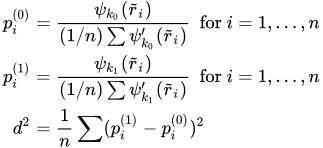
StartLayout 1st Row 1st Column p Subscript i Superscript left-parenthesis 0 right-parenthesis 2nd Column equals 3rd Column StartFraction psi Subscript k 0 Baseline left-parenthesis r overTilde Subscript i Baseline right-parenthesis Over left-parenthesis 1 slash n right-parenthesis sigma-summation psi prime Subscript k 0 Baseline left-parenthesis r overTilde Subscript i Baseline right-parenthesis EndFraction for i equals 1 comma ellipsis comma n 2nd Row 1st Column p Subscript i Superscript left-parenthesis 1 right-parenthesis 2nd Column equals 3rd Column StartFraction psi Subscript k 1 Baseline left-parenthesis r overTilde Subscript i Baseline right-parenthesis Over left-parenthesis 1 slash n right-parenthesis sigma-summation psi prime Subscript k 1 Baseline left-parenthesis r overTilde Subscript i Baseline right-parenthesis EndFraction for i equals 1 comma ellipsis comma n 3rd Row 1st Column d squared 2nd Column equals 3rd Column StartFraction 1 Over n EndFraction sigma-summation left-parenthesis p Subscript i Superscript left-parenthesis 1 right-parenthesis Baseline minus p Subscript i Superscript left-parenthesis 0 right-parenthesis Baseline right-parenthesis squared EndLayout

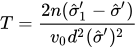
Let

upper T equals StartFraction 2 n left-parenthesis ModifyingAbove sigma With caret prime Subscript 1 Baseline minus ModifyingAbove sigma With caret prime right-parenthesis Over v 0 d squared left-parenthesis ModifyingAbove sigma With caret prime right-parenthesis squared EndFraction

Standard asymptotic theory shows that T approximately follows a chi squared distribution with p degrees of freedom. If T exceeds the alpha quantile chi Subscript alpha Superscript 2 of the chi squared distribution with p degrees of freedom, then the ROBUSTREG procedure gives a warning and recommends that you use other methods. Otherwise, the final MM estimate and the initial scale estimate are reported. You can specify alpha by using the ALPHA= option after the BIASTEST= option. By default, ALPHA=0.99.

Asymptotic Covariance and Confidence Intervals

Because the MM estimate is computed as an M estimate with a known scale in the last step, the asymptotic covariance for the M estimate can be used here for the asymptotic covariance of the MM estimate. Besides the three estimators H1, H2, and H3 as described in the section Asymptotic Covariance and Confidence Intervals, a weighted covariance estimator H4 is available. H4 is calculated as

upper K squared StartFraction left-bracket 1 slash left-parenthesis n minus p right-parenthesis right-bracket sigma-summation left-parenthesis psi left-parenthesis r Subscript i Baseline right-parenthesis right-parenthesis squared Over left-bracket left-parenthesis 1 slash n right-parenthesis sigma-summation left-parenthesis psi prime left-parenthesis r Subscript i Baseline right-parenthesis right-parenthesis right-bracket squared EndFraction bold upper W Superscript negative 1

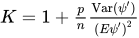
where upper K equals 1 plus StartFraction p Over n EndFraction StartFraction Var left-parenthesis psi Superscript prime Baseline right-parenthesis Over left-parenthesis upper E psi prime right-parenthesis squared EndFraction is the correction factor and upper W Subscript j k Baseline equals StartFraction 1 Over w overbar EndFraction sigma-summation w Subscript i Baseline x Subscript i j Baseline x Subscript i k, w overbar equals StartFraction 1 Over n EndFraction sigma-summation w Subscript i.

You can specify these estimators by using the option ASYMPCOV=[H1 | H2 | H3 | H4]. The ROBUSTREG procedure uses H4 as the default. Confidence intervals for estimated parameters are computed from the diagonal elements of the estimated asymptotic covariance matrix.

R Square and Deviance

The robust version of R square for the MM estimate is defined as
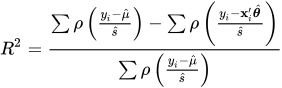
upper R squared equals StartStartFraction sigma-summation rho left-parenthesis StartFraction y Subscript i Baseline minus ModifyingAbove mu With caret Over ModifyingAbove s With caret EndFraction right-parenthesis minus sigma-summation rho left-parenthesis StartFraction y Subscript i Baseline minus bold x prime Subscript i Baseline ModifyingAbove bold-italic theta With caret Over ModifyingAbove s With caret EndFraction right-parenthesis OverOver sigma-summation rho left-parenthesis StartFraction y Subscript i Baseline minus ModifyingAbove mu With caret Over ModifyingAbove s With caret EndFraction right-parenthesis EndEndFraction

and the robust deviance is defined as the optimal value of the objective function on the sigma squared scale,

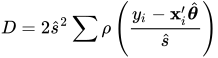
upper D equals 2 ModifyingAbove s With caret squared sigma-summation rho left-parenthesis StartFraction y Subscript i Baseline minus bold x prime Subscript i Baseline ModifyingAbove bold-italic theta With caret Over ModifyingAbove s With caret EndFraction right-parenthesis

where rho prime equals psi, ModifyingAbove bold-italic theta With caret is the MM estimator of bold-italic theta, ModifyingAbove mu With caret is the MM estimator of location, and ModifyingAbove s With caret is the MM estimator of the scale parameter in the full model.

Linear Tests

For MM estimation, you can use the same rho test and upper R Subscript n Superscript 2 test that used for M estimation. For more information, see the section Linear Tests.

Model Selection

For MM estimation, you can use the same two model selection methods that are used for M estimation. For more information, see the section Model Selection.

Last updated: December 09, 2022