The SEQDESIGN Procedure
SAMPLESIZE Statement
SAMPLESIZE <option>;
If each observation in the data set provides one unit of information in a hypothesis testing (such as a one-sample test for the mean), the SAMPLESIZE statement computes the required sample sizes for each sequential design that is specified in a DESIGN statement. However, for a survival analysis, an individual in the survival time data might provide only partial information because of censoring. For this hypothesis, the SAMPLESIZE statement computes the required numbers of events. With additional accrual information in a survival analysis, the sample sizes can also be computed.
Only one SAMPLESIZE statement can be specified. For each specified group sequential design, the SAMPLESIZE statement computes the required sample sizes or numbers of events. The SAMPLESIZE statement is not required if the SEQDESIGN procedure is used only to compare features among different designs.
You can specify the following option:
Table 4 summarizes the types of model-request that you can specify.
Table 4: MODEL= Option
| Option | Description |
|---|---|
| Fixed-Sample Models | |
| INPUTNOBS | Specifies the sample size for a fixed-sample design |
| INPUTNEVENTS | Specifies the number of events for a fixed-sample design |
| One-Sample Models | |
| ONESAMPLEMEAN | Specifies the one-sample Z test for the mean |
| ONESAMPLEFREQ | Specifies the one-sample test for the binomial proportion |
| Two-Sample Models | |
| TWOSAMPLEMEAN | Specifies the two-sample Z test for the mean difference |
| TWOSAMPLEFREQ | Specifies the two-sample test for binomial proportions |
| TWOSAMPLESURVIVAL | Specifies the log-rank test for two survival distributions |
| Regression Models | |
| REG | Specifies the test for a regression parameter |
| LOGISTIC | Specifies the test for a logistic regression parameter |
| PHREG | Specifies the test for a proportional hazards regression parameter |
The MODEL=INPUTNOBS option specifies the input sample size from a fixed-sample study of nonsurvival data, and the MODEL=INPUTNEVENTS option specifies the number of events from a fixed-sample study of survival data. The remaining MODEL= options specify the statistical models that are used to compute the required sample size. The default is MODEL=TWOSAMPLEMEAN, the two-sample Z test for the mean difference.
When MODEL=INPUTNOBS or MODEL=INPUTNEVENTS, the required sample size or number of events for the group sequential trial is computed by multiplying the input sample size or number of events by the ratio of the design information level to its corresponding fixed-sample information level. This ratio can be obtained by dividing the Max Information (Percent Fixed-Sample) in the "Design Information" table by 100. For a description of the "Design Information" table, see the section Design Information.
Fixed-Sample Models
The following two options compute the required sample size or number of events for a group sequential trial by using the sample size or number of events for the fixed-sample design:
- MODEL=INPUTNOBS ( options )
-
specifies the input sample size from a fixed-sample study of nonsurvival data. The available options are as follows:
N=n
SAMPLE=ONE | TWO
WEIGHT=
 <
<  >
> MATCHNOBS=YES | NO
The required N=n option specifies the sample size n for the fixed-sample design. The SAMPLE=ONE option specifies a one-sample test, and the SAMPLE=TWO option specifies a two-sample test. The default is SAMPLE=ONE.
With a two-sample test, the WEIGHT= option specifies the sample size allocation weights for the two groups. If
 is not specified,
  is used. The default is WEIGHT=1, which results in equal allocation for the two groups. The derived fractional sample sizes are rounded up to integers, and the MATCHNOBS=YES option requests these integer sample sizes to match the sample size allocation.
 For more information about the input sample size for the fixed-sample design in sample size computation, see the section Input Sample Size for Fixed-Sample Design.
- MODEL=INPUTNEVENTS ( D=d < options > )
-
specifies the number of events from a fixed-sample study of survival data. The required D=d option specifies the fixed-sample number of events d. To derive the sample size, you need to specify additional options from the following list:
ACCNOBS=

ACCRATE=

ACCRUAL=UNIFORM | EXP(PARM=
 )
)ACCTIME=

CEILING=TIME | N
FOLTIME=

HAZARD=
 <
<  >
> LOSS=NONE | EXP(HAZARD=
 | MEDLOSSTIME=
 )
)MEDSURVTIME=
 <
<  >
> SAMPLE=ONE | TWO
TOTALTIME=T
WEIGHT=
<  >
>
The SAMPLE=ONE option specifies a one-sample test, and the SAMPLE=TWO option specifies a two-sample test. The default is SAMPLE=ONE. With a two-sample test, the WEIGHT= option specifies the sample size allocation weights for the two groups. If
is not specified, =1 is used. The default is WEIGHT=1. For a one-sample test, the HAZARD=
option specifies the hazard rate explicitly, and the MEDSURVTIME= option specifies the hazard rate implicitly through the median survival time . Similarly, for a two-sample test, the HAZARD=  option specifies the hazard rates and for groups
 AandBexplicitly, and the MEDSURVTIME= option specifies hazard rates for groups
 AandBimplicitly through the median survival times and . Also, for a two-sample test,  if is not specified and
  if is not specified.
 The ACCRUAL= option specifies the method for individual accrual. The ACCRUAL=UNIFORM option (which is the default) specifies that the individual accrual is uniform in the accrual time
with a constant accrual rate , and the ACCRUAL=EXP(PARM=) option specifies that the individual accrual is truncated exponential with a scaled power parameter , where  and
and  . With a scaled parameter , the power parameter for the truncated exponential with the accrual time is given by
  .
. The ACCTIME= and FOLTIME= options specify the accrual time
and follow-up time , respectively. The TOTALTIME= option specifies the total study time, 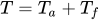 .
. The ACCRATE= option specifies the constant accrual rate
. If you specify the ACCRATE= option, then you must also specify one of the ACCTIME=, FOLTIME=, and TOTALTIME= options for the sample size computation. Otherwise, you must specify two of the ACCTIME=, FOLTIME=, and TOTALTIME= options to compute the accrual rate and sample size. The ACCNOBS= option specifies the total number of individuals in the study. If you specify the ACCNOBS= option, then you must also specify one of the ACCTIME=, FOLTIME=, and TOTALTIME= options for the sample size computation. Otherwise, you must specify two of the ACCTIME=, FOLTIME=, and TOTALTIME= options to compute the accrual rate and sample size.
The CEILING= option specifies the additional sample size information to be displayed in the "Number of Events (D) and Sample Sizes (N)" table. The CEILING=TIME option (which is the default) displays additional information that includes ceiling times at the stages, and the CEILING=N option displays additional information that includes ceiling sample sizes at the stages. When you specify the SAMPLE=TWO option along with the CEILING=N option, the ceiling sample sizes at each stage are derived to match the sample size allocation weights for the two groups.
The LOSS= option specifies the individual loss to follow-up in the sample size computation. The LOSS=NONE option (which is the default) specifies no loss to follow-up, and the LOSS=EXP option specifies exponential loss function. The HAZARD=
suboption specifies the exponential loss hazard rate , and the MEDLOSSTIME= suboption specifies the exponential loss hazard rate through the median loss times . For a detailed description of the input number of events for the fixed-sample design in sample size computation, see the section Input Number of Events for Fixed-Sample Design.
One-Sample Models
The following two options compute the required sample size for a one-sample group sequential test:
- MODEL=ONESAMPLEMEAN < ( options ) >
-
specifies the one-sample Z test for mean. The available options are as follows:
MEAN=

STDDEV=

The MEAN= option specifies the alternative reference
and is required if the alternative reference is not specified or derived in the procedure. If the MEAN=option is not specified, the specified or derived alternative reference is used. The STDDEV= option specifies the standard deviation
. The default is STDDEV=1. See the section Test for a Normal Mean for a detailed description of the one-sample Z test for mean. Note that the one-sample Z test for mean also includes the paired difference in two-treatment comparison (Jennison and Turnbull 2000, pp. 51–52), where
is the mean of differences within pairs under the alternative hypothesis and is the standard deviation for the mean of differences within pairs. - MODEL=ONESAMPLEFREQ < ( options ) >
-
specifies the one-sample test for binomial proportion with the null hypothesis
 and the alternative hypothesis
  , where
  and
and  . The available options are as follows:
 NULLPROP=

PROP=

REF= NULLPROP | PROP
The NULLPROP= and PROP= options specify the proportions under the null and alternative hypotheses, respectively. The default for the null reference is NULLPROP=0.5. The PROP= option is required if the alternative reference is not specified or derived in the procedure. If the PROP= option is not specified, the specified or derived alternative reference
 is used to compute the alternative reference
  .
. The REF= option specifies the hypothesis under which the proportion is used in the sample size computation. The REF=NULLPROP option uses the null hypothesis, and the REF=PROP option uses the alternative hypothesis to compute the sample size. The default is REF=PROP. See the section Test for a Binomial Proportion for a detailed description of the one-sample tests for proportion.
Two-Sample Models
The following three options compute the required sample size or number of events for a two-sample group sequential trial.
- MODEL=TWOSAMPLEMEAN < ( options ) >
-
specifies the two-sample Z test for mean difference. The available options are as follows:
MEANDIFF=
STDDEV=

WEIGHT=

MATCHNOBS= YES | NO
The MEANDIFF= option specifies the alternative reference
and is required if the alternative reference is not specified or derived in the procedure. If the MEANDIFF= option is not specified, the specified or derived alternative reference is used. The STDDEV= option specifies the standard deviations
 and
and  . If is not specified,
  . The default is STDDEV=1.
 The WEIGHT= option specifies the sample size allocation weights for the two groups. If
is not specified, is used. The default is WEIGHT=1, equal sample size for the two groups. The derived fractional sample sizes are rounded up to integers, and the MATCHNOBS=YES option requests these integer sample sizes to match the sample size allocation. The default is MATCHNOBS=NO. See the section Test for the Difference between Two Normal Means for a detailed description of the two-sample Z test for mean difference.
- MODEL=TWOSAMPLEFREQ < ( options ) >
-
specifies the two-sample test for binomial proportions. The available options are as follows:
NULLPROP=

PROP=

TEST= PROP | LOGOR | LOGRR
REF= NULLPROP | PROP | AVGNULLPROP | AVGPROP
WEIGHT=

MATCHNOBS= YES | NO
The NULLPROP= option specifies proportions
 and
and  in groups
 AandB, respectively, under the null hypothesis. If is not specified,
  . The default is NULLPROP=0.5.
 The PROP= option specifies proportion
 in group
 Aunder the alternative hypothesis. The proportion in group
 Bunder the alternative hypothesis is given by . The PROP= option is required if the alternative reference is not specified or derived in the procedure. If the PROP= option is not specified, the specified or derived alternative reference is used to compute , the proportion in group
 Aunder the alternative hypothesis.The TEST= option specified the null hypothesis
 in the test. The TEST=PROP option uses the difference in proportions
  , the TEST=LOGOR option uses the log odds-ratio test
  , where
and the TEST=LOGRR option uses the log relative risk test with
, where 
The default is TEST=LOGOR.
The REF= option specifies the hypothesis under which the proportions are used in the sample size computation. The REF=NULLPROP option uses the null proportions
 and , the REF=PROP option uses the alternative proportions and , the REF=AVGNULLPROP option uses the average null proportion, and the REF=AVGPROP option uses the average alternative proportion. The default is REF=PROP.
 The WEIGHT= option specifies the sample size allocation weights for the two groups. If
is not specified, is used. The default is WEIGHT=1, equal sample size for the two groups. The derived fractional sample sizes are also rounded up to integers, and the MATCHNOBS=YES option requests that these integer sample sizes match the sample size allocation. See the section Test for the Difference between Two Binomial Proportions, the section Test for Two Binomial Proportions with a Log Odds Ratio Statistic, and the section Test for Two Binomial Proportions with a Log Relative Risk Statistic for a detailed description of the two-sample tests for proportions.
-
MODEL=TWOSAMPLESURVIVAL < ( options ) >
MODEL=TWOSAMPLESURV < ( options ) > -
specifies the log-rank test for two survival distributions with the null hypothesis
 , where the parameter
  ,
,  is the value of
  under the null hypothesis and the values and are the constant hazard rates for groups
 AandB, respectively.The available options for the number of events are as follows:
NULLHAZARD=

NULLMEDSURVTIME=

HAZARD=

HAZARDRATIO=

MEDSURVTIME=

The NULLHAZARD= option specifies hazard rates
 and
and  for groups
 AandB, respectively, under the null hypothesis. If is not specified,
  . The NULLMEDSURVTIME= option specifies the median survival times
  and
and  under the null hypothesis. If
  is not specified,
  . If both NULLHAZARD= and NULLMEDSURVTIME= option are not specified, NULLHAZARD=0.06931, which corresponds to NULLMEDSURVTIME=10, is used.
 The hazard rate for group
Bunder the alternative hypothesis, , is identical to the hazard rate under the null hypothesis, . The HAZARD=, MEDSURVTIME=, and HAZARDRATIO= options specify the group
 Ahazard rate, the group Amedian survival time, and the hazard ratio 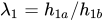 , respectively, under the alternative hypothesis. The HAZARD=, MEDSURVTIME=, or HAZARDRATIO= option is required if the alternative reference is not specified or derived in the procedure. If these three options are not specified, the specified or derived alternative reference is used to compute from the equation:
To derive the sample size, you need to specify additional options from the following list:
ACCNOBS=
ACCRATE=
ACCRUAL=UNIFORM | EXP(PARM=
)ACCTIME=
CEILING=TIME | N
FOLTIME=
LOSS=NONE | EXP(HAZARD=
| MEDLOSSTIME=)REF=NULLHAZARD | HAZARD
TOTALTIME=T
WEIGHT=
< >
The REF= option specifies the hypothesis under which the hazard is used in the sample size computation. The REF=NULLHAZARD option uses the null hypothesis, and the REF=HAZARD option uses the alternative hypothesis. The default is REF=HAZARD.
The WEIGHT= option specifies the sample size allocation weights for the two groups. If
is not specified, is used. The default is WEIGHT=1, equal sample size for the two groups. The ACCRUAL= option specifies the method for individual accrual. The ACCRUAL=UNIFORM option (which is the default) specifies that the individual accrual is uniform in the accrual time
with a constant accrual rate , and the ACCRUAL=EXP(PARM=) option specifies that the individual accrual is truncated exponential with a scaled power parameter , where and . With a scaled parameter , the power parameter for the truncated exponential with the accrual time is given by . The ACCTIME= and FOLTIME= options specify the accrual time
and follow-up time , respectively. The TOTALTIME= option specifies the total study time, . The ACCRATE= option specifies the constant accrual rate
. If you specify the ACCRATE= option, then you must also specify one of the ACCTIME=, FOLTIME=, and TOTALTIME= options for the sample size computation. Otherwise, you must specify two of the ACCTIME=, FOLTIME=, and TOTALTIME= options to compute the accrual rate and sample size. The ACCNOBS= option specifies the total number of individuals in the study. If you specify the ACCNOBS= option, then you must also specify one of the ACCTIME=, FOLTIME=, and TOTALTIME= options for the sample size computation. Otherwise, you must specify two of the ACCTIME=, FOLTIME=, and TOTALTIME= options to compute the accrual rate and sample size.
The CEILING= option specifies the additional sample size information to be displayed in the "Number of Events (D) and Sample Sizes (N)" table. The CEILING=TIME option (which is the default) displays additional information that includes ceiling times at the stages, and the CEILING=N option displays additional information that includes ceiling sample sizes at the stages. When you specify CEILING=N, the ceiling sample sizes at each stage are derived to match the sample size allocation weights for the two groups.
The LOSS= option specifies the individual loss to follow-up in the sample size computation. The LOSS=NONE option (which is the default) specifies no loss to follow-up, and the LOSS=EXP option specifies exponential loss function. The HAZARD=
suboption specifies the exponential loss hazard rate , and the MEDLOSSTIME= suboption specifies the exponential loss hazard rate through the median loss times . See the section Test for Two Survival Distributions with a Log-Rank Test for a detailed description of the two-sample log-rank test for survival data.
Regression Models
The following three options compute the required sample size or number of events for group sequential tests on a regression parameter.
- MODEL=REG < ( options ) >
-
specifies the Z test for a normal regression parameter. The available options are as follows:
BETA=

VARIANCE=

XVARIANCE=

XRSQUARE=

The BETA= option specifies the alternative reference
and is required if the alternative reference is not specified or derived in the procedure. If the BETA= option is not specified,  , the specified or derived alternative reference.
 The VARIANCE= and XVARIANCE= options specify the variances for the response variable
Yand covariateX, respectively. The defaults are VARIANCE=1 and XVARIANCE=1. For a model with more than one covariate, the XRSQUARE= option can be used to derive the variance ofXafter adjusting for other covariates. The default is XRSQUARE=0.See the section Test for a Parameter in the Regression Model for a detailed description of the Z test for the regression parameter.
- MODEL=LOGISTIC < ( options ) >
-
specifies the Z test for a logistic regression parameter. The available options are as follows:
BETA=
PROP= p
XVARIANCE=
XRSQUARE=
The BETA= option specifies the alternative reference
and is required if the alternative reference is not specified or derived in the procedure. If the BETA= option is not specified, , the specified or derived alternative reference. The PROP= option specifies the proportion of the binary response variable
Y. The default is PROP=0.5. The XVARIANCE= option specifies the variance of the covariateX. The default is XVARIANCE=1. For a model with more than one covariate, the XRSQUARE= option can be used to derive the variance ofXafter adjusting for other covariates. The default is XRSQUARE=0.See the section Test for a Parameter in the Logistic Regression Model for a detailed description of the Z test for the logistic regression parameter.
- MODEL=PHREG < ( options ) >
-
specifies the Z test for a proportional hazards regression parameter. The available options for the number of events are as follows:
BETA=
XVARIANCE=
XRSQUARE=
The BETA= option specifies the alternative reference
and is required if the alternative reference is not specified or derived in the procedure. If the BETA= option is not specified, , the specified or derived alternative reference. The XVARIANCE= option specifies the variance of the covariate
X. The default is XVARIANCE=1. For a model with more than one covariate, the XRSQUARE= option can be used to derive the variance ofXafter adjusting for other covariates. The default is XRSQUARE=0.To derive the sample size, you need to specify additional options from the following list:
ACCNOBS=
ACCRATE=
ACCRUAL=UNIFORM | EXP(PARM=
)ACCTIME=
CEILING=TIME | N
FOLTIME=
HAZARD=
LOSS=NONE | EXP(HAZARD=
| MEDLOSSTIME=)MEDSURVTIME=
TOTALTIME=T
The hazard rate is required for the sample size computation. The HAZARD=
 option specifies the hazard rate explicitly, and the MEDSURVTIME=
 option specifies the hazard rate implicitly through the median survival time .
 The ACCRUAL= option specifies the method for individual accrual. The ACCRUAL=UNIFORM option (which is the default) specifies that the individual accrual is uniform in the accrual time
with a constant accrual rate , and the ACCRUAL=EXP(PARM=) option specifies that the individual accrual is truncated exponential with a scaled power parameter , where and . With a scaled parameter , the power parameter for the truncated exponential with the accrual time is given by . The ACCTIME= and FOLTIME= options specify the accrual time
and follow-up time , respectively. The TOTALTIME= option specifies the total study time, . The ACCRATE= option specifies the constant accrual rate
. If you specify the ACCRATE= option, then you must also specify one of the ACCTIME=, FOLTIME=, and TOTALTIME= options for the sample size computation. Otherwise, you must specify two of the ACCTIME=, FOLTIME=, and TOTALTIME= options to compute the accrual rate and sample size. The ACCNOBS= option specifies the total number of individuals in the study. If you specify the ACCNOBS= option, then you must also specify one of the ACCTIME=, FOLTIME=, and TOTALTIME= options for the sample size computation. Otherwise, you must specify two of the ACCTIME=, FOLTIME=, and TOTALTIME= options to compute the accrual rate and sample size.
The CEILING= option specifies the additional sample size information to be displayed in the "Number of Events (D) and Sample Sizes (N)" table. The CEILING=TIME option (which is the default) displays additional information that includes ceiling times at the stages, and the CEILING=N option displays additional information that includes ceiling sample sizes at the stages.
The LOSS= option specifies the individual loss to follow-up in the sample size computation. The LOSS=NONE option (which is the default) specifies no loss to follow-up, and the LOSS=EXP option specifies exponential loss function. The HAZARD=
suboption specifies the exponential loss hazard rate , and the MEDLOSSTIME= suboption specifies the exponential loss hazard rate through the median loss times . For a detailed description of the Z test for the proportional hazards regression parameter, see the section Test for a Parameter in the Proportional Hazards Regression Model.