UPDATE Statement
Updates a master file by applying transactions.
| Valid in: | DATA step |
|---|---|
| Category: | File-Handling |
| Type: | Executable |
| Restriction: | This statement is not supported in a DATA step that runs in CAS. |
| Note: | The variables read using the MERGE statement are retained in the PDV. The data types of the variables that are read are also retained. For more information, see DATA Step Processing in SAS Programmer’s Guide: Essentials and the RETAIN Statement. |
| CAUTION |
If you add an OUTPUT statement when using an UPDATE statement, the results that are generated are predictable but can be undesired. |
Table of Contents
Syntax
Arguments
master-data-set
specifies the SAS data set used as the master file.
| Range | The name can be a one-level name (for example, FITNESS), a two-level name (for example, IN.FITNESS), or one of the special SAS data set names. |
|---|---|
| Tip | Instead of using a data set name, you can specify the physical pathname to the file, using syntax that your operating system understands. The pathname must be enclosed in single or double quotation marks. |
| See | Rules for Words and Names in the SAS Language in SAS Language Reference: Concepts |
(data-set-options)
specifies actions SAS is to take when it reads variables into the DATA step for processing.
| Requirement | Data-set-options must appear within parentheses and follow a SAS data set name. |
|---|---|
| Tip | Dropping, keeping, and renaming variables is often useful when you update a data set. Renaming like-named variables prevents the second value that is read from over-writing the first one. By renaming one variable, you make the values of both of them available for processing, such as comparing. |
| See | A list of data set options to use with input data sets in SAS Data Set Options: Reference |
| Example | Updating By Renaming Variables |
transaction-data-set
specifies the SAS data set that contains the changes to be applied to the master data set.
| Range | The name can be a one-level name (for example, HEALTH), a two-level name (for example, IN.HEALTH), or one of the special SAS data set names. |
|---|---|
| Tip | Instead of using a data set name, you can specify the physical pathname to the file, using syntax that your operating system understands. The pathname must be enclosed in single or double quotation marks. |
END=variable
creates and names a temporary variable that contains an end-of-file indicator. This variable is initialized to 0 and is set to 1 when UPDATE processes the last observation. This variable is not added to any data set.
UPDATEMODE=MISSINGCHECK
UPDATEMODE=NOMISSINGCHECK
specifies whether missing variable values in a transaction data set are to be allowed to replace existing variable values in a master data set.
MISSINGCHECK
prevents missing variable values in a transaction data set from replacing values in a master data set.
NOMISSINGCHECK
allows missing variable values in a transaction data set to replace values in a master data set.
| Default | MISSINGCHECK |
|---|---|
| Tip | Special missing values, however, are the exception and replace values in the master data set even when MISSINGCHECK (the default) is in effect. |
Details
Requirements
- The UPDATE statement must be accompanied by a BY statement that specifies the variables by which observations are matched.
- The BY statement should immediately follow the UPDATE statement to which it applies.
- The data sets listed in the UPDATE statement must be sorted by the values of the variables listed in the BY statement, or they must have an appropriate index.
- Each observation in the master data set should have a unique value of the BY variable or BY variables. If there are multiple values for the BY variable, only the first observation with that value is updated. The transaction data set can contain more than one observation with the same BY value. (Multiple transaction observations are all applied to the master observation before it is written to the output file.)
For more information, see Examples: Prepare Data in SAS Programmer’s Guide: Essentials.
Transaction Data Sets
Usually, the master data set and the transaction data set contain the same variables. However, to reduce processing time, you can create a transaction data set that contains only those variables that are being updated. The transaction data set can also contain new variables to be added to the output data set.
The output data set contains one observation for each observation in the master data set. If any transaction observations do not match master observations, they become new observations in the output data set. Observations that are not to be updated can be omitted from the transaction data set. See Overview of Combining Data in SAS Programmer’s Guide: Essentials.
Missing Values
By default, the UPDATEMODE=MISSINGCHECK option is in effect, so missing values in the transaction data set do not replace existing values in the master data set. If you want missing values in the transaction data set to replace existing values in the master data set, specify the UPDATEMODE=NOMISSINGCHECK option in the UPDATE statement.
data newpay;
   update payroll increase updatemode=nomissingcheck;
   by id;
run;
If you want only some variables that contain missing values to replace values from the master data set, you can specify the MISSING statementin the transaction data set. The MISSING statement enables you to assign characters in to represent special missing values.
- You specify the MISSING statement in the transaction data set to define a special character value and then replace the missing values with the special character defined in the MISSING statement.
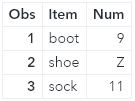
- Valid special characters special character values for the MISSING statement are any single character A-Z, a-z, or the underscore character ( _ ). Even when UPDATEMODE=MISSINGCHECK is in effect, the missing values designated as special missing values in the transaction data set replace the original values from the master data set.
- SAS converts the letters a-z to upper case letters in the output data set.
- Special missing values designated with a letter A-Z or a-z appear with that letter in the output data set.
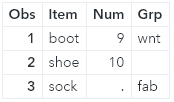
- Special missing values designated with an underscore ( _ ) appear as regular missing values in the output data set; that is, they are designated by a period ( . ) in the output data set.
|
Missing Character Designation |
Example |
Resulting Update Output |
|---|---|---|
|
A–Z |
|
The missing value that is defined as any letter A–Z in the transaction data set replaces the value in the master data set.
|
|
underscore ( _ ) |
|
The missing value that is defined as the underscore ( _ ) character in the transaction data set replaces the value in the master data set with a dot ( . ) for numeric variables and a blank for character variables.
|

See Updating with Missing Values for another example that shows the use of special missing values.
Comparisons
- Both UPDATE and MERGE can update observations in a SAS data set.
- MERGE automatically replaces existing values in the first data set with missing values in the second data set. UPDATE, however, does not do so by default. To cause UPDATE to overwrite existing values in the master data set with missing ones in the transaction data set, you must use UPDATEMODE=NOMISSINGCHECK.
- UPDATE changes or updates the values of selected observations in a master file by applying transactions. UPDATE can also add new observations.
Examples
Example 1: Basic Updating
These program statements create a new data set (OHIO.QTR1) by applying transactions to a master data set (OHIO.JAN). The BY variable STORE must appear in both OHIO.JAN and OHIO.WEEK4, and its values in the master data set should be unique:
data ohio.qtr1;
   update ohio.jan ohio.week4;
   by store;
run;
Example 2: Updating By Renaming Variables
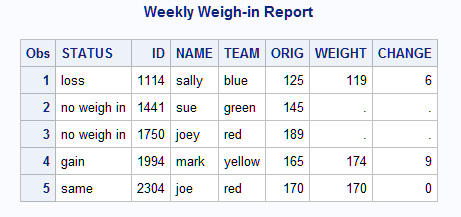
This example shows renaming a variable in the FITNESS data set so that it does not overwrite the value of the same variable in the program data vector. Also, the WEIGHT variable is renamed in each data set and a new WEIGHT variable is calculated. The master data set and the transaction data set are listed before the code that performs the update:
Master Data Set
            HEALTH
OBS    ID     NAME     TEAM    WEIGHT
 1    1114    sally    blue      125
 2    1441    sue      green     145
 3    1750    joey     red       189
 4    1994    mark     yellow    165
 5    2304    joe      red       170
Transaction Data Set
FITNESS
OBS ID NAME TEAM WEIGHT
1 1114 sally blue 119
2 1994 mark yellow 174
3 2304 joe red 170
/*****************************************/ data health;
input ID NAME $ TEAM $ WEIGHT;
length team $ 6;
cards;
1114 sally blue 125
1441 sue green 145
1750 joey red 189
1994 mark yellow 165
2304 joe red 170
;
data fitness;
input ID NAME $ TEAM $ WEIGHT;
length team $ 6;
cards;
1114 sally blue 119
1994 mark yellow 174
2304 joe red 170
;
   /* Sort both data sets by ID */
proc sort data=health;
   by id;
run;
proc sort data=fitness;
   by id;
run;
   /* Update Master with Transaction */
data health2;
   length STATUS $11;
   update health(rename=(weight=ORIG) in=a)
          fitness(drop=name team in=b);
   by id ;
   if a and b then
      do;
         CHANGE=abs(orig - weight);
         if weight<orig then status='loss';
         else if weight>orig then status='gain';
         else status='same';
      end;
   else status='no weigh in';
run;

proc print data=health2;
   title 'Weekly Weigh-in Report';
run;
Updating By Renaming Variables
Example 3: Updating with Missing Values
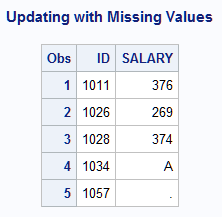
This example illustrates the DATA steps that are used to create a master data set PAYROLL and a transaction data set INCREASE that contains regular and special missing values. Note the following information after the update is made:
- The salary for ID 1026 remains the same.
- The salary for ID 1034 is a special missing value.
- The salary for ID 1057 is a regular missing value.
   /* Create the Master Data Set */
data payroll;
   input ID SALARY;
   datalines;
1011 245
1026 269
1028 374
1034 333
1057 582
;
   /* Create the Transaction Data Set */
data increase;
   input ID SALARY;
   missing A _;     /*1*/
   datalines;
1011 376
1026 .              /*2*/
1028 374
1034 A              /*3*/
1057 _              /*4*/
;
   /* Update Master with Transaction */
data newpay;
   update payroll increase;
   by id;
run;
proc print data=newpay;
   title 'Updating with Missing Values';
run;-
Specify the MISSING statement in the transaction data set to define the special missing value “A” and underscore ( _ ).
- When you define a special missing value by using any one of the letters A to Z in a MISSING statement and then perform an update, SAS changes the missing values in the updated data set to match the special missing value that you defined.
- When you define a special missing value by using the underscore character ( _ ) in the MISSING statement and then perform an update, SAS changes the missing values in the updated data set to a period ( . ).
-
The UPDATE statement does not update values if they are regular missing values in the transaction data set. Regular missing values are values that are not defined as special missing values. Because this is the regular notation for a missing regular numeric variable ( . ), the UPDATE statement preserves the original salary value of 269 for ID 1026. If you want the output data set to be updated with missing values in the transaction data set, you must specify UPDATEMODE=NOMISSINGCHECK. in the UPDATE statement. Alternatively, you can insert an underscore character in place of the missing value and use the MISSING statement to define the underscore character as a special missing value.
-
The salary for ID 1034 is the special missing value that is designated by the letter “A” because it was defined in the MISSING statement in the transaction DATA step.
-
When you specify an underscore ( _ ) in the MISSING statement of the transaction data set and use the underscore as a value in the transaction data set to update data, SAS reads the underscore as a regular missing value and replaces the value with a dot in the output data set. The dot notation is the traditional symbol for a missing numeric character in SAS.
Updating with Missing Values
See Also
-
Definition of Data Set Options in SAS Data Set Options: Reference
-
Reading, Combining, and Modifying SAS Data Sets in SAS Language Reference: Concepts
-
Statements:
-
System Options:
- MISSING= System Option in SAS System Options: Reference