INPUT Statement: Column
Reads input values from specified columns and assigns the values to the corresponding SAS variables.
| Valid in: | DATA step |
|---|---|
| Category: | File-Handling |
| Type: | Executable |
| Restriction: | This statement is not supported in a DATA step that runs in CAS. |
Table of Contents
Syntax
Arguments
variable
specifies a variable that is assigned input values.
$
indicates that the variable has character values rather than numeric values.
| Tip | If the variable is previously defined as character, $ is not required. |
|---|
start-column
specifies the first column of the input record that contains the value to read.
–end-column
specifies the last column of the input record that contains the value to read.
| Tip | If the variable value occupies only one column, omit end-column. |
|---|---|
| Example | Because end-column is
omitted, the values for the character variable GENDER occupy only
column 16:
|
.decimals
specifies the power of 10 by which to divide the value. If the data contains decimal points, the .decimals value is ignored.
| Tip | An explicit decimal point in the input value overrides a decimal specification in the INPUT statement. |
|---|---|
| Examples | Read Individual Input Data Using Decimals |
| Read Input Records Using Decimals |
@
holds the input record for the execution of the next INPUT statement within the same iteration of the DATA step. This line-hold specifier is called trailing @.
| Restriction | The trailing @ must be the last item in the INPUT statement. |
|---|---|
| Tip | The trailing @ prevents the next INPUT statement from automatically releasing the current input record and reading the next record into the input buffer. It is useful when you need to read from a record multiple times. |
| See | Pointer Controls |
@@
holds the input record for the execution of the next INPUT statement across iterations of the DATA step. This line-hold specifier is called double trailing @.
| Restriction | The double trailing @ must be the last item in the INPUT statement. |
|---|---|
| Tip | The double trailing @ is useful when each input line contains values for several observations. |
| See | Using Line-Hold Specifiers |
Details
When to Use Column Input
With column input, the column numbers that contain the value follow a variable name in the INPUT statement. To read with column input, data values must have these attributes:
- appear in the same columns in all the input data records
- consist of standard numeric form or character form (footnote 1)
Column input has these useful features:
- Character values can contain embedded blanks.
- Character values can be from 1 to 32,767 characters long.
- Input values can be read in any order, regardless of their position in the record.
- Values or parts of values
can be read multiple times. For example, this INPUT statement reads
an ID value in columns 10 through 15, and then reads a GROUP value
from column 13:
input id 10-15 group 13; - Both leading and trailing blanks within the field are ignored. Therefore, if numeric values contain blanks that represent 0s or if you want to retain leading and trailing blanks in character values, read the value with an informat. For more information, see INPUT Statement: Formatted.
Missing Values
Missing data does not require a placeholder. The INPUT statement interprets a blank field as missing and reads other values correctly. If a numeric or character field contains a single period, the variable value is set to missing.
Reading Data Lines
SAS always pads the data records that follow the DATALINES statement (in-stream data) to a fixed length in multiples of 80. The CARDIMAGE system option determines whether to read or truncate data past the 80th column.
Reading Variable-Length Records
By default, SAS uses the FLOWOVER option to read varying-length data records. If the record contains fewer values than expected, the INPUT statement reads the values from the next data record. To read varying-length data, you might need to use the TRUNCOVER option in the INFILE statement. The TRUNCOVER option is more efficient than the PAD option, which pads the records to a fixed length. For more information, see Reading Past the End of a Line.
Examples
Example 1: Read Input Records with Column Input
This DATA step shows how to read input data records with column input:
data scores;
   input name $ 1-18 score1 25-27 score2 30-32
      score3 35-37;
   datalines;
Joseph                  11   32   76
Mitchel                 13   29   82
Sue Ellen               14   27   74
;
Example 2: Read Individual Input Data Using Decimals
This INPUT statement reads the input data for a numeric variable using two decimal places:
|
Input Data |
Statement |
Result |
|
|---|---|---|---|
|
|
|
|
|
|
|
|
|
|
|
|
|
|
|
|
|
|
|
|
|
|
|
|
|
|
|
|
| 1 The decimal specification in the INPUT statement is overridden by the input data value. | |||
Example 3: Read Input Records Using Decimals
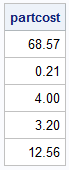
This DATA step uses the .decimals argument to read values from input lines and insert a decimal place into data that does not have an explicit decimal already defined. Data that contains an explicit decimal is not changed, but the data is padded to match the greatest number of significant digits that occur in any of the output data after conversion.
data product1 noobs;
   input partcost 1-5 .2;
   datalines;
6857
21
400
3.2
12.56
;
proc print data=product1 noobs; run;
See Also
-
Statements: