INFILE Statement
Specifies an external file to read with an INPUT statement.
| Valid in: | DATA Step |
|---|---|
| Category: | File-Handling |
| Type: | Executable |
| Restrictions: | This statement is not supported in a DATA step that runs in CAS. |
| When SAS is in a locked-down state, the INFILE statement is not available for files that are not in the locked-down path list. For more information, see SAS Processing Restrictions for Servers in a Locked-Down State in SAS Language Reference: Concepts. | |
| Operating environment: | The INFILE statement contains operating-environment-specific material. See the SAS documentation for your operating environment before using this statement. |
| See: | INFILE Statement under Windows, UNIX, and z/OS |
Table of Contents
- Syntax
- Arguments
- INFILE Options
- Operating Environment Options
- DBMS Specifications
- Details
- How to Use the INFILE Statement
- Reading from Multiple Input Files
- Reading Multiple External Files Using the FILEVAR= Option
- Updating External Files in Place
- Accessing the Contents of the Input Buffer
- Reading Delimited Data
- Reading Long Instream Data Records
- Reading Past the End of a Line
- Comparisons
- Examples
- Example 1: Changing How Delimiters Are Treated
- Example 2: Handling Missing Values and Short Records with List Input
- Example 3: Scanning Variable-Length Records for a Specific Character String
- Example 4: Reading Files That Contain Variable-Length Records
- Example 5: Reading from Multiple External Files
- Example 6: Updating an External File
- Example 7: Truncating Copied Records
- Example 8: Listing the Pointer Location
- Example 9: Working with Data in the Input Buffer
- Example 10: Accessing the Input Buffers of Multiple Files
- Example 11: Specifying an Encoding When Reading an External File
- Example 12: Reading All File Members of a Directory
- Example 13: Reading a List of File Members
- Example 14: Reading the Return Code from a URL Request
- See Also
Syntax
Arguments
file-specification
identifies the source of the input data records, which is an external file or instream data. file-specification can have these forms:
'external-file'
specifies the physical name of an external file. The physical name is the name that the operating environment uses to access the file.
fileref
specifies the fileref of an external file.
| Range | 1 to 8 bytes |
|---|---|
| Requirement | You must have previously associated the fileref with an external file in a FILENAME statement, FILENAME function, or an appropriate operating-environment command. |
| See | FILENAME Statement |
fileref(file)
specifies a fileref of an aggregate storage location and the name of a file or member, enclosed in parentheses, that resides in that location.
| Requirements | If a file is located in an aggregate storage location and it has an invalid SAS name, you must enclose the name in quotation marks. |
|---|---|
| You must have previously associated the fileref with an external file in a FILENAME statement, a FILENAME function, or an appropriate operating-environment command. | |
| Operating environment | Different operating environments call an aggregate grouping of files by different names such as a directory, a MACLIB, or a partitioned data set. For more information about how to specify external files, see the SAS documentation for your operating environment. |
| See | FILENAME Statement |
CARDS | CARDS4
for a definition, see DATALINES.
| Alias | DATALINES | DATALINES4 |
|---|
DATALINES | DATALINES4
specifies that the input data immediately follow the DATALINES statement or DATALINES4 statement in the DATA step. Using DATALINES enables you to use the INFILE statement options to control how the INPUT statement reads instream data lines.
| Alias | CARDS | CARDS4 |
|---|---|
| Example | Changing How Delimiters Are Treated |
| Tip | You can verify the existence of file-specification by using the SYSERR macro variable if the ERRORCHECK option is set to STRICT. |
|---|
device-type
specifies the type of device or the access method that is used if the fileref points to an input or output device or location that is not a physical file.
ACTIVEMQ
specifies an access method that enables you to access an ActiveMQ messaging broker.
| Interaction | If the DATA step does not recognize the access method option, the DATA step passes the option to the access method for handling. |
|---|---|
| See | FILENAME Statement: ACTIVEMQ Access Method in Application Messaging with SAS |
CATALOG
specifies the CATALOG access method.
| Interaction | If the DATA step does not recognize the access method option, the DATA step passes the option to the access method for handling. |
|---|---|
| See | For a complete list of options that are available with the CATALOG access method, see FILENAME Statement: CATALOG Access Method. |
CLIPBOARD
specifies the CLIPBOARD access method.
| Interaction | If the DATA step does not recognize the access method option, the DATA step passes the option to the access method for handling. |
|---|---|
| See | For a complete list of options that are available with the CLIPBOARD access method, see FILENAME Statement: CLIPBOARD Access Method. |
DISK
specifies that the device is a disk drive.
| Tip | When you assign a fileref to a file on disk, you are not required to specify DISK. |
|---|
DUMMY
specifies that the input from the external file be discarded.
| Interaction | The DUMMY option indicates that an immediate end of file is encountered with a corresponding INPUT statement. If the FILEVAR= option is specified along with DUMMY, the file that is specified by the FILEVAR= variable is not read. |
|---|---|
| Tip | Specifying DUMMY can be useful for testing. |
FTP
specifies the FTP access method.
| Interaction | If the DATA step does not recognize the access method option, the DATA step passes the option to the access method for handling. |
|---|---|
| See | For a complete list of options that are available with the FTP access method, see FILENAME Statement: FTP Access Method. |
| Example |
|
GTERM
indicates that the output device type is a graphics device that receives graphics data.
HADOOP
specifies the Hadoop access method.
| Interaction | If the DATA step does not recognize the access method option, the DATA step passes the option to the access method for handling. |
|---|---|
| See | For a complete list of options that are available with the Hadoop access method, see FILENAME Statement: Hadoop Access Method. |
JMS
specifies a Java Message Service (JMS) destination.
PIPE
specifies an unnamed pipe.
| Note | Some operating environments do not support pipes. |
|---|
PLOTTER
specifies an unbuffered graphics output device.
PRINTER
specifies a printer or printer spool file.
SFTP
specifies the SFTP access method.
| Interaction | If the DATA step does not recognize the access method option, the DATA step passes the option to the access method for handling. |
|---|---|
| See | For a complete list of options that are available with the SFTP access method, see FILENAME Statement: SFTP Access Method. |
SOCKET
specifies the SOCKET access method.
| Interaction | If the DATA step does not recognize the access method option, the DATA step passes the option to the access method for handling. |
|---|---|
| See | For a complete list of options that are available with the SOCKET access method, see FILENAME Statement: SOCKET Access Method. |
TAPE
specifies a tape drive.
TERMINAL
specifies the user's terminal.
UPRINTER
specifies a Universal Printer definition name.
| Tip | If you do not specify the printer name in the FILENAME statement, the PRINTERPATH options control which Universal Printer is used and the destination of the output. |
|---|
URL
specifies the URL access method.
| Interaction | If the DATA step does not recognize the access method option, the DATA step passes the option to the access method for handling. |
|---|---|
| See | STATUS=variable. For a complete list of options that are available with the URL access method, see FILENAME Statement: URL Access Method. |
WEBDAV
specifies the WebDAV access method.
| Interaction | If the DATA step does not recognize the access method option, the DATA step passes the option to the access method for handling. |
|---|---|
| See | For a complete list of options that are available with the WebDAV access method, see FILENAME Statement: WebDAV Access Method. |
| Alias | DEVICE=device-type |
|---|---|
| Default | DISK |
| Requirement | device-type or DEVICE=device-type must immediately follow file-specification in the statement. |
| Operating environment | Additional specifications might be required when you specify some devices. See the SAS documentation for your operating environment before specifying a value other than DISK. Values in addition to the ones that are listed here might be available in some operating environments. |
INFILE Options
BLKSIZE=block-size
specifies the block size of the input file.
| Default | Dependent on the operating environment. For more information, see the SAS documentation for your operating environment. |
|---|
COLUMN=variable
names a variable that SAS uses to assign the current column location of the input pointer. As with automatic variables, the COLUMN= variable is not written to the data set.
| Alias | COL= |
|---|---|
| See | LINE= |
| Example | Listing the Pointer Location |
DELIMITER= delimiter(s)
specifies an alternate delimiter (other than a blank) to be used for LIST input, where delimiter(s) can be one of these items:
'list-of-delimiting-characters'
specifies one or more characters to read as delimiters.
| Requirement | Enclose the list of characters in quotation marks. |
|---|---|
| Example | Changing How Delimiters Are Treated |
character-variable
specifies a character variable whose value becomes the delimiter.
| Alias | DLM= |
|---|---|
| Default | Blank space |
| Tips | The delimiter is case sensitive. |
| Some common delimiters are the comma (,), verticle pipe (|), semicolon (;), and tab. The tab is specified by a hexadecimal character. Under UNIX and Windows, the value is '09'x. Under z/OS, the value is '05'x. | |
| See | Reading Delimited Data, DLMSTR=, and DSD (delimiter-sensitive data) |
| Example | Changing How Delimiters Are Treated |
DLMSTR= delimiter
specifies a character string as an alternate delimiter (other than a blank) to be used for LIST input, where delimiter can be one of these items:
'delimiting-string'
specifies a character string to read as a delimiter.
| Requirement | Enclose the string in quotation marks. |
|---|---|
| Example | Changing How Delimiters Are Treated |
character-variable
specifies a character variable whose value becomes the delimiter.
| Default | Blank space |
|---|---|
| Interactions | If you specify more than one DLMSTR= option in the INFILE statement, the DLMSTR= option that is specified last is used. If you specify both the DELIMITER= and DLMSTR= options, the option that is specified last is used. |
| If you specify RECFM=N, ensure that the LRECL is large enough to hold the largest input item. Otherwise, the delimiter can be split across the record boundary. | |
| Tip | The delimiter is case sensitive. To make the delimiter case insensitive, use the DLMSOPT='I' option. |
| See | Reading Delimited Data, DELIMITER=, DLMSOPT=, and DSD |
| Example | Changing How Delimiters Are Treated |
DLMSOPT= 'options'
specifies parsing options for the DLMSTR= option, where options can be one of these values:
I
specifies that case-insensitive comparisons are done.
T
specifies that trailing blanks of the string delimiter be removed.
| Tips | The T option is useful when you use a variable as the delimiter string. |
|---|---|
| You can specify either I, T, or both. |
| Requirement | The DLMSOPT= option has an effect only when used with the DLMSTR= option. |
|---|---|
| See | DLMSTR= |
| Example | Changing How Delimiters Are Treated |
DSD (delimiter-sensitive data)
specifies that when data values are enclosed in quotation marks, delimiters within the value are treated as character data. The DSD option changes how SAS treats delimiters when you use LIST input and sets the default delimiter to a comma. When you specify the DSD option, SAS treats two consecutive delimiters as a missing value and removes quotation marks from character values.
| Interaction | Use the DELIMITER= option or DLMSTR= option to change the delimiter. |
|---|---|
| Tip | Use the DSD option and LIST input to read a character value that contains a delimiter within a string that is enclosed in quotation marks. The INPUT statement treats the delimiter as a valid character and removes the quotation marks from the character string before the value is stored. Use the tilde (~) format modifier to retain the quotation marks. |
| See | Reading Delimited Data, DELIMITER=, and DLMSTR= |
| Examples | Changing How Delimiters Are Treated |
| Handling Missing Values and Short Records with List Input |
ENCODING= 'encoding-value'
specifies the encoding to use when reading from the external file. The value for ENCODING= indicates that the external file has a different encoding from the current session encoding.
When you read data from an external file, SAS transcodes the data from the specified encoding to the session encoding.
| Default | SAS assumes that an external file is in the same encoding as the session encoding. |
|---|---|
| See | For valid encoding values, see Encoding Values in SAS Language Elements in SAS National Language Support (NLS): Reference Guide. |
| Example | Specifying an Encoding When Reading an External File |
END=variable
specifies a variable that SAS sets to 1 when the current input data record is the last in the input file. Until SAS processes the last data record, the END= variable is set to 0. As with automatic variables, this variable is not written to the data set.
| Restriction | You cannot use the END= option with the UNBUFFERED option, the DATALINES statement, the DATALINES4 statement, or an INPUT statement that reads multiple input data records. |
|---|---|
| Tip | Use the option EOF= when END= is invalid. |
| Example | Reading from Multiple External Files |
EOF=label
specifies a statement label that is the object of an implicit GOTO when the INFILE statement reaches end of file. When an INPUT statement attempts to read from a file that has no more records, SAS moves execution to the statement label indicated.
| Interaction | Use EOF= instead of the END= option with the UNBUFFERED option, the DATALINES statement, the DATALINES4 statement, or an INPUT statement that reads multiple input data records. |
|---|---|
| Tip | The EOF= option is useful when you read from multiple input files sequentially. |
| See | END=, EOV=, and UNBUFFERED |
EOV=variable
specifies a variable that SAS sets to 1 when the first record in a file in a series of concatenated files is read. The variable is set only after SAS encounters the next file. As with automatic variables, the EOV= variable is not written to the data set.
| Tip | Reset the EOV= variable to 0 after SAS encounters each boundary. |
|---|---|
| See | END= and EOF= |
EXPANDTABS | NOEXPANDTABS
specifies whether to expand tab characters to the standard tab setting. The standard tab setting is set at 8-column intervals that start at column 9.
| Default | NOEXPANDTABS |
|---|---|
| Tip | EXPANDTABS is useful when you read data that contains the tab character that is native to your operating environment. |
FILENAME=variable
specifies a variable that SAS sets to the physical name of the currently opened input file. In a series of concatenated files, the variable is updated only after SAS encounters the next file. As with automatic variables, the FILENAME= variable is not written to the data set.
| Tip | Use a LENGTH statement to make the variable length long enough to contain the value of the file name. |
|---|---|
| See | FILEVAR= |
| Example | Reading from Multiple External Files |
FILEVAR=variable
specifies a variable whose change in value causes the INFILE statement to close the current input file and open a new one. When the next INPUT statement executes, it reads from the new file that the FILEVAR= variable specifies. As with automatic variables, this variable is not written to the data set.
| Restriction | The FILEVAR= variable must contain a character string that is a physical file name. |
|---|---|
| Interaction | When you use the FILEVAR= option, the file-specification is a placeholder, not an actual file name or a fileref that has been previously assigned to a file. SAS uses this placeholder for reporting processing information to the SAS log. The placeholder must conform to the same rules as a fileref. |
| Tips | Use FILEVAR= to dynamically change the currently opened input file to a new physical file. |
| When using FILEVAR=, it is not possible to know whether the input file that is currently open is the last file. When the DATA step comes to an end-of-file marker or the end of all open data sets, it performs an orderly shutdown. In addition, if you use FILEVAR with FIRSTOBS, a file with only a header record in a series of files triggers a normal shutdown of the DATA step. The shutdown occurs because SAS reads beyond the end-of-file marker and the DATA step terminates. You can use the EOF= option to avoid the shutdown. | |
| See | Updating External Files in Place |
| Example | Reading from Multiple External Files |
FIRSTOBS=record-number
specifies a record number that SAS uses to begin reading input data records in the input file.
| Default | 1 |
|---|---|
| Tips | Use FIRSTOBS= with OBS= to read a range of records from the middle of a file. |
| Use FIRSTOBS=2 to skip a header record in a file. | |
| Example | This statement processes record 50 through record 100.
|
FLOWOVER
causes an INPUT statement to continue to read the next input data record if it does not find values in the current input line for all the variables in the statement. FLOWOVER is the default behavior of the INPUT statement.
| See | Reading Past the End of a Line, MISSOVER, STOPOVER, and TRUNCOVER |
|---|
LENGTH=variable
specifies a variable that SAS sets to the length of the current input line. SAS does not assign the variable a value until an INPUT statement executes. As with automatic variables, the LENGTH= variable is not written to the data set.
| Tip | This option, in conjunction with the $VARYING informat, is useful when the field width varies. |
|---|---|
| Examples | Reading Files That Contain Variable-Length Records |
| Truncating Copied Records |
LINE=variable
specifies a variable that SAS sets to the line location of the input pointer in the input buffer. As with automatic variables, the LINE= variable is not written to the data set.
| Range | 1 to the value of the N= option |
|---|---|
| Interaction | The value of the LINE= variable is the current relative line number within the group of lines that is specified by the N= option or by the #n line pointer control in the INPUT statement. |
| See | COLUMN= and N= |
| Example | Listing the Pointer Location |
LINESIZE=line-size
specifies the record length that is available to the INPUT statement.
| Alias | LS= |
|---|---|
| Range | up to 32767 |
| Interaction | If an INPUT statement attempts to read past the column that is specified by the LINESIZE= option. The action that is taken depends on whether the FLOWOVER, MISSOVER, SCANOVER, STOPOVER, or TRUNCOVER option is in effect. FLOWOVER is the default. |
| Operating environment | Values for line-size are dependent on the operating-environment record size. For more information, see the SAS documentation for your operating environment. |
| Tip | Use LINESIZE= to limit the record length when you do not want to read the entire record. |
| Example | If your data lines contain a sequence number in columns 73
through 80, use this INFILE statement to restrict the INPUT statement to the
first 72
columns:
|
LRECL=logical-record-length
specifies the logical record length.
| Default | Dependent on the file characteristics of your operating environment |
|---|---|
| Restriction | LRECL is not valid when you use the DATALINES file specification. |
| Interaction | Alternatively, you can specify a global logical record length by using the LRECL= System Option in SAS System Options: Reference. The default value for the global LRECL system option is 32767. If you are using fixed-length records (RECFM=F), the default value for LRECL is 256. |
| Operating environment | Values for logical-record-length are dependent on the operating environment. For more information, see the SAS documentation for your operating environment. |
| Tip | LRECL= specifies the physical line length of the file. LINESIZE= tells the INPUT statement how much of the line to read. |
MISSOVER
prevents an INPUT statement from reading a new input data record if it does not find values in the current input line for all the variables in the statement. When an INPUT statement reaches the end of the current input data record, variables without any values assigned are set to missing.
| Tip | Use MISSOVER if the last field or fields might be missing and you want SAS to assign missing values to the corresponding variable. |
|---|---|
| See | Reading Past the End of a Line, FLOWOVER, SCANOVER, STOPOVER, and TRUNCOVER |
| Example | Handling Missing Values and Short Records with List Input |
MEMVAR=variable
enables you to open the individual files that are contained in a directory or contained in a directory-based file such as a ZIP file. When a directory fileref or physical name is provided in the INFILE statement, the file that is referred to in the MEMVAR= variable is opened. When the value of the MEMVAR= variable changes, the current file is closed and the new file is opened. To read all members of a directory, set the MEMVAR= variable to blanks.
| Restriction | The value of a MEMVAR= variable must contain a character string that contains a physical file name or the value must contain only blanks. When the value of the MEMVAR= variable is set to blanks, the INFILE statement closes the current file, retrieves a member name from the directory, places this name into the MEMVAR= variable, and opens the new file. |
|---|---|
| Tips | This variable, like automatic variables, is not written to the data set. |
| If any of the physical file names is longer than 8 bytes (the default length of a character variable), assign the MEMVAR= variable a longer length with another statement such as a LENGTH statement or an INPUT statement. | |
| See | FILENAME= |
| Examples | Reading All File Members of a Directory |
| Reading a List of File Members |
N=available-lines
specifies the number of lines that are available to the input pointer at one time.
| Default | The highest value that follows a # pointer control in any INPUT statement in the DATA step. If you omit a # pointer control, the default value is 1. |
|---|---|
| Interaction | This option affects only the number of lines that the pointer can access at a time; it has no effect on the number of lines an INPUT statement reads. |
| Tips | When you use # pointer controls
in an INPUT statement that are less than the value of N=, you might get
unexpected results. To prevent unexpected results, include a # pointer
control that equals the value of the N= option. For example:
|
| The INPUT statement includes a #5 pointer control, even though no data is read from that record. | |
| Example | Listing the Pointer Location |
NBYTE=variable
specifies the name of a variable that contains the number of bytes to read from a file when you are reading data in stream record format (RECFM=S in the FILENAME statement).
| Default | The LRECL value of the file |
|---|---|
| Interaction | If the number of bytes to read is set to –1, the FTP and SOCKET access methods return the number of bytes that are currently available in the input buffer. |
| See | The RECFM= option in the FILENAME statement, SOCKET access method, and the RECFM= option in the FILENAME statement, FTP access method |
OBS=record-number | MAX
| record-number | specifies the record number of the last record to read in an input file that is read sequentially. |
| MAX | specifies the maximum number of observations to process, which is at least as large as the largest signed, 32-bit integer. The absolute maximum depends on your host operating environment. |
| Default | MAX |
|---|---|
| Tip | Use OBS= with FIRSTOBS= to read a range of records from the middle of a file. |
| Example | This statement processes only the first 100 records in the
file:
|
PAD | NOPAD
controls whether SAS pads the records that are read from an external file with blanks to the length that is specified in the LRECL= option.
| Default | NOPAD |
|---|---|
| See | LRECL= option |
PRINT | NOPRINT
specifies whether the input file contains carriage-control characters.
| Tip | To read a file in a DATA step without having to remove the carriage-control characters, specify PRINT. To read the carriage-control characters as data values, specify NOPRINT. |
|---|
RECFM=record-format
specifies the record format of the input file.
| Interaction | In SAS 9.4, the default value for the global LRECL system option is 32767. If you are using fixed-length records (RECFM=F), the default value for LRECL is 256. |
|---|---|
| Operating environment | Values for record-format are dependent on the operating environment. For more information, see the SAS documentation for your operating environment. |
RESET=variable
specifies whether to close the current input file and open a new file, or close and reopen the current input file. When the variable value is 0, the current file is closed and a new file is opened when the value of the FILEVAR= variable changes. When the variable value is 1, the current file is closed and the file that is referred to by the FILEVAR= variable is reopened.
| Default | The current file is closed and a new file is opened when the value of the FILEVAR= variable changes. |
|---|
SCANOVER
causes the INPUT statement to scan the input data records until the character string that is specified in the @'character-string' expression is found.
| Interaction | The MISSOVER, TRUNCOVER, and STOPOVER options change how the INPUT statement behaves when it scans for the @'character-string' expression and reaches the end of the record. By default (FLOWOVER option), the INPUT statement scans the next record while these other options cause scanning to stop. |
|---|---|
| Tip | It is redundant to specify both SCANOVER and FLOWOVER. |
| See | Reading Past the End of a Line, FLOWOVER , MISSOVER , STOPOVER , and TRUNCOVER |
| Example | Scanning Variable-Length Records for a Specific Character String |
SHAREBUFFERS
specifies that the FILE statement and the INFILE statement share the same buffer.
| Alias | SHAREBUFS |
|---|---|
| Tips | Use SHAREBUFFERS with the INFILE, FILE, and PUT statements to update an external file in place. Updating an external file in place saves CPU time because the PUT statement output is written straight from the input buffer instead of the output buffer. |
| Use SHAREBUFFERS to update specific fields in an external file instead of an entire record. | |
| Example | Updating an External File |
| CAUTION |
When using SHAREBUFFERS, RECFM=V, and _INFILE_, use caution if you read a record with one length and update the file with a record of a different length. The length of the record can change by modifying _INFILE_. One option to avoid this potential problem is to pad or truncate _INFILE_ so that the original record length is maintained. |
START=variable
specifies a variable whose value SAS uses as the first column number of the record that the PUT _INFILE_ statement writes. As with automatic variables, the START variable is not written to the data set.
| See | _INFILE_ option in the PUT statement |
|---|
STATUS=variable
specifies a variable whose value contains the return status code from a URL request.
| See | FILENAME Statement: URL Access Method |
|---|---|
| Example | Reading the Return Code from a URL Request |
STOPOVER
causes the DATA step to stop processing if an INPUT statement reaches the end of the current record without finding values for all variables in the statement. When an input line does not contain the expected number of values, SAS sets _ERROR_ to 1, stops building the data set as if a STOP statement has executed, and prints the incomplete data line.
| Tip | Use FLOWOVER to reset the default behavior. |
|---|---|
| See | Reading Past the End of a Line, FLOWOVER , MISSOVER , SCANOVER , and TRUNCOVER |
| Example | Handling Missing Values and Short Records with List Input |
TERMSTR
controls the end-of-line delimiter in files that are formatted by Linux. By default, either a line feed alone or a carriage return and a line feed indicate the end of a line. To explicitly define the end-of-line delimiter, specify one of the following values:
| CR | Carriage return. |
| CRLF | Carriage return line feed. |
| LF | Line feed. This parameter is used to read files that are formatted by Linux. |
TRUNCOVER
overrides the default behavior of the INPUT statement when an input data record is shorter than the INPUT statement expects. By default, the INPUT statement automatically reads the next input data record. TRUNCOVER enables you to read variable-length records when some records are shorter than the INPUT statement expects. Variables without any values assigned are set to missing.
| Tip | Use TRUNCOVER to assign the contents of the input buffer to a variable when the field is shorter than expected. |
|---|---|
| See | Reading Past the End of a Line, FLOWOVER , MISSOVER , SCANOVER , and STOPOVER |
| Example | Scanning Variable-Length Records for a Specific Character String |
UNBUFFERED
tells SAS not to perform a buffered (“look ahead”) read.
| Alias | UNBUF |
|---|---|
| Interaction | When you use UNBUFFERED, SAS never sets the END= variable to 1. |
| Tip | When you read instream data with a DATALINES statement, UNBUFFERED is in effect. |
_INFILE_=variable
specifies a character variable that references the contents of the current input buffer for this INFILE statement. You can use the variable in the same way as any other variable, even as the target of an assignment. The variable is automatically retained and initialized to blanks. As with automatic variables, the _INFILE_= variable is not written to the data set.
| Restriction | variable cannot be a previously defined variable. Ensure that the _INFILE_= specification is the first occurrence of this variable in the DATA step. Do not set or change the length of the _INFILE_= variable with the LENGTH statement or ATTRIB statement. However, you can attach a format to this variable with the ATTRIB statement or FORMAT statement. |
|---|---|
| Interaction | The maximum length of this character variable is the logical record length (LRECL= ) for the specified INFILE statement. However, SAS does not open the file to know the LRECL= until before the execution phase. Therefore, the designated size for this variable during the compilation phase is 32,767 bytes. |
| Tips | Modification of this variable directly modifies the INFILE statement's current input buffer. Any PUT _INFILE_ (when this INFILE is current) that follows the buffer modification reflects the modified buffer contents. The _INFILE_= variable accesses only the current input buffer of the specified INFILE statement even if you use the N= option to specify multiple buffers. |
| To access the contents of the input buffer in another statement without using the _INFILE_= option, use the automatic variable _INFILE_. | |
| The _INFILE_ variable does not have a fixed width. When you assign a value to the _INFILE_ variable, the length of the variable changes to the length of the value that is assigned. | |
| See | Accessing the Contents of the Input Buffer |
| Examples | Working with Data in the Input Buffer |
| Accessing the Input Buffers of Multiple Files |
Operating Environment Options
DBMS Specifications
DBMS-Specifications
enables you to read records from some DBMS files. You must license SAS/ACCESS software to be able to read from DBMS files. See the SAS/ACCESS documentation for the DBMS that you use.
Details
- How to Use the INFILE Statement
- Reading from Multiple Input Files
- Reading Multiple External Files Using the FILEVAR= Option
- Updating External Files in Place
- Accessing the Contents of the Input Buffer
- Reading Delimited Data
- Reading Long Instream Data Records
- Reading Past the End of a Line
How to Use the INFILE Statement
Because the INFILE statement identifies the file to read, it must execute before the INPUT statement that reads the input data records. You can use the INFILE statement in conditional processing, such as an IF-THEN statement, because it is executable. The INFILE statement enables you to control the source of the input data records.
Usually, you use an INFILE statement to read data from an external file. When data is read from the job stream, you must use a DATALINES statement. However, to take advantage of certain data-reading options that are available only in the INFILE statement, you can use an INFILE statement with the file-specification DATALINES and a DATALINES statement in the same DATA step. For more information, see Reading Long Instream Data Records.
When you use more than one INFILE statement for the same file specification and you use options in each INFILE statement, the effect is additive. To avoid confusion, use all the options in the first INFILE statement for a given external file.
Reading from Multiple Input Files
You can read from multiple input files in a single iteration of the DATA step in one of two ways:
- Specify multiple INFILE statements to keep multiple files open and change which file is read. The DATA step reads from multiple input files during each iteration of the DATA step. As SAS switches from one file to the next in a single iteration, each file remains open until the first row of each file is read. The input pointer remains in place for each file to begin reading from that location the next time the INPUT statement executes in the next DATA step iteration.
- Specify the FILEVAR= option in the INFILE statement to dynamically change the current input file within a single DATA step iteration. The FILEVAR= option uses a second INPUT statement in a DO loop to open a file and read all of its rows. It then closes the file and opens the next file listed in the DATALINES statement, and so on, until all the files are read.
See Also
Reading Multiple External Files Using the FILEVAR= Option
Reading File Names Using the DATALINES Statement
The FILEVAR=variable in the INFILE statement provides a simple and efficient means of reading multiple external files into a single SAS data set. In this example, SAS uses multiple INFILE statements and a DO loop to read three external files (file1, file2, and file3) into the output data set, output. Here are the contents of the external files:
Contents of External Text Files
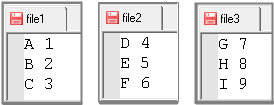
In the example, the
first INFILE statement specifies the DATALINES option to tell SAS where the input data is located (in the DATALINES
statement as a list of file names). The second INFILE statement causes
SAS to store the file names read from DATALINES in a temporary variable, file2read.
On the next iteration of the DATA Step, the next file name listed
in DATALINES is stored in file2read and then
opened by the INPUT statement. These iterations continue until the
last file listed in DATALINES is read.
data output;
   length file2read $40;                         /*1*/
   input file2read $;                            /*2*/
   infile datalines;                             /*3*/
   infile dummy filevar =  file2read end = done; /*4*/

   do while(not done);                           /*5*/
      input Var1 $ Var2;
      output;                                    /*6*/
   end;
datalines;                                       /*7*/
C:\Users\sasuser\file1
C:\Users\sasuser\file2
C:\Users\sasuser\file3
;
proc print data=output; run;
-
Specify the LENGTH statement to create a new variable called
file2read. The variablefile2readcollectively represents the names of the external files that are specified in the DATALINES statement (file1,file2, andfile3). Each file contains the rows to be read into the output data set. -
Specify the INPUT statement to read a value for the variable
file2readon each iteration of the DATA step. -
Specify the first INFILE statement with the DATALINES option. The DATALINES option tells SAS to read the input data from the list of files in the DATALINES statement.
-
Specify a second INFILE statement with three options: DUMMY, FILEVAR=, and END=, explained as follows:
The DUMMY option serves as a placeholder so that the INFILE statement does not expect the customary file reference and instead executes the FILEVAR= option. The
filevar=file2readstatement causes SAS to store the file names in the variablefile2read. On each iteration of the DATA Step, SAS reads each of the external file names and stores them in the variablefile2read.In the END= option, specify a temporary variable,
done. The END= option initially sets the variabledoneto0, which indicates that the DATA statement has more rows to read. When the DATA step reaches the last row (the end of file) of the currently open file, the DATA step sets the END= variable to1, indicating that there are no more rows to read. The temporary variable is used as the condition for the DO loop to stop DATA step processing when the last record of the last file is read.Note: SAS sets the variabledoneto1when the last record of the last external file is read.Note: The END= variable value (done) and the FILEVAR= variable (file2read) are not written to the output data set. -
Specify the DO WHILE statement with the
donevariable as the condition. As long as the variabledoneis not equal to1, the DATA step keeps processing rows for the currently open data set. When the DATA step reads the end of the last file listed in the DATALINES statement, SAS setsdoneto1and the DO loop stops reading rows from the current file and returns control to the DATA step. The DATA step then iterates again, reading the next value for file2read, which is the next file name in the DATALINES statement. -
Specify the OUTPUT statement.
-
The DATALINES statement contains the list of external files to be read.
Output SAS Data Set
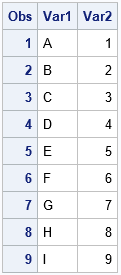
If you do not use a DO loop that contains the INPUT statement, the DATA step reads only the first record from each of the external files. This is because the DATA step automatically stops processing a file when an INPUT statement reads the last record in the file. When the last record is read, DO processing stops and passes control to the next statement that follows the DO loop. For more information about DATA step processing, see how the DATA step processes input data.
The DO loop usually takes the form of a DO WHILE statement. Note the following about the two types of loops:
- DO UNTIL evaluates the condition at the end of the DO loop. As a result, DO UNTIL statements always execute the loop code at least once. If any of the files being read in are empty, DO UNTIL causes the DATA step to terminate prematurely.
- DO WHILE evaluates the condition at the top of the DO loop. As a result, there might be cases in which the DO WHILE statement does not execute the code in the loop at all. If any of the files being read in are empty, DO WHILE does not cause the DATA step to terminate prematurely.
Cautions When Using IF and DELETE with the FILEVAR= Option
The subsetting IF statement and the DELETE statement might produce unexpected results if either is used with the FILEVAR= option.
When the IF statement condition in a DO loop is not satisfied, SAS stops processing the current iteration of the DATA step and returns processing control to the first executable statement after the DO loop. The same cautions apply for the DELETE statement. When SAS stops processing the current iteration of the DATA step, no more records are read by the DO loop, the current file is closed, and the next file is opened for processing.
See Also
-
How the DATA Step Processes Data in SAS Programmer’s Guide: Essentials
-
IF Statements in SAS Programmer’s Guide: Essentials
Reading Multiple File Names from a SAS Data Set
You can list the names of the input files in a SAS data set instead of in the DATALINES statement. To do this, you use a SET statement with the INFILE FILEVAR statement to read the input files from the data set.
data one;
   set two;
   infile dummy filevar= file2read end=done;
   do while(not done);
       input var1 $ var2;
       output;
   end;
run;
See Also
Updating External Files in Place
You can use the INFILE statement with the FILE statement to update records in an external file:
- Specify the INFILE statement before the FILE statement.
- Specify the same fileref or physical file name in each statement.
- Use options that are common to both the INFILE and FILE statements in the INFILE statement instead of the FILE statement. (Any such options that are used in the FILE statement are ignored.)
See Updating an External File.
To update individual fields within a record instead of the entire record, see the SHAREBUFFERS option.
Accessing the Contents of the Input Buffer
In addition to the _INFILE_ variable, you can use the automatic _INFILE_ variable to reference the contents of the current input buffer for the most recent execution of the INFILE statement. This character variable is automatically retained and initialized to blanks. As with other automatic variables, _INFILE_ is not written to the data set.
When you specify the _INFILE_= option in an INFILE statement, the _INFILE_ variable is also indirectly referenced by the automatic _INFILE_ variable. If the automatic _INFILE_ variable is present and you omit _INFILE_ in a particular INFILE statement, SAS creates an internal _INFILE_ variable for that INFILE statement. Otherwise, SAS does not create the _INFILE_ variable for a particular FILE.
During execution and at the point of reference, the maximum length of this character variable is the maximum length of the current _INFILE_ variable. However, because _INFILE_ references only other variables whose lengths are not known until before the execution phase, the designated length is 32,767 bytes during the compilation phase. For example, if you assign _INFILE_ to a new variable whose length is undefined, the default length of the new variable is 32,767 bytes. You cannot use the LENGTH statement and the ATTRIB statement to set or override the length of _INFILE_. You can use the FORMAT statement and the ATTRIB statement to assign a format to _INFILE_.
As with other SAS variables, you can update the _INFILE_ variable in an assignment statement. You can also use a format with _INFILE_ in a PUT statement. For example, this PUT statement writes the contents of the input buffer using a hexadecimal format.
put _infile_ $hex100.;Any modification of _INFILE_ directly modifies the current input buffer for the current INFILE statement. The execution of any PUT _INFILE_ statement that follows this buffer modification reflects the contents of the modified buffer.
_INFILE_ accesses only the contents of the current input buffer for an INFILE statement, even when you use the N= option to specify multiple buffers. You can access all the N= buffers, but you must use an INPUT statement with the # line pointer control to make the desired buffer the current input buffer.
Reading Delimited Data
By default, the delimiter that is used to read input data records with list input is a blank space. The delimiter-sensitive data (DSD) option, the DELIMITER= option, the DLMSTR= option, and the DLMSOPT= option affect how list input handles delimiters. The DELIMITER= option or DLMSTR= option specifies that the INPUT statement use a character other than a blank as a delimiter for data values that are read with list input. When the DSD option is in effect, the INPUT statement uses a comma as the default delimiter.
To read a value as missing between two consecutive delimiters, use the DSD option. By default, the INPUT statement treats consecutive delimiters as a unit. When you use DSD, the INPUT statement treats consecutive delimiters separately. Therefore, a value that is missing between consecutive delimiters is read as a missing value. To change the delimiter from a comma to another value, use the DELIMITER= option or DLMSTR= option.
For example, this DATA step program uses list input to read data that is separated with commas. The second data line contains a missing value. Because SAS allows consecutive delimiters with list input, the INPUT statement cannot detect the missing value.
data scores;
   infile datalines delimiter=',';
   input test1 test2 test3;
   datalines;
91,87,95
97,,92
,1,1
;
With the FLOWOVER option in effect, the data set SCORES contains two, not three, observations. The second observation is built incorrectly.
|
OBS |
TEST1 |
TEST2 |
TEST3 |
|
|---|---|---|---|---|
|
1 |
91 |
87 |
95 |
|
|
2 |
97 |
92 |
1 |
|
To correct the problem, use the DSD option in the INFILE statement.
data scores;
   input test1 test2 test3;
   datalines;
91,87,95
97,,92
,1,1
;
   infile datalines dsd;
Now the INPUT statement detects the two consecutive delimiters and therefore assigns a missing value to variable TEST2 in the second observation.
|
OBS |
TEST1 |
TEST2 |
TEST3 |
|
|---|---|---|---|---|
|
1 |
91 |
87 |
95 |
|
|
2 |
97 |
. |
92 |
|
|
3 |
. |
1 |
1 |
|
The DSD option also enables list input to read a character value that contains a delimiter within a quoted string. For example, if data is separated with commas, DSD enables you to place the character string in quotation marks and read a comma as a valid character. SAS does not store the quotation marks as part of the character value. To retain the quotation marks as part of the value, use the tilde (~) format modifier in an INPUT statement. See Changing How Delimiters Are Treated.
If your data is longer than the default length, you need to use informats. For example, date or time values, names, and addresses can be longer than eight characters. In such cases, you either need to add an INFORMAT statement to the DATA step or add informats directly in the INPUT statement. If you add informats in the INPUT statement, you must add a colon (:) in front of the informat. This tells SAS to read from the first character after the current delimiter to the number of characters specified in the informat.
data a;
   infile 'c:\sas\example.csv' dlm='09'x dsd truncover;
   input fname :$20. lname :$30. address1 :$50. address2 :$50. city :$40.
         state :$2. zip phone :$12.;
run;
Here are some other INFILE options that you might consider using when you read delimited data.
- FIRSTOBS=
-
Use this option to skip a header record by specifying FIRSTOBS=2.
- TERMSTR=
-
Use this option to specify the end-of-line character. This option is useful when you want to share data files that are created on one operating system with another operating system. For example, if you are running SAS in a Windows environment and you need to read a file that was created under UNIX, use TERMSTR=LF.
In SAS 9.4, SAS automatically normalizes imported copies of files that are created in Windows when you are reading the files in a UNIX environment This enables easier sharing of files between the environments.
- TRUNCOVER=
-
Use this option to specify that SAS use only the available input data in the current record to populate as many variables as possible. By default, if the INPUT statement reads past the end of a record without finding enough data to populate the variables listed, the statement continues to read data from the next record. Use the TRUNCOVER= option to keep SAS from reading the next record.
Here are some troubleshooting problems and solutions.
|
Problem |
Solution |
|---|---|
|
The SAS log contains
this message and all of the data in the data set seems to be read: |
This is most likely not a problem. This message occurs when one of these conditions is true:
The message indicates that the FIRSTOBS= option has skipped a line because the line is longer than the LRECL= value. SAS recognizes that a line is longer than the LRECL= value, but it does not recognize that the line has been skipped by the FIRSTOBS= option. |
|
Your last variable is numeric and it is missing in every observation. The most frequent cause for a missing variable is reading a Windows file in a UNIX environment, which uses only a line feed. The UNIX operating system reads the carriage return as data. Because the data is not numeric, an invalid data message is generated. |
Use the TERMSTR=CRLF option in your INFILE statement. In releases prior to SAS®9, either convert the file to the proper UNIX structure or add the carriage return (<CR>) to the list of delimiters. If you are reading a CSV file, specify the carriage return as DL DLM='2C0D’x. If you are reading a tab-delimited file, use DLM=’090D’x. If you have a different delimiter, contact SAS Technical Support for help. |
|
When you read a CSV file, the records are split inside a quoted string. For example, sometimes a long comment field abruptly stops and continues on the next row of the file that you are reading. You can see it if you open the file in a text editor. This problem occurs most commonly in files that are created from Microsoft Excel worksheets. In Excel, the column contains soft returns to help in formatting. When you save the worksheet as a CSV file, the soft returns incorrectly appear to SAS as end-of-record markers, which causes the records to be split incorrectly. |
In SAS®9 or later, under Windows, you can use the TERMSTR=CRLF option in the INFILE statement. This setting indicates that SAS accepts only the complete return and line feed as an end-of-record marker. In releases prior to SAS®9, run the following program. The program converts any line-feed character between double quotation marks to a space to enable SAS to read the file correctly. In this program, the INFILE and FILE statements refer to the same file. The SHAREBUFFERS option enables the external file to be updated in place, removing the offending characters. The program reads the file one byte at a time and replaces the line-feed character, as needed. |
Reading Long Instream Data Records
You can use the INFILE statement with the DATALINES file specification to process instream data. An INPUT statement reads the data records that follow the DATALINES statement. If you use the CARDIMAGE system option, SAS processes the data lines exactly like 80-byte punched card images that are padded with blanks. The default FLOWOVER option in the INFILE statement causes the INPUT statement to read the next record if SAS does not find values in the current record for all of the variables in the statement. To ensure that your data is processed correctly, use an external file for input when record lengths are greater than 80 bytes.
Reading Past the End of a Line
By default, if the INPUT statement tries to read past the end of the current input data record, the statement moves the input pointer to column 1 of the next record to read the remaining values. This default behavior is specified by the FLOWOVER option. A message is written to the SAS log.
NOTE: SAS went to a new line when INPUT
statement reached past the end of a line.
Several options are available to change the INPUT statement behavior when an end of line is reached. The STOPOVER option treats this condition as an error and stops building the data set. The MISSOVER and TRUNCOVER options do not allow the input pointer to go to the next record when the current INPUT statement is not satisfied. The SCANOVER option, used with @'character-string', scans the input record until it finds the specified character-string. The FLOWOVER option restores the default behavior.
The TRUNCOVER and MISSOVER options are similar. The MISSOVER option causes the INPUT statement to set a value to missing if the statement is unable to read an entire field because the value is shorter than the field length that is specified in the INPUT statement. The TRUNCOVER option writes whatever characters are read to the appropriate variable.
For example, an external file with variable-length records contains these records:
----+----1----+----2
1
22
333
4444
55555
The following DATA step reads this data to create a SAS data set. Only one of the input records is as long as the informatted length of the variable TESTNUM.
data numbers;
   infile 'external-file';
   input testnum 5.;
run;
The DATA step creates the three observations from the five input records because by default the FLOWOVER option is used to read the input records.
If you use the MISSOVER option in the INFILE statement, the DATA step creates five observations. All the values that were read from records that were too short are set to missing. Use the TRUNCOVER option in the INFILE statement if you prefer to see what values were present in records that were too short to satisfy the current INPUT statement.
infile 'external-file' truncover;The DATA step now reads the same input records and creates five observations. The following table compares the SAS data sets.
|
OBS |
FLOWOVER |
MISSOVER |
TRUNCOVER |
|---|---|---|---|
|
1 |
22 |
. |
1 |
|
2 |
4444 |
. |
22 |
|
3 |
55555 |
. |
333 |
|
4 |
|
. |
4444 |
|
5 |
|
55555 |
55555 |
Comparisons
- The INFILE statement specifies the input file for any INPUT statements in the DATA step. The FILE statement specifies the output file for any PUT statements in the DATA step.
- An INFILE statement usually identifies data from an external file. A DATALINES statement indicates that data follows in the job stream. You can use the INFILE statement with the file specification DATALINES to take advantage of certain data-reading options that affect how the INPUT statement reads instream data.
Examples
Example 1: Changing How Delimiters Are Treated
By default, the INPUT statement uses a blank as the delimiter. In this example, the DATA step uses a comma as the delimiter.
data num;
   infile datalines dsd;
   input x y z;
   datalines;
,2,3
4,5,6
7,8,9
;
The argument DATALINES
in the INFILE statement enables you to use an INFILE statement option
to read instream data lines. The DSD option sets the comma as the
default delimiter. Because a comma precedes the first value in the
first data line, a missing value is assigned to variable X in
the first observation, and the value 2 is
assigned to variable Y.
If the data uses multiple
delimiters or a single delimiter other than a comma, simply specify
the delimiter values with the DELIMITER= option. In this example,
the characters a and b function
as delimiters.
data nums;
    infile datalines dsd delimiter='ab';
    input X Y Z;
    datalines;
1aa2ab3
4b5bab6
7a8b9
;

proc print; run;
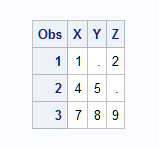
The output that PROC
PRINT generates shows the resulting nums data
set. Values are missing for variables in the first and second observations
because DSD causes list input to detect two consecutive delimiters.
If you omit DSD, the characters a, b, aa, ab, ba,
or bb function as the delimiter and
no variables are assigned missing values.
The nums Data Set
If you want to use a
string as the delimiter, specify the delimiter values with the DLMSTR=
option. In this example, the string PRD is
used as the delimiter. Note that the string contains uppercase characters.
By using the DLMSOPT= option, PRD, Prd, PRd, PrD, pRd, pRD, prD,
and prd are all valid delimiters.
data test;
    infile datalines dsd dlmstr='PRD' dlmsopt='i';
    input X Y Z;
    datalines;
1PRD2PRd3
4PrD5Prd6
7pRd8pRD9
;
 proc print data=test; run;
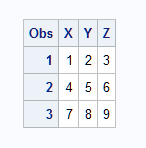
The output from PROC
PRINT shows all the observations in the test data
set.
The test Data Set
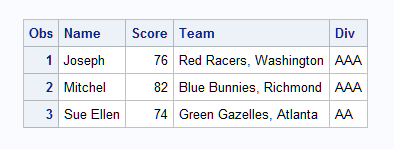
This DATA step uses modified list input and the DSD option to read data that is separated by commas and that might contain commas as part of a character value.
data scores;
   infile datalines dsd;
   input Name : $9. Score
         Team  : $25. Div $;
   datalines;
Joseph,76,"Red Racers, Washington",AAA
Mitchel,82,"Blue Bunnies, Richmond",AAA
Sue Ellen,74,"Green Gazelles, Atlanta",AA
;

proc print; run;
The
output that PROC PRINT generates shows the resulting scores data
set. The delimiter (comma) is stored as part of the value of TEAM,
whereas the quotation marks are not.
The scores Data Set
Example 2: Handling Missing Values and Short Records with List Input
This example shows how to prevent missing values from causing problems when you read the data with list input. Some data lines in this example contain fewer than five temperature values. Use the MISSOVER option so that these values are set to missing.
data weather;
   infile datalines missover;
   input temp1-temp5;
   datalines;
97.9 98.1 98.3
98.6 99.2 99.1 98.5 97.5
96.2 97.3 98.3 97.6 96.5
;
SAS reads the three
values on the first data line as the values of temp1, temp2,
and temp3. The MISSOVER option causes SAS
to set the values of temp4 and temp5 to
missing for the first observation because no values for those variables
are in the current input data record.
When you omit the MISSOVER
option or use FLOWOVER, SAS moves the input pointer to line 2 and
reads values for temp4 and temp5.
The next time the DATA step executes, SAS reads a new line which,
in this case, is line 3. This message appears in the SAS log:
NOTE: SAS went to a new line when INPUT statement
      reached past the end of a line.
You can also use the STOPOVER option in the INFILE statement. Using the STOPOVER option causes the DATA step to halt execution when an INPUT statement does not find enough values in a record of raw data.
infile datalines stopover;Because SAS does not
find a temp4 value in the first data record,
it sets _ERROR_ to 1, stops building
the data set, and prints data line 1.
Example 3: Scanning Variable-Length Records for a Specific Character String
This example shows how to use TRUNCOVER in combination with SCANOVER to pull phone numbers from a phone book. The phone number is always preceded by the word “phone:”. Because the phone numbers include international numbers, the maximum length is 32 characters.
filename phonebk host-specific-path;
data _null_;
  file phonebk;
  input line $80.;
  put line;
  datalines;
    Jenny's Phone Book
    Jim Johanson phone: 619-555-9340
       Jim wants a scarf for the holidays.
    Jane Jovalley phone: (213) 555-4820
       Jane started growing cabbage in her garden.
       Her dog's name is Juniper.
    J.R. Hauptman phone: (49)12 34-56 78-90
       J.R. is my brother.
   ;
run;
Use @'phone:' to scan the lines of the file for a phone number and position the file pointer where the phone number begins. Use TRUNCOVER in combination with SCANOVER to skip the lines that do not contain 'phone:' and write only the phone numbers to the SAS log.
data _null_;
   infile phonebk truncover scanover;
   input @'phone:' phone $32.;
   put phone=;
run;
The program writes these lines to the SAS log:
phone=619-555-9340
phone=(213) 555-4820
phone=(49)12 34-56 78-90
Example 4: Reading Files That Contain Variable-Length Records
This example shows how to use LENGTH=, in combination with the $VARYING. informat to read a file that contains variable-length records.
data a;
   infile file-specification
          length=linelen   /* 1 */
          lrecl=510 pad;
   input firstvar 1-10 @;
   varlen=linelen-10;      /* 2 */
   input @11 secondvar $varying500. varlen;
run;-
Assign
linelen. -
Calculate
varlen.
These actions occur in the preceding DATA step:
- The INFILE statement creates the variable LINELEN but does not assign a value to the variable.
- When the first INPUT statement executes, SAS determines the line length of the record and assigns that value to the variable LINELEN. The single trailing @ holds the record in the input buffer for the next INPUT statement.
- The assignment statement uses the two known lengths (the length of FIRSTVAR and the length of the entire record) to determine the length of VARLEN.
- The second INPUT statement uses the VARLEN value with the informat $VARYING500. to read the variable SECONDVAR.
For more information, see $VARYINGw. Informat in SAS Formats and Informats: Reference.
Example 5: Reading from Multiple External Files
This DATA step reads from two input files during each iteration of the DATA step. As SAS switches from one file to the next, each file remains open. The input pointer remains in place to begin reading from that location the next time an INPUT statement reads from that file.
data qtrtot(drop=jansale febsale marsale aprsale maysale junsale);
   infile quarter1;                       /*1*/
   input name $ jansale febsale marsale;  /*2*/
   q1total = sum(jansale,febsale,marsale);

   infile quarter2;                       /*3*/
   input @7 aprsale maysale junsale;
   q2total=sum(aprsale,maysale,junsale);  /*4*/
run; /*5*/-
Specify the first INFILE statement to identify the location of the first file.
-
Specify the first INPUT statement to read values from the first file.
-
Specify the second INFILE statement to identify the location of second file.
-
Specify the second INPUT statement to read values from the second file.
-
Stop processing when SAS reaches the last record in the shortest input file.
This DATA step uses FILEVAR= to read from a different file during each iteration of the DATA step.
data allsales;
   length fileloc myinfile $ 300;
   input fileloc $ ;     /*1*/
   infile datalines;     /*2*/
   infile dummy filevar=fileloc end=done     /*3*/
   do while(not done);     /*4*/
     input name $ jansale febsale marsale;
     output;     /*5*/
   end;
   put 'Finished reading ' myinfile=;
   datalines;
external-file1
external-file2
external-file3
;-
Specify the INPUT statement with the temporary variable
filelocto read instream data in the DATALINES statement. -
Specify the INPUT statement to read a value for the variable
filelocon each iteration of the DATA step. -
Specify a second INFILE statement with three options: DUMMY, FILEVAR=, and END=, explained as follows:
The DUMMY option serves as a placeholder so that the INFILE statement does not expect the customary file reference and instead executes the FILEVAR= option. The
filevar=filelocstatement causes SAS to store the file names in the variablefileloc. On each iteration of the DATA Step, SAS reads each of the external file names and stores them in the variablefileloc.In the END= option, specify a temporary variable,
done. The END= option initially sets the variabledoneto0, which indicates that the DATA statement has more rows to read. When the DATA step reaches the last row (the end of file) of the currently open file, the DATA step sets the END= variable to1, indicating that there are no more rows to read. The temporary variable is used as the condition for the DO loop to stop DATA step processing when the last record of the last file is read.Note: SAS sets the variabledoneto1when the last record of the last external file is read.Note: The END= variable value (done) and the FILEVAR= variable (fileloc) are not written to the output data set. -
Specify the DO WHILE statement with the
donevariable as the condition. As long as the variabledoneis not equal to1, the DATA step keeps processing rows for the currently open data set. When the DATA step reads the end of the last file listed in the DATALINES statement, SAS setsdoneto1and the DO loop stops reading rows from the current file and returns control to the DATA step. The DATA step then iterates again, reading the next value forfileloc, which is the next file name in the DATALINES statement. -
Specify the OUTPUT statement.
The FILENAME= option
assigns the name of the current input file to the variable myinfile.
The LENGTH statement ensures that the FILENAME= variable and the FILEVAR=
variable have a length that is long enough to contain the value of
the file name. The PUT statement prints the physical name of the currently
open input file to the SAS log.
Example 6: Updating an External File
This example shows how to use the INFILE statement with the SHAREBUFFERS option and the INPUT, FILE, and PUT statements to update an external file in place.
data _null_;
     /* The INFILE and FILE statements     */
     /* must specify the same file.       */
   infile file-specification-1 sharebuffers;
   file file-specification-1;
   input state $ 1-2 phone $ 5-16;
     /* Replace area code for NC exchanges */
   if state= 'NC' and substr(phone,5,3)='333' then
     phone='910-'||substr(phone,5,8);
   put phone 5-16;
run;
Example 7: Truncating Copied Records
The LENGTH= option is useful when you copy the input file to another file with the PUT _INFILE_ statement. Use LENGTH= to truncate the copied records. For example, these statements truncate the last 20 columns from each input data record before the input data record is written to the output file.
data _null_;
   infile  file-specification-1 length=a;
   input;
   a=a-20;
   file file-specification-2;
   put _infile_;
run;
The START= option is also useful when you want to truncate what the PUT _INFILE_ statement copies. For example, if you do not want to copy the first 10 columns of each record, these statements copy from column 11 to the end of each record in the input buffer.
data _null_;
   infile file-specification start=s;
   input;
   s=11;
   file file-specification-2;
   put _infile_;
run;
Example 8: Listing the Pointer Location
This DATA step assigns
the value of the current pointer location in the input buffer to the
variables Linept and Columnpt.
data _null_;
   infile datalines n=2 line=Linept col=Columnpt;
   input name $ 1-15 #2 @3 id;
   put Linept= Columnpt=;
   datalines;
J. Brooks
  40974
T. R. Ansen
  4032
;
The preceding statements produce these lines for each execution of the DATA step because the input pointer is on the second line in the input buffer when the PUT statement executes.
Linept=2 Columnpt=9
Linept=2 Columnpt=8
Example 9: Working with Data in the Input Buffer
The _INFILE_ variable always contains the most recent record that is read from an INPUT statement. The following example illustrates the use of the _INFILE_ variable to perform these tasks:
- read an entire record that you want to parse without using the INPUT statement
- read an entire record that you want to write to the SAS log
- modify the contents of the input record before parsing the line with an INPUT statement
The example file contains phone bill information. The numeric data, minutes, and charge are enclosed in angle brackets (< >).
filename phonbill host-specific-filename;
data _null_;
   file phonbill;
   input line $80.;
   put line;
   datalines;
   City Number Minutes Charge
   Jackson 415-555-2384 <25> <2.45>
   Jefferson 813-555-2356 <15> <1.62>
   Joliet 913-555-3223 <65> <10.32>
   ;
run;
This code reads each record and parses the record to extract the minute and charge values.
data _null_;
   infile phonbill firstobs=2;
   input;
   city = scan(_infile_, 1, ' ');
   char_min = scan(_infile_, 3, ' ');
   char_min = substr(char_min, 2, length(char_min)-2);
   minutes = input(char_min, BEST12.);
   put city= minutes=;
run;
The program writes these lines to the SAS log:
city=Jackson minutes=25
city=Jefferson minutes=15
city=Joliet minutes=65
The INPUT statement in this code reads a record from the file. The automatic _INFILE_ variable is used in the PUT statement to write the record to the SAS log.
data _null_;
   infile phonbill;
   input;
   put _infile_;
run;
The program writes these lines to the SAS log:
City Number Minutes Charge
Jackson 415-555-2384 <25> <2.45>
Jefferson 813-555-2356 <15> <1.62>
Joliet 913-555-3223 <65> <10.32>
In this code, the first INPUT statement reads and holds the record in the input buffer. The _INFILE_= option removes the angle brackets (< >) from the numeric data. The second INPUT statement parses the value in the buffer.
data _null_;
   length city number $16. minutes charge 8;
   infile phonbill firstobs=2;
   input @;
   _infile_ = compress(_infile_, '<>');
   input city number minutes charge;
   put city= number= minutes= charge=;
run;
The program writes these lines to the SAS log:
city=Jackson number=415-555-2384 minutes=25 charge=2.45
city=Jefferson number=813-555-2356 minutes=15 charge=1.62
city=Joliet number=913-555-3223 minutes=65 charge=10.32
Example 10: Accessing the Input Buffers of Multiple Files
This example uses both
the _INFILE_ automatic variable and the _INFILE_= option to read multiple
files and access the input buffers for each of them. This code creates
four files: three data files and one file that contains the names
of all the data files. The second DATA step reads the file names file,
opens each data file, and writes the contents to the SAS log. Because
the PUT statement needs _INFILE_ for the file names file and the data
file, one of the _INFILE_ variables is referenced with the variable fname.
data _null_;
   do i = 1 to 3;
      fname= 'external-data-file' || put(i,1.) || '.dat';
      file datfiles filevar=fname;
      do j = 1 to 5;
         put i j;
      end;
      file 'external-filenames-file';
      put fname;
   end;
run;
data _null_;
   infile 'external-filenames-file' _infile_=fname;
   input;
   infile datfiles filevar=fname end=eof;
   do while(^eof);
      input;
      put fname _infile_;
   end;
run;
The program writes these lines to the SAS log:
NOTE: The infile 'external-filenames-file' is:
      File Name=external-filenames-file,
      RECFM=V, LRECL=256
NOTE: The infile DATFILES is:
      File Name=external-filenames-file1.dat,
      RECFM=V, LRECL=256
external-filenames-file1.dat 1 1
external-filenames-file1.dat 1 2
external-filenames-file1.dat 1 3
external-filenames-file1.dat 1 4
external-filenames-file1.dat 1 5
NOTE: The infile DATFILES is
      File Name=external-filenames-file2.dat,
      RECFM=V, LRECL=256
external-filenames-file2.dat 2 1
external-filenames-file2.dat 2 2
external-filenames-file2.dat 2 3
external-filenames-file2.dat 2 4
external-filenames-file2.dat 2 5
NOTE: The infile DATFILES is
      File Name=external-filenames-file3.dat,
      RECFM=V, LRECL=256
external-filenames-file3.dat 3 1
external-filenames-file3.dat 3 2
external-filenames-file3.dat 3 3
external-filenames-file3.dat 3 4
external-filenames-file3.dat 3 5
Example 11: Specifying an Encoding When Reading an External File
This example creates a SAS data set from an external file. The external file's encoding is in UTF-8, and the current SAS session encoding is Wlatin1. By default, SAS assumes that the external file is in the same encoding as the session encoding, which causes the character data to be written to the new SAS data set incorrectly.
To tell SAS what encoding to use when reading the external file, specify the ENCODING= option. When you tell SAS that the external file is in UTF-8, SAS then transcodes the external file from UTF-8 to the current session encoding when writing to the new SAS data set. Therefore, the data is written to the new data set correctly in Wlatin1.
libname myfiles 'SAS-library';
filename extfile 'external-file';
data myfiles.unicode;
   infile extfile encoding="utf-8";
   input Make $ Model $ Year;
run;
Example 12: Reading All File Members of a Directory
This example reads all
of the files from the c:\mydir\tmp directory
using the MEMVAR= variable set to a blank.
data _null_;
  length memname $ 1024;
  memname = ' ';
  infile 'c:\mydir\tmp' memvar=memname end=done;
  put memname=;
  do while (^done);
    input x;
    put _all_;
  end;
run;
Example 13: Reading a List of File Members
This example reads a
list of files from the c:\mydir\tmp directory
that are assigned to the MEMVAR= option.
data _null_;
   length mname $ 32;
   do mname = 'erase.dat', 'erase2.dat';
      infile 'c:\mydir\tmp' memvar=mname end=done;
      do while (^done);
         input x;
         put _all_;
      end;
   end;
   stop;
run;
Example 14: Reading the Return Code from a URL Request
This example attempts to access a web resource that does not exist. As a result, the STATUS= variable is set to the page not found code (404).
filename in url "http://www.sas.com/missing_page.html" lrecl=1000;
data _NULL_;
   infile in status=ioerr;
   input;
   if (ioerr = 404) then do;
      put 'File not found';
      stop;
   end;
run;
The program writes this line to the SAS log:
File not found
See Also
-
How Many Characters Can I Use When I Measure SAS Name Lengths in Bytes? in SAS Language Reference: Concepts
-
Statements:
- FILENAME Statement
- FILENAME Statement: ACTIVEMQ Access Method in Application Messaging with SAS
- FILENAME Statement: JMS Access Method in Application Messaging with SAS
- INPUT Statement
-
“LOCKDOWN Statement” in SAS Intelligence Platform: Application Server Administration Guide
- PUT Statement
-
System Options:
-
“LOCKDOWN System Option in SAS Intelligence Platform: Application Server Administration Guide
-