The LOGISTIC Procedure
MODEL Statement
<label:> MODEL variable<(variable_options)> = <effects> </ options>;
<label:> MODEL events/trials = <effects> </ options>;
The MODEL statement names the response variable and the explanatory effects, including covariates, main effects, interactions, and nested effects; see the section Specification of Effects in Chapter 53, The GLM Procedure, for more information. If you omit the explanatory effects, PROC LOGISTIC fits an intercept-only model. You must specify exactly one MODEL statement. The optional label must be a valid SAS name; it is used to identify the resulting output when you specify the ROC statement or the ROCCI option.
Two forms of the MODEL statement can be specified. The first form, referred to as single-trial syntax, is applicable to binary, ordinal, and nominal response data. The second form, referred to as events/trials syntax, is restricted to the case of binary response data. The single-trial syntax is used when each observation in the DATA= data set contains information about only a single trial, such as a single subject in an experiment. When each observation contains information about multiple binary-response trials, such as the counts of the number of subjects observed and the number responding, then events/trials syntax can be used.
In the events/trials syntax, you specify two variables that contain count data for a binomial experiment. These two variables are separated by a slash. The value of the first variable, events, is the number of positive responses (or events). The value of the second variable, trials, is the number of trials. The values of both events and (trials–events) must be nonnegative and the value of trials must be positive for the response to be valid.
In the single-trial syntax, you specify one variable (on the left side of the equal sign) as the response variable. This variable can be character or numeric. Variable_options specific to the response variable can be specified immediately after the response variable with parentheses around them.
For both forms of the MODEL statement, explanatory effects follow the equal sign. Variables can be either continuous or classification variables. Classification variables can be character or numeric, and they must be declared in the CLASS statement. When an effect is a classification variable, the procedure inserts a set of coded columns into the design matrix instead of directly entering a single column containing the values of the variable.
Response Variable Options
Model Options
Table 8 summarizes the options available in the MODEL statement. These options can be specified after a slash (/).
Table 8: MODEL Statement Options
| Option | Description |
|---|---|
| Model Specification Options | |
| EQUALSLOPES | Specifies equal slope parameters |
| LINK= | Specifies the link function |
| NOFIT | Suppresses model fitting |
| NOINT | Suppresses the intercept |
| OFFSET= | Specifies the offset variable |
| SELECTION= | Specifies the effect selection method |
| UNEQUALSLOPES | Specifies unequal slope parameters |
| Effect Selection Options | |
| BEST= | Controls the number of models displayed for SCORE selection |
| DETAILS | Requests detailed results at each step |
| FAST | Uses the fast elimination method |
| HIERARCHY= | Specifies whether and how hierarchy is maintained and whether a single effect or multiple effects are allowed to enter or leave the model per step |
| INCLUDE= | Specifies the number of effects included in every model |
| MAXSTEP= | Specifies the maximum number of steps for STEPWISE selection |
| SEQUENTIAL | Adds or deletes effects in sequential order |
| SLENTRY= | Specifies the significance level for entering effects |
| SLSTAY= | Specifies the significance level for removing effects |
| START= | Specifies the number of variables in the first model |
| STOP= | Specifies the number of variables in the final model |
| STOPRES | Adds or deletes variables by the residual chi-square criterion |
| Model-Fitting Specification Options | |
| ABSFCONV= | Specifies the absolute function convergence criterion |
| FCONV= | Specifies the relative function convergence criterion |
| FIRTH | Specifies Firth’s penalized likelihood method |
| GCONV= | Specifies the relative gradient convergence criterion |
| HALFMAX= | Specifies the maximum number of step halvings |
| MAXFUNCTION= | Specifies the maximum number of function calls for the conditional analysis |
| MAXITER= | Specifies the maximum number of iterations |
| NOCHECK | Suppresses checking for infinite parameters |
| RIDGEINIT= | Specifies the initial ridging value |
| RIDGING= | Specifies the technique used to improve the log-likelihood function when its value is worse than that of the previous step |
| SINGULAR= | Specifies the tolerance for testing singularity |
| TECHNIQUE= | Specifies the iterative algorithm for maximization |
| XCONV= | Specifies the relative parameter convergence criterion |
| Confidence Interval Options | |
| ALPHA= | Specifies  for the for the 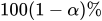 confidence intervals confidence intervals |
| CLODDS= | Computes confidence intervals for odds ratios |
| CLPARM= | Computes confidence intervals for parameters |
| PLCONV= | Specifies the profile-likelihood convergence criterion |
| Classification Options | |
| CTABLE | Displays the classification table |
| PEVENT= | Specifies prior event probabilities |
| PPROB= | Specifies probability cutpoints for classification |
| Overdispersion and Goodness-of-Fit Test Options | |
| AGGREGATE= | Determines subpopulations for Pearson chi-square and deviance |
| GOF | Computes goodness-of-fit tests and statistics |
| LACKFIT | Requests the Hosmer and Lemeshow goodness-of-fit test |
| SCALE= | Specifies the method to correct overdispersion |
| ROC Curve Options | |
| OUTROC= | Names the output ROC data set |
| ROCCI | Computes confidence intervals for the AUC |
| ROCEPS= | Specifies the probability grouping criterion |
| Regression Diagnostics Options | |
| INFLUENCE | Displays influence statistics |
| IPLOTS | Displays influence statistics |
| Display Options | |
| CORRB | Displays the correlation matrix |
| COVB | Displays the covariance matrix |
| EXPB | Displays exponentiated values of the estimates |
| ITPRINT | Displays the iteration history |
| NODUMMYPRINT | Suppresses the "Class Level Information" table |
| NOODDSRATIO | Suppresses the default "Odds Ratio" table |
| ORPVALUE | Displays p-values in tables produced by the CLODDS= option and ODDSRATIO statement |
| PARMLABEL | Displays parameter labels |
| PCORR | Displays the partial correlation statistic |
| RSQUARE | Displays the generalized R-square |
| STB | Displays standardized estimates |
| Computational Options | |
| BINWIDTH= | Specifies the bin size for estimating association statistics |
| NOLOGSCALE | Performs calculations by using normal scaling |
The following list describes these options.
- ABSFCONV=value
-
specifies the absolute function convergence criterion. Convergence requires a small change in the log-likelihood function in subsequent iterations,

where
 is the value of the log-likelihood function at iteration i. See the section Convergence Criteria for more information.
- AGGREGATE<=(variable-list)>
-
specifies the subpopulations on which the Pearson chi-square test statistic and the likelihood ratio chi-square test statistic (deviance) are calculated. Observations with common values in the given list of variables are regarded as coming from the same subpopulation. Variables in the list can be any variables in the input data set. Specifying the AGGREGATE option is equivalent to specifying the AGGREGATE= option with a variable list that includes all explanatory variables in the MODEL statement. The deviance and Pearson goodness-of-fit statistics are calculated only when the SCALE= option is specified. Thus, the AGGREGATE (or AGGREGATE=) option has no effect if the SCALE= option is not specified.
See the section Rescaling the Covariance Matrix for more information.
- ALPHA=number
sets the level of significance
for  % confidence intervals for regression parameters or odds ratios. The value of number must be between 0 and 1. By default, number is equal to the value of the ALPHA= option in the PROC LOGISTIC statement, or 0.05 if the option is not specified. This option has no effect unless confidence limits for the parameters (CLPARM= option) or odds ratios (CLODDS= option or ODDSRATIO statement) are requested.
- BEST=number
specifies that number models with the highest score chi-square statistics are to be displayed for each model size. It is used exclusively with the SCORE model selection method. If the BEST= option is omitted and there are no more than 10 explanatory variables, then all possible models are listed for each model size. If the option is omitted and there are more than 10 explanatory variables, then the number of models selected for each model size is, at most, equal to the number of explanatory variables listed in the MODEL statement.
- BINWIDTH=width
-
specifies the size of the bins used for estimating the association statistics. For more information, see the section Rank Correlation of Observed Responses and Predicted Probabilities. Valid values are
 (for polytomous response models,
  ). If you have a binary response and fewer than 5,000,000 observations, the default is BINWIDTH=0; this means that no binning is performed and the exact values of the statistics are computed using the trapezoidal area described in the section ROC Computations. This method is a bit slower and might require more memory than the binning approach.
 If a nonzero width does not evenly divide the unit interval, it is reduced to a valid value and a message is displayed in the SAS log. The number of bins is also constrained by the amount of memory available on your machine; if a nonzero width is so small that you cannot allocate 8
 width bytes of memory for the bins, then width is adjusted to a value for which memory can be allocated and a note is displayed in the SAS log.
 The BINWIDTH= option is ignored and no binning is performed when a ROC statement is specified, when ROC graphics are produced, or when the SCORE statement computes an ROC area.
- CLODDS=PL | WALD | BOTH
produces confidence intervals for odds ratios of main effects not involved in interactions or nestings. Computation of these confidence intervals is based on the profile likelihood (CLODDS=PL) or based on individual Wald tests (CLODDS=WALD). By specifying CLODDS=BOTH, the procedure computes two sets of confidence intervals for the odds ratios, one based on the profile likelihood and the other based on the Wald tests. The confidence coefficient can be specified with the ALPHA= option. The CLODDS=PL option is not available with the STRATA statement. Classification main effects that use parameterizations other than REF, EFFECT, or GLM are ignored. If you need to compute odds ratios for an effect involved in interactions or nestings, or using some other parameterization, then you should specify an ODDSRATIO statement for that effect.
- CLPARM=PL | WALD | BOTH
-
requests confidence intervals for the parameters. Computation of these confidence intervals is based on the profile likelihood (CLPARM=PL) or individual Wald tests (CLPARM=WALD). If you specify CLPARM=BOTH, the procedure computes two sets of confidence intervals for the parameters, one based on the profile likelihood and the other based on individual Wald tests. The confidence coefficient can be specified with the ALPHA= option. The CLPARM=PL option is not available with the STRATA statement.
See the section Confidence Intervals for Parameters for more information.
- CORRB
- COVB
- CTABLE
-
classifies the input binary response observations according to whether the predicted event probabilities are above or below some cutpoint value z in the range
 . An observation is predicted as an event if the predicted event probability exceeds or equals z. You can supply a list of cutpoints other than the default list by specifying the PPROB= option. Also, you can compute positive and negative predictive values as posterior probabilities by using Bayes’ theorem. You can use the PEVENT= option to specify prior probabilities for computing these statistics. The CTABLE option is ignored if the data have more than two response levels. This option is not available with the STRATA statement.
 For more information, see the section Classification Table.
- DETAILS
produces a summary of computational details for each step of the effect selection process. It produces the "Analysis of Effects Eligible for Entry" table before displaying the effect selected for entry for forward or stepwise selection. For each model fitted, it produces the "Joint Tests" or "Type 3 Analysis of Effects" table if the fitted model involves CLASS variables, the "Analysis of Maximum Likelihood Estimates" table, and measures of association between predicted probabilities and observed responses. For the statistics included in these tables, see the section Displayed Output. The DETAILS option has no effect when SELECTION=NONE.
- EQUALSLOPES<=effect | (effect-list)>
-
specifies one or more effects that have the same parameters for each response function in a polytomous response model. If you specify more than one effect, enclose the effects in parentheses. The effects must be explanatory effects that are specified in the MODEL statement. For the generalized logit model, you can also specify the INTERCEPT effect.
If you do not specify this option, the generalized logit model makes the unequal slopes assumption,
 , where the response functions have different slope parameters
  . If you specify this option without an effect or effect-list, all slope parameters are shared across the response functions, resulting in the model
  . Specifying an effect or effect-list enables you to choose which effects have the same parameters across the response functions. For any specified selection method, equal slope parameters can contain and be contained in only other equal slope parameters; for more information, see the HIERARCHY= option.
 You can specify the EQUALSLOPES option along with the UNEQUALSLOPES option to create an effect that has both equal and unequal slopes. In this case, the parameters that have equal slopes model the mean effect across the response functions, whereas the parameters that have unequal slopes model deviations from the mean. For more information, see the UNEQUALSLOPES option.
For an example that uses this option, see Example 79.18. If you specify the EQUALSLOPES option, you cannot specify any of the EFFECTPLOT, ESTIMATE, EXACT, LSMEANS, LSMESTIMATE, MARGINS, ROC, ROCCONTRAST, SLICE, STORE, and STRATA statements, and you cannot specify the following options: CTABLE, FIRTH, OUTROC=, PEVENT=, PPROB=, RIDGING=, and TECHNIQUE=.
-
EXPB
EXPEST displays the exponentiated values (e
 ) of the parameter estimates
  in the "Analysis of Maximum Likelihood Estimates" table for the logit model. These exponentiated values are the estimated odds ratios for parameters corresponding to the continuous explanatory variables, and for CLASS effects that use reference or GLM parameterizations.
 - FAST
uses a computational algorithm of Lawless and Singhal (1978) to compute a first-order approximation to the remaining slope estimates for each subsequent elimination of a variable from the model. Variables are removed from the model on the basis of these approximate estimates. This option is extremely efficient because the model is not refitted for every variable removed. The FAST option is used when SELECTION=BACKWARD and in the backward elimination steps when SELECTION=STEPWISE. The FAST option is ignored when SELECTION=FORWARD or SELECTION=NONE.
- FCONV=value
-
specifies the relative function convergence criterion. Convergence requires a small relative change in the log-likelihood function in subsequent iterations,
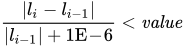
where
is the value of the log likelihood at iteration i. See the section Convergence Criteria for more information. - FIRTH
-
performs Firth’s penalized maximum likelihood estimation to reduce bias in the parameter estimates (Heinze and Schemper 2002; Firth 1993). This method is useful in cases of separability, as often occurs when the event is rare, and is an alternative to performing an exact logistic regression. See the section Firth’s Bias-Reducing Penalized Likelihood for more information.
Note: The intercept-only log likelihood is modified by using the full-model Hessian, computed with the slope parameters equal to zero. When fitting a model and scoring a data set in the same PROC LOGISTIC step, the model is fit using Firth’s penalty for parameter estimation purposes, but the penalty is not applied to the scored log likelihood.
- GCONV=value
-
specifies the relative gradient convergence criterion. Convergence requires that the normalized prediction function reduction is small,
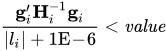
where
is the value of the log-likelihood function,  is the gradient vector, and
  is the (expected) Hessian matrix, all at iteration i. This is the default convergence criterion, and the default value is 1E–8. See the section Convergence Criteria for more information.
 - GOF<(gof-options)>
-
performs goodness-of-fit tests for specified or selected binary response models and displays more fit statistics. This option is not available for polytomous response models or for a link function other than the logit. This option is also ignored if the optimization fails, if your data are separable, or if the specified or selected model has no covariates.
It is usually recommended that you have at least five observations for every combination of your explanatory variables in order to compute valid Pearson chi-square and deviance goodness-of-fit tests. However, when you have sparse data, particularly when you have continuous variables in your model, this condition is not met and these two tests are not appropriate. The GOF option computes additional tests that are valid in these situations, and the "Deviance and Pearson Goodness-of-Fit Statistics" table is replaced by the "Goodness-of-Fit Statistics" table. These tests are described in detail in the section Goodness-of-Fit Tests.
This option modifies the standard "Model Fit Statistics" table by displaying one column of the statistics that are discussed in the section Model Fitting Information.
By default, specifying this option also sets the SCALE=NONE, AGGREGATE, LACKFIT, and PLOTS=CALIBRATION options. You can override these options, except for SCALE=NONE, by explicitly specifying them or by specifying certain gof-options.
The LACKFIT option is enabled in a manner that is recommended by Paul, Pennell, and Lemeshow (2013), where the number of groups is chosen to maintain the same power as grouping 1,000 observations into 10 groups. If you have fewer than 1,000 observations, then the LACKFIT(NGROUPS=10) option is used. If you have 1,000 to 25,000 observations, then the following number of groups is formed,

where
 is the number of observations,
  is the number of events, and
  is the number of nonevents. If you have more than 25,000 observations, then the LACKFIT option is disabled; however, you can still specify the LACKFIT option in the MODEL statement.
 You can specify the following gof-options:
The GOF option is not available when you specify the EXACT and STRATA statements. The GOF option is ignored when you specify the SELECTION=SCORE option.
- HALFMAX=number
specifies the maximum number of step halvings to use when you also specify the RIDGING=NONE option. By default, HALFMAX=50.
-
HIERARCHY=keyword
HIER=keyword -
specifies whether and how the model hierarchy requirement is applied and whether a single effect or multiple effects are allowed to enter or leave the model in one step. You can specify that only CLASS effects, or both CLASS and interval effects, be subject to the hierarchy requirement. The HIERARCHY= option is ignored unless you also specify one of the following options: SELECTION=FORWARD, SELECTION=BACKWARD, or SELECTION=STEPWISE.
Model hierarchy refers to the requirement that, for any term to be in the model, all effects contained in the term must be present in the model. For example, in order for the interaction A*B to enter the model, the main effects A and B must be in the model. Likewise, neither effect A nor B can leave the model while the interaction A*B is in the model.
The keywords you can specify in the HIERARCHY= option are as follows:
- NONE
indicates that the model hierarchy is not maintained. Any single effect can enter or leave the model at any given step of the selection process.
- SINGLE
indicates that only one effect can enter or leave the model at one time, subject to the model hierarchy requirement. For example, suppose that you specify the main effects A and B and the interaction A*B in the model. In the first step of the selection process, either A or B can enter the model. In the second step, the other main effect can enter the model. The interaction effect can enter the model only when both main effects have already been entered. Also, before A or B can be removed from the model, the A*B interaction must first be removed. All effects (CLASS and interval) are subject to the hierarchy requirement.
- SINGLECLASS
is the same as HIERARCHY=SINGLE except that only CLASS effects are subject to the hierarchy requirement.
- MULTIPLE
indicates that more than one effect can enter or leave the model at one time, subject to the model hierarchy requirement. In a forward selection step, a single main effect can enter the model, or an interaction can enter the model together with all the effects that are contained in the interaction. In a backward elimination step, an interaction itself, or the interaction together with all the effects that the interaction contains, can be removed. All effects (CLASS and continuous) are subject to the hierarchy requirement.
- MULTIPLECLASS
is the same as HIERARCHY=MULTIPLE except that only CLASS effects are subject to the hierarchy requirement.
The default value is HIERARCHY=SINGLE, which means that model hierarchy is to be maintained for all effects (that is, both CLASS and continuous effects) and that only a single effect can enter or leave the model at each step.
- INCLUDE=number | EQUALSLOPES
-
specifies effects in the MODEL statement to include in every model during model selection. You can specify the following values:
- number
requests that the first number effects be included in every model.
- EQUALSLOPES
enables you to include all the equal slope effects in every model and perform the selection process on the unequal slope effects.
By default, INCLUDE=0. The INCLUDE= option has no effect when SELECTION=NONE. You cannot specify the INCLUDE=EQUALSLOPES option if you specify SELECTION=SCORE.
If you specify the same effect in both the EQUALSLOPES and UNEQUALSLOPES options, then that effect is treated as two separate effects. For example, suppose you specify the following MODEL statement:
model Y=X1 X2 / equalslopes unequalslopes selection=forward;The X1 and X2 variables both generate an equal slope effect and an unequal slope effect. Specifying INCLUDE=1 includes the equal slope effect for X1 in every model; specifying INCLUDE=2 includes both the equal and unequal slope effects for X1 in every model; specifying INCLUDE=EQUALSLOPES includes the equal slope effects for X1 and for X2 in every model.
Note that the INCLUDE= and START= options perform different tasks: the INCLUDE= option includes effects in every model, whereas the START= option requires only that the effects appear in the first model.
- INFLUENCE<(STDRES)>
-
displays diagnostic measures for identifying influential observations in the case of a binary or binomial response model. For each observation, the INFLUENCE option displays the case number (which is the sequence number of the observation), the values of the explanatory variables included in the final model, and the regression diagnostic measures developed by Pregibon (1981). The STDRES option includes standardized and likelihood residuals in the display. See Example 79.6 for an illustration.
For a discussion of these diagnostic measures, see the section Regression Diagnostics. When a STRATA statement is specified, the diagnostics are computed following Storer and Crowley (1985); for more information, see the section Regression Diagnostic Details.
- IPLOTS
produces an index plot for the regression diagnostic statistics developed by Pregibon (1981) for binary or binomial response models. An index plot is a scatter plot with the regression diagnostic statistic represented on the Y axis and the case number on the X axis. See Example 79.6 for an illustration.
- ITPRINT
displays the iteration history of the maximum-likelihood model fitting. The ITPRINT option also displays the last evaluation of the gradient vector and the final change in the –2 Log Likelihood.
- LACKFIT<(DF=df DFREDUCE=r NGROUPS=G)>
-
performs the Hosmer and Lemeshow goodness-of-fit test for binary and polytomous response models (Hosmer and Lemeshow 2000; Fagerland, Hosmer, and Bofin 2008; Fagerland and Hosmer 2013, 2016). The subjects are divided into at most G groups of approximately the same size. You can specify G as any integer greater than or equal to 5; by default, G=10. The discrepancies between the observed and expected number of observations in these groups are summarized by the Pearson chi-square statistic, which is then compared to a chi-square distribution. The number of degrees of freedom that PROC LOGISTIC uses for this test depends on the specified model; you can override this number by specifying a nonnegative integer df and by modifying the reduction r. For more information, see the section The Hosmer-Lemeshow Goodness-of-Fit Test.
A small p-value suggests that the fitted model is not an adequate model. The LACKFIT option is not available with the STRATA statement.
-
LINK=keyword
L=keyword -
specifies the link function linking the response probabilities to the linear predictors. You can specify one of the following keywords. The default is LINK=LOGIT.
- ALOGIT
is the adjacent-category logit function for polytomous response models. PROC LOGISTIC fits the adjacent-category logit model, in which each category is contrasted with the following category.
- CLOGLOG
is the complementary log-log function. PROC LOGISTIC fits the binary complementary log-log model when there are two response categories and fits the cumulative complementary log-log model when there are more than two response categories. The aliases are CCLOGLOG, CCLL, and CUMCLOGLOG.
- GLOGIT
is the generalized logit function for polytomous response models. PROC LOGISTIC fits the generalized logit model, in which each nonreference category is contrasted with the reference category. You can use the response variable option REF= to specify the reference category.
- LOGIT
is the log odds function. PROC LOGISTIC fits the binary logit model when there are two response categories and fits the cumulative logit model when there are more than two response categories. The aliases are CLOGIT and CUMLOGIT.
- PROBIT
is the inverse standard normal distribution function. PROC LOGISTIC fits the binary probit model when there are two response categories and fits the cumulative probit model when there are more than two response categories. The aliases are NORMIT, CPROBIT, and CUMPROBIT.
The LINK= option is not available with the STRATA statement.
For more information, see the section Link Functions and the Corresponding Distributions.
- MAXFUNCTION=number
-
specifies the maximum number of function calls to perform when you are maximizing the likelihood. This option is valid only when you specify an EQUALSLOPES or UNEQUALSLOPES option, or when you specify a STRATA statement. The default values are as follows:
125 when the number of parameters

500 when

1,000 when

Because the optimization is terminated only after a full iteration is completed, the number of function calls that are actually performed can exceed number. If convergence is not attained, the displayed output and all output data sets that PROC LOGISTIC creates contain results that are based on the last maximum likelihood iteration.
- MAXITER=number
specifies the maximum number of iterations to perform. By default, MAXITER=25. If convergence is not attained in number iterations, the displayed output and all output data sets created by the procedure contain results that are based on the last maximum likelihood iteration.
- MAXSTEP=number
specifies the maximum number of times any explanatory variable is added to or removed from the model when SELECTION=STEPWISE. The default number is twice the number of explanatory variables in the MODEL statement. When the MAXSTEP= limit is reached, the stepwise selection process is terminated. All statistics that are displayed by the procedure (and included in output data sets) are based on the last model fitted. The MAXSTEP= option has no effect when SELECTION=NONE, FORWARD, or BACKWARD.
- NOCHECK
disables the checking process to determine whether maximum likelihood estimates of the regression parameters exist. If you are sure that the estimates are finite, this option can reduce the execution time if the estimation takes more than eight iterations. For more information, see the section Existence of Maximum Likelihood Estimates.
-
NODUMMYPRINT
NODESIGNPRINT
NODP suppresses the "Class Level Information" table, which shows how the design matrix columns for the CLASS variables are coded.
- NOINT
suppresses the intercept for the binary response model, the first intercept for the ordinal response model (which forces all intercepts to be nonnegative), or all intercepts for the generalized logit model. This can be particularly useful in conditional logistic analysis; see Example 79.11.
- NOFIT
performs the global score test without fitting the model. The global score test evaluates the joint significance of the effects in the MODEL statement. No further analyses are performed. If the NOFIT option is specified along with other MODEL statement options, NOFIT takes effect and all other options except FIRTH, LINK=, NOINT, OFFSET=, and TECHNIQUE= are ignored. The NOFIT option is not available with the STRATA statement.
- NOLOGSCALE
specifies that computations for the conditional and exact logistic regression models should be computed by using normal scaling. Log scaling can handle numerically larger problems than normal scaling; however, computations in the log scale are slower than computations in normal scale.
-
NOODDSRATIO
NOOR - OFFSET=name
names the offset variable. The regression coefficient for this variable will be fixed at 1. For an example that uses this option, see Example 79.14. You can also use the OFFSET= option to restrict parameters to a fixed value. For example, if you want to restrict the parameter for variable
X1to 1 and the parameter forX2to 2, computeRestrict in a DATA step, specify the option
 offset=Restrict, and leaveX1andX2out of the model.- ORPVALUE
displays p-values in tables produced by the CLODDS= option and the ODDSRATIO statement. A p-value for an odds ratio corresponds to the significance level such that the two-sided confidence interval for the odds ratio has "1" as one of its endpoints. Computing profile-likelihood p-values requires optimizing restricted log-likelihood equations; for more information, see the section Confidence Intervals for Parameters. This option is not available with the FIRTH option.
-
OUTROC=SAS-data-set
OUTR=SAS-data-set creates, for binary response models, an output SAS data set that contains the data necessary to produce the receiver operating characteristic (ROC) curve. The OUTROC= option is not available with the STRATA statement. See the section OUTROC= Output Data Set for the list of variables in this data set.
- PARMLABEL
displays the labels of the parameters in the "Analysis of Maximum Likelihood Estimates" table.
- PCORR
computes the partial correlation statistic
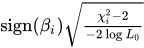 for each parameter i, where
  is the Wald chi-square statistic for the parameter and
  is the log-likelihood of the intercept-only model (Hilbe 2009, p. 101). If
  then the partial correlation is set to 0. The partial correlation for the intercept terms is set to missing.
 - PEVENT=value | (list)
specifies one prior probability or a list of prior probabilities for the event of interest. This option is available only for binary and binomial response models. The positive and negative predictive values are then computed as posterior probabilities by Bayes’ theorem. The prior probability is also used in computing the rate of correct prediction. For each prior probability in the given list, a classification table of all observations is computed. By default, the prior probability is the total sample proportion of events. The PEVENT= option is useful for stratified samples. This option affects results that are produced by the CTABLE option, the computation of the positive and negative predictive values that are displayed in ROC curves when ROCOPTIONS(ID=POSPRED) or ROCOPTIONS(ID=NEGPRED), some of the ROC optimal statistics, and the PR curves. This option is ignored by the GOF option. For more information, see the section Positive Predictive Values, Negative Predictive Values, and Correct Classification Rates Using Bayes’ Theorem. Also see the PPROB= option for information about how the list is specified.
- PLCL
is the same as specifying CLPARM=PL.
- PLCONV=value
controls the convergence criterion for confidence intervals based on the profile-likelihood function. The quantity value must be a positive number, with a default value of 1E–4. The PLCONV= option has no effect if profile-likelihood confidence intervals (CLPARM=PL) are not requested.
- PLRL
is the same as specifying CLODDS=PL.
- PPROB=value | (list)
-
specifies one critical probability value (or cutpoint) or a list of critical probability values for classifying observations with the CTABLE option. This option is available only for binary and binomial response models. Each value must be between 0 and 1. A response that has a cross validated predicted probability greater than or equal to the current PPROB= value is classified as an event response. The PPROB= option is ignored if the CTABLE option is not specified.
A classification table for each of several cutpoints can be requested by specifying a list. For example, the following statement requests a classification of the observations for each of the cutpoints 0.3, 0.5, 0.6, 0.7, and 0.8:
pprob= (0.3, 0.5 to 0.8 by 0.1)If the PPROB= option is not specified, the default is to display the classification for a range of probabilities from the smallest estimated probability (rounded down to the nearest 0.02) to the highest estimated probability (rounded up to the nearest 0.02) with 0.02 increments.
- RIDGEINIT=number
specifies the initial ridge value. The maximum ridge value is 2,000 times the maximum of 1 and the initial ridge value. If the initial ridge value is less than 1E–4, it is raised to 1E–4. By default, RIDGEINIT=1E–4.
- RIDGING=ABSOLUTE | RELATIVE | NONE
specifies the technique used to improve the log-likelihood function when its value in the current iteration is less than that in the previous iteration. If you specify the RIDGING=ABSOLUTE option, the diagonal elements of the negative (expected) Hessian are inflated by adding the ridge value. If you specify the RIDGING=RELATIVE option, the diagonal elements are inflated by a factor of 1 plus the ridge value. If you specify the RIDGING=NONE option, the crude line search method of taking half a step is used instead of ridging. By default, RIDGING=RELATIVE.
-
RISKLIMITS
RL
WALDRL is the same as specifying CLODDS=WALD.
- ROCCI
displays standard errors and confidence limits for the area under the ROC curve (AUC) statistic when you have a binary response variable. This option replaces the "Association of Predicted Probabilities and Observed Responses" table with the "ROC Association Statistics" table.
- ROCEPS=number
specifies a criterion for the ROC and PR curves that is used for grouping estimated event probabilities that are close to each other. This option is available only for binary and binomial response models. In each group, the difference between the largest and the smallest estimated event probabilities does not exceed the given value. The value of number must be between 0 and 1; the default value is the square root of the machine epsilon, which is about 1E–8. The smallest estimated probability in each group serves as a cutpoint for predicting an event response. The ROCEPS= option has no effect unless you specify the OUTROC= option, the BINWIDTH=0 option, an ROC statement, the PLOTS=PR option, or the PLOTS=ROC option.
-
RSQUARE
RSQ requests a generalized R-square measure for binary and polytomous response models. For more information, see the section Generalized Coefficient of Determination.
- SCALE=scale
-
enables you to supply the value of the dispersion parameter or to specify the method for estimating the dispersion parameter. It also enables you to display the "Deviance and Pearson Goodness-of-Fit Statistics" table. To correct for overdispersion or underdispersion, the covariance matrix is multiplied by the estimate of the dispersion parameter. Valid values for scale are as follows:
- D | DEVIANCE
specifies that the dispersion parameter be estimated by the deviance divided by its degrees of freedom.
- P | PEARSON
specifies that the dispersion parameter be estimated by the Pearson chi-square statistic divided by its degrees of freedom.
- WILLIAMS <(constant)>
specifies that Williams’ method be used to model overdispersion. This option can be used only with the events/trials syntax. An optional constant can be specified as the scale parameter; otherwise, a scale parameter is estimated under the full model. A set of weights is created based on this scale parameter estimate. These weights can then be used in fitting subsequent models of fewer terms than the full model. When fitting these submodels, specify the computed scale parameter as constant. See Example 79.10 for an illustration.
- N | NONE
specifies that no correction is needed for the dispersion parameter; that is, the dispersion parameter remains as 1. This specification is used for requesting the deviance and the Pearson chi-square statistic without adjusting for overdispersion.
- constant
sets the estimate of the dispersion parameter to be the square of the given constant. For example, SCALE=2 sets the dispersion parameter to 4. The value constant must be a positive number.
You can use the AGGREGATE (or AGGREGATE=) option to define the subpopulations for calculating the Pearson chi-square statistic and the deviance. In the absence of the AGGREGATE (or AGGREGATE=) option, each observation is regarded as coming from a different subpopulation. For the events/trials syntax, each observation consists of n Bernoulli trials, where n is the value of the trials variable. For single-trial syntax, each observation consists of a single response, and for this setting it is not appropriate to carry out the Pearson or deviance goodness-of-fit analysis. Thus, PROC LOGISTIC ignores specifications SCALE=P, SCALE=D, and SCALE=N when single-trial syntax is specified without the AGGREGATE (or AGGREGATE=) option.
The "Deviance and Pearson Goodness-of-Fit Statistics" table includes the Pearson chi-square statistic, the deviance, the degrees of freedom, the ratio of each statistic divided by its degrees of freedom, and the corresponding p-value. The SCALE= option is not available with the STRATA statement. For more information, see the section Overdispersion.
-
SELECTION=BACKWARD | B
| FORWARD | F
| NONE | N
| STEPWISE | S
| SCORE -
specifies the method used to select the variables in the model. BACKWARD requests backward elimination, FORWARD requests forward selection, NONE fits the complete model specified in the MODEL statement, and STEPWISE requests stepwise selection. SCORE requests best subset selection. By default, SELECTION=NONE. SCORE selection is not available when you also specify LINK=GLOGIT.
For more information, see the section Effect-Selection Methods.
-
SEQUENTIAL
SEQ forces effects to be added to the model in the order specified in the MODEL statement or eliminated from the model in the reverse order of that specified in the MODEL statement. The model-building process continues until the next effect to be added has an insignificant adjusted chi-square statistic or until the next effect to be deleted has a significant Wald chi-square statistic. The SEQUENTIAL option has no effect when SELECTION=NONE.
- SINGULAR=value
specifies the tolerance for testing the singularity of the Hessian matrix (Newton-Raphson algorithm) or the expected value of the Hessian matrix (Fisher scoring algorithm). The Hessian matrix is the matrix of second partial derivatives of the log-likelihood function. The test requires that a pivot for sweeping this matrix be at least this number times a norm of the matrix. Values of the SINGULAR= option must be numeric. By default, value is the machine epsilon times 1E7, which is approximately 1E–9. However, if you specify an ordinal, orthogonalized ordinal, or orthogonalized reference parameterization in the CLASS statement, then value is the machine epsilon times 1E4, which is approximately 1E–12.
-
SLENTRY=value
SLE=value specifies the significance level of the score chi-square for entering an effect into the model in the FORWARD or STEPWISE method. Values of the SLENTRY= option should be between 0 and 1, inclusive. By default, SLENTRY=0.05. The SLENTRY= option has no effect when SELECTION=NONE, SELECTION=BACKWARD, or SELECTION=SCORE.
-
SLSTAY=value
SLS=value specifies the significance level of the Wald chi-square for an effect to stay in the model in a backward elimination step. Values of the SLSTAY= option should be between 0 and 1, inclusive. By default, SLSTAY=0.05. The SLSTAY= option has no effect when SELECTION=NONE, SELECTION=FORWARD, or SELECTION=SCORE.
- START=number | EQUALSLOPES
-
specifies which effects in the MODEL statement are included in the initial model. You can specify the following values:
- number
requests that the first number effects be included in the initial model. The value of number ranges from 0 to s, where s is the total number of effects that are specified in the MODEL statement. The default value of number is s when SELECTION=BACKWARD and 0 when SELECTION=FORWARD or SELECTION=STEPWISE. When SELECTION=SCORE, START=number specifies that the smallest models contain number effects, where number ranges from 1 to s; the default value is 1.
- EQUALSLOPES
enables you to begin the model selection process with all the equal slope effects in the model.
The START= option has no effect when SELECTION=NONE. You cannot specify the START=EQUALSLOPES option if you specify SELECTION=SCORE.
If you specify the same effect in both the EQUALSLOPES and UNEQUALSLOPES options, then that effect is treated as two separate effects. For example, suppose you specify the following MODEL statement:
model Y=X1 X2 / equalslopes unequalslopes selection=forward;The X1 and X2 variables both generate an equal slope effect and an unequal slope effect. Specifying START=1 includes the equal slope effect for X1 in the initial model; specifying START=2 includes both the equal and unequal slope effects for X1 in the initial model; specifying START=EQUALSLOPES includes the equal slope effects for X1 and for X2 in the initial model.
Note that the INCLUDE= and START= options perform different tasks: the INCLUDE= option includes effects in every model, whereas the START= option requires only that the effects appear in the first model.
- STB
-
displays the standardized estimates for the parameters in the "Analysis of Maximum Likelihood Estimates" table. The standardized estimate of
 is given by
  , where
  is the total sample standard deviation for the ith explanatory variable and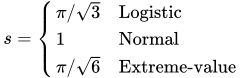
The sample standard deviations for parameters associated with CLASS and EFFECT variables are computed using their codings. For the intercept parameters, the standardized estimates are set to missing.
- STOP=number
specifies the maximum (SELECTION=FORWARD) or minimum (SELECTION=BACKWARD) number of effects to be included in the final model. The effect selection process is stopped when number effects are found. The value of number ranges from 0 to s, where s is the total number of effects in the MODEL statement. The default value of number is s for the FORWARD method and 0 for the BACKWARD method. For the SCORE method, STOP=number specifies that the largest models contain number effects, where number ranges from 1 to s; the default value of number is s. The STOP= option has no effect when SELECTION=NONE or STEPWISE.
-
STOPRES
SR specifies that the removal or entry of effects be based on the value of the residual chi-square. If SELECTION=FORWARD, then the STOPRES option adds the effects into the model one at a time until the residual chi-square becomes insignificant (until the p-value of the residual chi-square exceeds the SLENTRY= value). If SELECTION=BACKWARD, then the STOPRES option removes effects from the model one at a time until the residual chi-square becomes significant (until the p-value of the residual chi-square becomes less than the SLSTAY= value). The STOPRES option has no effect when SELECTION=NONE or SELECTION=STEPWISE.
-
TECHNIQUE=FISHER | NEWTON
TECH=FISHER | NEWTON specifies the optimization technique for estimating the regression parameters. NEWTON (or NR) is the Newton-Raphson algorithm and FISHER (or FS) is the Fisher scoring algorithm. Both techniques yield the same estimates, but the estimated covariance matrices are slightly different except for the case when the LOGIT link is specified for binary response data. By default, TECHNIQUE=FISHER. If you specify the LINK=GLOGIT or LINK=ALOGIT option, then Newton-Raphson is the default and only available method. The TECHNIQUE= option is not applied to conditional and exact conditional analyses. This option is not available when the EQUALSLOPES or UNEQUALSLOPES option is specified. For more information, see the section Iterative Algorithms for Model Fitting.
-
UNEQUALSLOPES<=effect>
UNEQUALSLOPES<=(effect-list)> -
specifies one or more effects in a model for which you want a different set of parameters for each response function in a polytomous response model. If you specify more than one effect, enclose the effects in parentheses. The effects must be explanatory effects that are specified in the MODEL statement. Each member of the effect-list can have one of the following forms:
effect effect=numberlist _C_=numberlist where the numberlist enables you to specify constrained parameters (Peterson and Harrell 1990). To assign a default numberlist for all the explanatory effects in this option, specify the _C_=numberlist form.
For example, suppose your ordinal response variable
Yhas three levels, {0, 1, 2}, so that you have two cumulative response functions. Let the CLASS variableAhave three levels, {a, b, c}, with reference coding. The following table shows how the numberlist is distributed across the models:If You Specify Then You Fit This Model unequalslopes=(A=1 2 3 4)

unequalslopes=(_C_=1 2)

If you do not specify this option, the cumulative response models (and the adjacent-category logit model) make the parallel lines assumption,
 , where each response function has the same slope parameters
  . If you specify this option without an effect or effect-list, all slope parameters vary across the response functions, resulting in the model
  . Specifying an effect or effect-list enables you to choose which effects have different parameters across the response functions, and whether the parameters are constrained or unconstrained. For any specified selection method, unconstrained parameters can contain and be contained in only other unconstrained parameters, and constrained parameters can contain and be contained in only other constrained parameters; for more information, see the HIERARCHY= option. If you select the first
  parameters to have equal slopes and the remaining
  parameters to have unequal slopes, the model can be written as
  . Such a model that uses the CLOGIT link is called a partial proportional odds model (Peterson and Harrell 1990).
 You can specify this option along with the EQUALSLOPES option to create an effect that has both equal and unequal slopes. In this case, the parameters that have equal slopes model the mean effect across the response functions, whereas the parameters that have unequal slopes model deviations from the mean. To distinguish between these two types of parameters, the unconstrained unequal slope parameters are prefixed with "U_" and the constrained parameters are prefixed with "C_". You can use the "Joint Tests" or "Type 3 Analysis of Effects" table to test whether the unequal slope parameters are zero.
For an example that uses this option, see Example 79.18. If you specify the UNEQUALSLOPES option, you cannot specify any of the EFFECTPLOT, ESTIMATE, EXACT, LSMEANS, LSMESTIMATE, MARGINS, ROC, ROCCONTRAST, SLICE, STORE, and STRATA statements, and you cannot specify the following options: CTABLE, FIRTH, OUTROC=, PEVENT=, PPROB=, RIDGING=, and TECHNIQUE=.
-
WALDCL
CL is the same as specifying CLPARM=WALD.
- XCONV=value
-
specifies the relative parameter convergence criterion. Convergence requires a small relative parameter change in subsequent iterations,
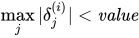
where
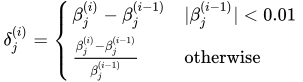
and
 is the estimate of the jth parameter at iteration i. See the section Convergence Criteria for more information.