The LOGISTIC Procedure
PROC LOGISTIC Statement
PROC LOGISTIC <options>;
The PROC LOGISTIC statement invokes the LOGISTIC procedure. Optionally, it identifies input and output data sets, suppresses the display of results, and controls the ordering of the response levels. Table 1 summarizes the options available in the PROC LOGISTIC statement.
Table 1: PROC LOGISTIC Statement Options
| Option | Description |
|---|---|
| Input/Output Data Set Options | |
| COVOUT | Displays the estimated covariance matrix in the OUTEST= data set |
| DATA= | Names the input SAS data set |
| INEST= | Specifies the initial estimates SAS data set |
| INMODEL= | Specifies the model information SAS data set |
| NOCOV | Does not save covariance matrix in the OUTMODEL= data set |
| OUTDESIGN= | Specifies the design matrix output SAS data set |
| OUTDESIGNONLY | Outputs the design matrix only |
| OUTEST= | Specifies the parameter estimates output SAS data set |
| OUTMODEL= | Specifies the model output data set for scoring |
| Response and CLASS Variable Options | |
| DESCENDING | Reverses the sort order of the response variable |
| MAXRESPONSELEVELS= | Specifies the maximum number of response levels allowed |
| NAMELEN= | Specifies the maximum length of effect names |
| ORDER= | Specifies the sort order of the response variable |
| TRUNCATE | Truncates class level names |
| Displayed Output Options | |
| ALPHA= | Specifies the significance level for confidence intervals |
| NOPRINT | Suppresses all displayed output |
| PLOTS | Specifies options for plots |
| SIMPLE | Displays descriptive statistics |
| Large Data Set Option | |
| MULTIPASS | Does not copy the input SAS data set for internal computations |
| Control of Other Statement Options | |
| EXACTONLY | Performs exact analysis only |
| EXACTOPTIONS | Specifies global options for EXACT statements |
| ROCOPTIONS | Specifies global options for ROC statements |
- ALPHA=number
-
specifies the level of significance
 for
for  % confidence intervals. The value number must be between 0 and 1; the default value is 0.05, which results in 95% intervals. This value is used as the default confidence level for limits computed by the following options:
 Statement Options CONTRAST ESTIMATE= EXACT ESTIMATE= MODEL CLODDS= CLPARM= ODDSRATIO CL= OUTPUT LOWER= UPPER= PROC LOGISTIC PLOTS=EFFECT(CLBAR CLBAND) ROCCONTRAST ESTIMATE= SCORE CLM You can override the default in most of these cases by specifying the ALPHA= option in the separate statements.
- COVOUT
adds the estimated covariance matrix to the OUTEST= data set. For the COVOUT option to have an effect, the OUTEST= option must be specified. See the section OUTEST= Output Data Set for more information.
- DATA=SAS-data-set
names the SAS data set containing the data to be analyzed. If you omit the DATA= option, the procedure uses the most recently created SAS data set. The INMODEL= option cannot be specified with this option.
-
DESCENDING
DESC reverses the sort order for the levels of the response variable. If both the DESCENDING and ORDER= options are specified, PROC LOGISTIC orders the levels according to the ORDER= option and then reverses that order. This option has the same effect as the response variable option DESCENDING in the MODEL statement. See the section Response Level Ordering for more detail.
- EXACTONLY
requests only the exact analyses. The asymptotic analysis that PROC LOGISTIC usually performs is suppressed.
- EXACTOPTIONS (options)
-
specifies options that apply to every EXACT statement in the program. The available options are summarized here, and full descriptions are available in the EXACTOPTIONS statement.
Option Description ABSFCONV Specifies the absolute function convergence criterion ADDTOBS Adds the observed sufficient statistic to the sampled exact distribution BUILDSUBSETS Builds every distribution for sampling EPSILON= Specifies the comparison fuzz for partial sums of sufficient statistics FCONV Specifies the relative function convergence criterion MAXTIME= Specifies the maximum time allowed in seconds METHOD= Specifies the DIRECT, NETWORK, NETWORKMC, or MCMC algorithm N= Specifies the number of Monte Carlo samples ONDISK Uses disk space SEED= Specifies the initial seed for sampling STATUSN= Specifies the sampling interval for printing a status line STATUSTIME= Specifies the time interval for printing a status line XCONV Specifies the relative parameter convergence criterion - INEST=SAS-data-set
names the SAS data set that contains initial estimates for all the parameters in the model. If BY-group processing is used, it must be accommodated in setting up the INEST= data set. See the section INEST= Input Data Set for more information.
- INMODEL=SAS-data-set
-
specifies the name of the SAS data set that contains the model information needed for scoring new data. This INMODEL= data set is the OUTMODEL= data set saved in a previous PROC LOGISTIC call. The OUTMODEL= data set should not be modified before its use as an INMODEL= data set.
The DATA= option cannot be specified with this option; instead, specify the data sets to be scored in the SCORE statements. FORMAT statements are not allowed when the INMODEL= data set is specified; variables in the DATA= and PRIOR= data sets in the SCORE statement should be formatted within the data sets.
You can specify the BY statement provided that the INMODEL= data set is created under the same BY-group processing.
The CLASS, EFFECT, EFFECTPLOT, ESTIMATE, EXACT, LSMEANS, LSMESTIMATE, MODEL, OUTPUT, ROC, ROCCONTRAST, SLICE, STORE, TEST, and UNIT statements are not available with the INMODEL= option.
- MAXRESPONSELEVELS=number
specifies the maximum number of response levels that are allowed in your data set. If you have more response levels than the maximum number allowed, then a message is displayed in the SAS log that provides the value of number that is required in order to continue the analysis, and the procedure stops. By default, MAXRESPONSELEVELS=100.
- MULTIPASS
forces the procedure to reread the DATA= data set as needed rather than require its storage in memory or in a temporary file on disk. By default, the data set is cleaned up and stored in memory or in a temporary file. This option can be useful for large data sets. All exact analyses are ignored in the presence of the MULTIPASS option. If a STRATA statement is specified, then the data set must first be grouped or sorted by the strata variables.
- NAMELEN=number
specifies the maximum length of effect names in tables and output data sets to be number characters, where number is a value between 20 and 200. The default length is 20 characters.
- NOCOV
specifies that the covariance matrix not be saved in the OUTMODEL= data set. The covariance matrix is needed for computing the confidence intervals for the posterior probabilities in the OUT= data set in the SCORE statement. Specifying this option will reduce the size of the OUTMODEL= data set.
- NOPRINT
suppresses all displayed output. Note that this option temporarily disables the Output Delivery System (ODS); see Chapter 23, Using the Output Delivery System, for more information.
-
ORDER=DATA | FORMATTED | FREQ | INTERNAL
RORDER=DATA | FORMATTED | INTERNAL specifies the sort order for the levels of the response variable. See the response variable option ORDER= in the MODEL statement for more information. For ordering of CLASS variable levels, see the ORDER= option in the CLASS statement.
- OUTDESIGN=SAS-data-set
specifies the name of the data set that contains the design matrix for the model. The data set contains the same number of observations as the corresponding DATA= data set and includes the response variable (with the same format as in the DATA= data set), the FREQ variable, the WEIGHT variable, the OFFSET= variable, and the design variables for the covariates, including the Intercept variable of constant value 1 unless the NOINT option in the MODEL statement is specified.
- OUTDESIGNONLY
suppresses the model fitting and creates only the OUTDESIGN= data set. This option is ignored if the OUTDESIGN= option is not specified.
- OUTEST=SAS-data-set
creates an output SAS data set that contains the final parameter estimates and, optionally, their estimated covariances (see the preceding COVOUT option). The output data set also includes a variable named
_LNLIKE_, which contains the log likelihood. See the section OUTEST= Output Data Set for more information.- OUTMODEL=SAS-data-set
-
specifies the name of the SAS data set that contains the information about the fitted model. This data set contains sufficient information to score new data without having to refit the model. It is solely used as the input to the INMODEL= option in a subsequent PROC LOGISTIC call. The OUTMODEL= option is not available with the STRATA statement. Information in this data set is stored in a very compact form, so you should not modify it manually.
Note: The STORE statement can also be used to save your model. See the section STORE Statement for more information.
-
PLOTS <(global-plot-options)> <=plot-request <(options)>>
PLOTS <(global-plot-options)> =(plot-request <(options)> <…plot-request <(options)>>) -
controls the plots produced through ODS Graphics. When you specify only one plot-request, you can omit the parentheses from around the plot-request. For example:
PLOTS = ALL
PLOTS = (ROC EFFECT INFLUENCE(UNPACK))
PLOTS(ONLY) = EFFECT(CLBAR SHOWOBS)
ODS Graphics must be enabled before plots can be requested. For example:
ods graphics on;
proc logistic plots=all;
   model y=x;
run;
For more information about enabling and disabling ODS Graphics, see the section Enabling and Disabling ODS Graphics in Chapter 24, Statistical Graphics Using ODS.
If the PLOTS option is not specified or is specified with no plot-requests, then graphics are produced by default in the following situations:
If the INFLUENCE or IPLOTS option is specified in the MODEL statement, then the INFLUENCE plots are produced unless the MAXPOINTS= cutoff is exceeded.
If you specify the OUTROC= option in the MODEL statement, then ROC curves are produced. If you also specify a SELECTION= method, then an overlaid plot of all the ROC curves for each step of the selection process is displayed.
If the OUTROC= option is specified in a SCORE statement, then the ROC curve for the scored data set is displayed.
If you specify ROC statements, then an overlaid plot of the ROC curves for the model (or the selected model if a SELECTION= method is specified) and for all the ROC statement models is displayed.
If you specify the CLODDS= option in the MODEL statement or if you specify the ODDSRATIO statement, then a plot of the odds ratios and their confidence limits is displayed.
For general information about ODS Graphics, see Chapter 24, Statistical Graphics Using ODS.
The following global-plot-options are available:
The following plot-requests are available:
- ALL
produces all appropriate plots. You can specify other options with ALL. For example, to display all plots and unpack the DFBETAS plots, you can specify
plots=(all dfbetas(unpack)).- CALIBRATION<(calibration-options)>
-
displays calibration plots for the fitted model. For binomial response data, a loess curve is fit to the observed events/trials ratios versus the predicted probabilities. For binary data, an indicator variable is set to 1 if the response is an event and set to 0 otherwise, and a loess curve is fit to this indicator versus the predicted probabilities. For polytomous response data, a panel of plots is produced that displays one plot for each response level as follows: an indicator variable is set to 1 if the observed response equals that level and set to 0 otherwise, and a loess curve is fit to this indicator versus the predicted probability of that level. See Output 79.19.4 for an example of this plot.
You can specify the following calibration-options:
- DFBETAS <(UNPACK)>
displays plots of DFBETAS versus the case (observation) number. This option is available only for binary and binomial response models. This displays the statistics that are generated by the DFBETAS=_ALL_ option in the OUTPUT statement. The UNPACK option displays the plots separately. See Output 79.6.5 for an example of this plot.
- DPC<(dpc-options)>
-
displays plots of DIFCHISQ and DIFDEV versus the predicted event probability, and displays the markers according to the value of the confidence interval displacement C. This option is available only for binary and binomial response models. See Output 79.6.8 for an example of this plot. You can specify the following dpc-options:
- MAXSIZE=Smax
specifies the maximum size when TYPE=BUBBLE or TYPE=LABEL. For TYPE=BUBBLE, the size is the bubble radius and MAXSIZE=21 by default; for TYPE=LABEL, the size is the font size and MAXSIZE=20 by default. This dpc-option is ignored if TYPE=GRADIENT.
- MAXVALUE=Cmax
displays all observations for which C
 Cmax at the value of the MAXSIZE= option when TYPE=BUBBLE or TYPE=LABEL. By default, Cmax=
 . This dpc-option is ignored if TYPE=GRADIENT.
 - MINSIZE=Smin
specifies the minimum size when TYPE=BUBBLE or TYPE=LABEL. Any observation that maps to a smaller size is displayed at this size. For TYPE=BUBBLE, the size is the bubble radius and MINSIZE=3.5 by default; for TYPE=LABEL, the size is the font size and MINSIZE=2 by default. This dpc-option is ignored if TYPE=GRADIENT.
- TYPE=BUBBLE | GRADIENT | LABEL
-
specifies how the C statistic is displayed. You can specify the following values:
- BUBBLE
displays circular markers whose areas are proportional to C and whose colors are determined by their response.
- GRADIENT
colors the markers according to the value of C.
- LABEL
displays the ID variables (if an ID statement is specified) or the observation number. The colors of the ID variable or observation numbers are determined by their response, and their font sizes are proportional to
 .
.
By default, TYPE=GRADIENT.
-
UNPACKPANELS
UNPACK displays the plots separately.
- EFFECT<(effect-options)>
-
displays and enhances the effect plots for the model. For more information about effect plots and the available effect-options, see the section PLOTS=EFFECT Plots.
Note: The EFFECTPLOT statement provides much of the same functionality and more options for creating effect plots. See Outputs Model-Predicted Probabilities by Sex, Model-Predicted Probabilities, Model-Predicted Probabilities, Predicted Probability and 95% Prediction Limits, and Model-Predicted Probabilities for examples of effect plots.
- INFLUENCE<(UNPACK | STDRES)>
displays index plots of RESCHI, RESDEV, leverage, confidence interval displacements C and CBar, DIFCHISQ, and DIFDEV. This option is available only for binary and binomial response models. These plots are produced by default when any plot-request is specified and the MAXPOINTS= cutoff is not exceeded. The UNPACK option displays the plots separately. The STDRES option also displays index plots of STDRESCHI, STDRESDEV, and RESLIK. See Outputs Residuals, Hat Matrix, and CI Displacement C and CI Displacement CBar, Change in Deviance and Pearson Chi-Square for examples of these plots.
- LEVERAGE<(UNPACK)>
displays plots of DIFCHISQ, DIFDEV, confidence interval displacement C, and the predicted probability versus the leverage. This option is available only for binary and binomial response models. The UNPACK option displays the plots separately. See Output 79.6.7 for an example of this plot.
- NONE
suppresses all plots.
- ODDSRATIO <(oddsratio-options)>
displays and enhances the odds ratio plots for the model. For more information about odds ratio plots and the available oddsratio-options, see the section Odds Ratio Plots. See Outputs Plot of Odds Ratios of Heat at Several Values of Soak,Plot of the ODDSRATIO Statement Results, Plot of Odds Ratios for Additive, and Plot of Odds Ratios for Style for examples of this plot.
- PHAT<(UNPACK)>
displays plots of DIFCHISQ, DIFDEV, confidence interval displacement C, and leverage versus the predicted event probability. This option is available only for binary and binomial response models. The UNPACK option displays the plots separately. See Output 79.6.6 for an example of this plot.
- PR<(STEPLEN=value)>
-
displays the precision-recall (PR) curve for binary and binomial response models. If you specify a method in the SELECTION= option, then an overlaid plot of all the PR curves for each step of the selection process is displayed. If you specify ROC statements, then an overlaid plot of the model (or the selected model if you specify the SELECTION= option) and the ROC statement models is displayed. If you specify the OUTROC= option in a SCORE statement, then the PR curve for the scored data set is also displayed.
Because PR curves are remappings of the ROC curve (Davis and Goadrich 2006), the CROSSVALIDATE, EPS, ID, WEIGHTED, METHOD=, THINX=, THINY=, and OPTIMAL suboptions in the ROCOPTIONS option are also applied to PR curves. The PRIOREVENT= and PRIOR= options in the SCORE statement apply to the curves produced by that statement.
The STEPLEN= option specifies the length of a step along the ROC curve, which is used to determine extra points at which the PR curve is computed. For more information, see the section Precision-Recall Curves.
- ROC<(ID<=keyword>)>
-
displays the ROC curve. This option is available only for binary and binomial response models. If you also specify a SELECTION= method, then an overlaid plot of all the ROC curves for each step of the selection process is displayed. If you specify ROC statements, then an overlaid plot of the model (or the selected model if a SELECTION= method is specified) and the ROC statement models is displayed. If you specify the OUTROC= option in a SCORE statement, then the ROC curve for the scored data set is displayed.
The ID= option labels certain points on the ROC curve. Typically, the labeled points are closest to the upper left corner of the plot, and points directly below or to the right of a labeled point are suppressed. This option is identical to, and has the same keywords as, the ID= suboption of the ROCOPTIONS option.
You can define the following macro variables to modify the labels and titles on the graphic:
- _ROC_ENTRY_ID
sets the note for the ID= option on the ROC plot.
- _ROC_ENTRYTITLE
sets the first title line on the ROC plot.
- _ROC_ENTRYTITLE2
sets the second title line on the ROC plot.
- _ROC_XAXISOPTS_LABEL
sets the X-axis label on the ROC and overlaid ROC plots.
- _ROC_YAXISOPTS_LABEL
sets the Y-axis label on the ROC and overlaid ROC plots.
- _ROCOVERLAY_ENTRYTITLE
sets the title on the overlaid ROC plot.
To revert to the default labels and titles, you can specify the macro variables in a %SYMDEL statement. For example:
%let _ROC_ENTRYTITLE=New Title;
Submit PROC LOGISTIC statementSee Output 79.8.3 and Example 79.8 for examples of these ROC plots.
- ROCOPTIONS (options)
-
specifies options that apply to every model specified in a ROC statement. Some of these options also apply to the SCORE statement and to the precision-recall (PR) curves. This option is available only for binary and binomial response models. You can specify the following options:
- ALPHA=number
sets the significance level for creating confidence limits of the areas and the pairwise differences. The ALPHA= value that is specified in the PROC LOGISTIC statement is the default. If neither ALPHA= value is specified, then ALPHA=0.05 by default.
- AREA
displays a table of the area under the empirical ROC curve, the area under the convex hull of the empirical ROC curve when METHOD=CONVEXHULL, the area under the binormal ROC curve when METHOD=BINORMAL, the area under the lower ROC curve when METHOD=LOWER, and the area under the PR curve when PLOTS=PR.
-
CROSSVALIDATE
X uses cross validated predicted probabilities instead of the model-predicted probabilities for all ROC and area under the ROC curve (AUC) computations and for all PR curve and area computations; for more information, see the section Classification Table. The cross validated probabilities are also used in computations for the "Association of Predicted Probabilities and Observed Responses" table. If you use a SCORE statement, then the OUTROC= data set and the AUC statistic from the FITSTAT option use the cross validated probabilities only when you score the original data set; otherwise, the model-predicted probabilities are used.
- EPS=value
is an alias for the ROCEPS= option in the MODEL statement; however, if you also specify that ROCEPS= value, then this option is ignored. This value is used to determine which predicted probabilities are equal. The default value is the square root of the machine epsilon, which is about 1E–8.
- ID<=keyword>
-
displays labels on certain points on the individual ROC and PR curves and also on the SCORE statement’s ROC and PR curves. This option overrides the ID= suboption of the PLOTS=ROC option. If several observations lie at the same place on the curve, the value for the last observation is displayed. If you specify the ID option with no keyword, any variables that are listed in the ID statement are used. If no ID statement is specified, the observation number is displayed. The following keywords are available:
- 1MSPEC
displays the false positive fraction (1 – specificity).
- FALPOS
displays the fraction of falsely predicted event responses.
- FALNEG
displays the fraction of falsely predicted nonevent responses.
- ID
displays the ID variables.
- MISCLASS
displays the misclassification rate.
- NEGPRED
displays the negative predictive value (1 – FALNEG).
- OBS
displays the (last) observation number.
- OPTSTAT
displays the value of the first statistic specified in the OPTIMAL= option.
- POSPRED
displays the positive predictive value (1 – FALPOS).
- PROB
displays the model predicted probability.
- SENSIT
displays the true positive fraction (sensitivity).
The SENSIT, 1MSPEC, POSPRED, and NEGPRED statistics are defined in the section Receiver Operating Characteristic Curves. The misclassification rate is the number of events that are predicted as nonevents and the number of nonevents that are predicted as events as calculated by using the given cutpoint (predicted probability) divided by the number of observations. If the PEVENT= option is also specified, then POSPRED and NEGPRED are computed using the first PEVENT= value and Bayes’ theorem, as discussed in the section Positive Predictive Values, Negative Predictive Values, and Correct Classification Rates Using Bayes’ Theorem.
- METHOD=<BINORMAL | CONVEXHULL | EMPIRICAL | LOWER>
-
specifies the method that is used to estimate the ROC and PR curves. By default, the empirical curves are produced as described in the section Receiver Operating Characteristic Curves. This is the area estimation method used for ROC comparisons.
The LOWER method modifies the empirical curve by always using a step function created by stepping up at the observed thresholds. This provides a more conservative estimate of the true ROC curve than the empirical estimate.
The CONVEXHULL method modifies the empirical curve by skipping thresholds that could be improved by replacing the observations with a weighted coin flip; it is sometimes called the attainable curve. The convex hull always has a larger AUC than the empirical curve.
The BINORMAL method assumes that the predicted values for your events and for your nonevents both have normal distributions (Metz 1978). If your events are distributed as
 and your nonevents are distributed as
  , and
, and  , then the binormal curve is given by
where

The area under the binormal ROC curve is
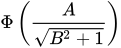
Although the binormal curve is smoother than the empirical curves, it can easily extend below the diagonal and might not be a good fit to your data. The METHOD= option is not available when you specify ROC statements or the ROCCI option, because the required standard errors are based on the empirical ROC curves.
- NODETAILS
suppresses the display of the model fitting information for the models specified in the ROC statements.
- OPTIMAL<=statistic | (statistics-list)>
-
marks observed thresholds on the ROC and PR curves that optimize the given statistics, and adds these statistics to the OUTROC= data set. Note that there can be more than one threshold that optimizes the statistic. You can specify more than one optimal statistic, and if the same threshold is optimal for several statistics, the marks are jittered. In the following list, let P be the prevalence
 of the events in the population; by default, the prevalence is the proportion of events in the training data set
  , where
  is the frequency of events and n is the total frequency. However, you can change this value by specifying the PEVENT= option in the MODEL statement or the PRIOR= or PRIOREVENT= option in the SCORE statement. For each threshold on the ROC curve, denote the true positive fraction (sensitivity, recall) for that threshold as
  , the false positive fraction (1 – specificity) as
  , the true negative fraction (specificity) as
  , the precision (positive predictive value) as
  , and the negative predictive value as
  . The following statistics are available; the default is OPTIMAL=YOUDEN:
 - ACCURACY
marks the observed threshold that has the most correct observations. This statistic is the same as EFFICIENCY, but it is computed using the observed event proportions.
- COST<(cost-options)>
-
marks the threshold that has the maximum cost criterion
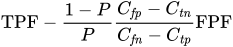 , where
  is the cost of a true positive,
  is the cost of a true negative,
  is the cost of a false positive,
  is the cost of a false negative, and the quotient
  is called the cost ratio. This criterion minimizes a cost function of the form
  , where
  is the average cost,
  is a fixed but unspecified cost,
  is the probability of a true positive for that threshold,
  is the probability of a true negative,
  is the probability of a false positive, and
  is the probability of a false negative (Metz 1978; Zweig and Campbell 1993). You can specify the following cost-options:
 - TP=cost
is the cost
of a true positive. - TN=cost
is the cost
of a true negative. - FP=cost
is the cost
of a false positive. - FN=cost
is the cost
of a false negative. - COSTRATIO=ratio | ratio-list
is the cost ratio
 . If you specify the cost ratio, then the other cost-options are ignored. You can specify more than one cost ratio as a numeric list of values, and they are identified on the plots and in the OUTROC= data set by appending the cost ratio to the text "_COST".
By default, TP=0, TN=0, FP=1, and FN=1, so that COSTRATIO=1. Note that the observed threshold that minimizes the average cost lies on the convex hull of the ROC curve.
- DIST01
marks the threshold where the pair (sensitivity,1 – specificity) is closest to (0,1). This statistic is computed as
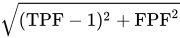 .
. - EFFICIENCY
marks the threshold that has the maximum efficiency. This statistic is computed as
 .
. - F<(
 | beta-list)>
 marks the threshold that has the maximum F score (Williams 2021). This statistic is computed as
 . Without taking prevalence into account, this is
  . By default,
  . Other typical choices are
  when precision is more important and
  when recall is more important. You can specify more than one value in the beta-list as a standard numeric list of values, and they are displayed in parentheses after the "F".
 - GMEAN
marks the threshold that has the largest geometric mean. This statistic is computed as
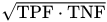 .
. - MCC
marks the threshold that has the maximum Matthews correlation coefficient (phi coefficient). This statistic is computed as
 .
. - MCOST<(cost-options)>
-
marks the threshold that has the largest misclassification cost criterion. This criterion is the same as the COST option’s criterion, except that costs are attributed only to misclassification so that
 . You can specify the following cost-options:
 - FP=cost
is the cost
of a false positive. - FN=cost
is the cost
of a false negative. - COSTRATIO=ratio | ratio-list
is the cost ratio
 . If you specify the cost ratio, then the other cost-options are ignored. You can specify more than one cost ratio as a numeric list of values, and they are identified on the plots and in the OUTROC= data set by appending the cost ratio to the text "_MCOST".
- SSPDIFF
marks the threshold where sensitivity and sensitivity are most equal. This statistic is computed as
 .
. - YOUDEN
marks the threshold that has the maximum Youden index (Youden 1950). This statistic is computed as
 .
.
- OUT=SAS-data-set-name
- THINX=value
suppresses labels on the ROC curve for any threshold that is too close to the preceding threshold’s label. Let X = sensitivity and Y = 1 – specificity; suppose the point
 is labeled; and let the next point be
  . If both
  and
and  , then is not labeled. Similarly, this option suppresses labels on the PR curve for any threshold that is too close to the preceding threshold’s label, where Y = precision and X = recall. Optimal threshold labels are never thinned. By default, THINX=0.05.
 - THINY=value
suppresses labels on the ROC and PR curves for any threshold that is too close to the preceding threshold’s label. See the THINX= option for details. Optimal threshold labels are never thinned. By default, THINY=0.05.
- WEIGHTED
uses frequency
 weight in the ROC and PR computations (Izrael et al. 2002) instead of just frequency. Typically, weights are considered in the fit of the model only, and hence they are accounted for in the parameter estimates. The "Association of Predicted Probabilities and Observed Responses" table uses frequency (unless the BINWIDTH=0 option is also specified in the MODEL statement) and is suppressed when ROC comparisons are performed. This option also affects computations of the ROC and PR curves performed by the SCORE statement, as well as computations of all areas under the curves.
- SIMPLE
displays simple descriptive statistics (mean, standard deviation, minimum, and maximum) for each continuous explanatory variable. For each CLASS variable involved in the modeling, the frequency counts of the classification levels are displayed. The SIMPLE option generates a breakdown of the simple descriptive statistics or frequency counts for the entire data set and also for individual response categories.
- TRUNCATE
determines class levels by using no more than the first 16 characters of the formatted values of CLASS, response, and strata variables. This option invokes the same option in the CLASS statement.
PLOTS=EFFECT Plots
Only one PLOTS=EFFECT plot is produced by default; you must specify other effect-options to produce multiple plots. For binary response models, the following plots are produced when an EFFECT option is specified with no effect-options:
If you have only continuous covariates in the model, then a plot is displayed of the predicted probability versus the first continuous covariate, fixing all other continuous covariates at their means. See Output 79.7.4 for an example with one continuous covariate.
If you have only classification covariates in the model, then a plot is displayed of the predicted probability versus the first CLASS covariate at each level of the second CLASS covariate, if any, holding all other CLASS covariates at their reference levels. If you have exactly two CLASS covariates, and one is nested in the other, then the nested covariate is clustered within the levels of the other covariate.
If you have both classification and continuous covariates in the model, then a plot is displayed of the predicted probability versus the first continuous covariate at up to 10 cross-classifications of the CLASS covariate levels, fixing all other continuous covariates at their means and all other CLASS covariates at their reference levels. For example, if your model has four binary covariates, there are 16 cross-classifications of the CLASS covariate levels. The plot displays the 8 cross-classifications of the levels of the first three covariates, and the fourth covariate is fixed at its reference level.
For polytomous response models, similar plots are produced by default, except that the response levels are used in place of the CLASS covariate levels. Plots for polytomous response models involving OFFSET= variables with multiple values are not available.
The following effect-options specify the type of graphic to produce:
Note: Any variable not specified in a SLICEBY= or PLOTBY= option is available to be displayed on the X axis. A variable can be specified in at most one of the SLICEBY=, PLOTBY=, and X= options.
The following effect-options enhance the graphical output:
- ALPHA=number
specifies the size of the confidence limits. The ALPHA= value specified in the PROC LOGISTIC statement is the default. If neither ALPHA= value is specified, then ALPHA=0.05 by default.
- CLBAND<=YES | NO>
displays confidence limits on the plots. This option is not available with the INDIVIDUAL option. If you have CLASS covariates on the X axis, then error bars are displayed (see the CLBAR option) unless you also specify the CONNECT option.
- CLBAR
displays the error bars on the plots when you have CLASS covariates on the X axis; if the X axis is continuous, then this invokes the CLBAND option. For polytomous response models with CLASS covariates only and with the POLYBAR option specified, the stacked bar charts are replaced by side-by-side bar charts with error bars.
- CLUSTER<=percent>
displays the levels of the SLICEBY= effect in a side-by-side fashion instead of stacking them. This option is available when you have CLASS covariates on the X axis. You can specify percent as a percentage of half the distance between X levels. The percent value must be between 0.1 and 1; the default percent depends on the number of X levels and the number of levels of the SLICEBY= effect. Default clustering can be removed by specifying the NOCLUSTER option.
- CLUSTERGRID<=YES | NO>
separates the CLASS covariate levels on the X axis with grid lines when the levels of the SLICEBY= effect are clustered.
-
CONNECT<=YES | NO>
JOIN<=YES | NO> connects the predicted values with a line. This option is available when you have CLASS covariates on the X axis. You can suppress default connecting lines by specifying the NOCONNECT option.
- EXTEND=value
extends continuous X axes by a factor of value
 in each direction. By default, EXTEND=0.2.
 - MAXATLEN=length
specifies the maximum number of characters to use to display the levels of all the fixed variables. If the text is too long, it is truncated and ellipses ("…") are appended. By default, length is equal to its maximum allowed value, 256.
- NOCLUSTER
prevents clustering of the levels of the SLICEBY= effect. This option is available when you have CLASS covariates on the X axis.
- NOCLUSTERGRID
removes the default grid lines that separate the levels of the CLASS covariates on the X axis when the SLICEBY= effect is clustered.
- NOCONNECT
removes the line that connects the predicted values. This option is available when you have CLASS covariates on the X axis.
- POLYBAR
replaces scatter plots of polytomous response models with bar charts. This option has no effect on binary-response models, and it is overridden by the CONNECT option. By default, the X axis is chosen to be a crossing of available classification variables so that there are no more than 16 levels; if no such crossing is possible then the first available classification variable is used. You can override this default by specifying the X= option.
- SHOWOBS<=YES | NO>
displays observations on the plot when the MAXPOINTS= cutoff is not exceeded. For events/trials notation, the observed proportions are displayed; for single-trial binary-response models, the observed events are displayed at
 and the observed nonevents are displayed at
  . For polytomous response models the predicted probabilities at the observed values of the covariate are computed and displayed.
 - YRANGE=(<min><,max>)
displays the Y axis as [min,max]. Note that the axis might extend beyond your specified values. By default, the entire Y axis, [0,1], is displayed for the predicted probabilities. This option is useful if your predicted probabilities are all contained in some subset of this range.
Odds Ratio Plots
The odds ratios and confidence limits from the default "Odds Ratio Estimates" table and from the tables produced by the CLODDS= option or the ODDSRATIO statement can be displayed in a graphic. If you have many odds ratios, you can produce multiple graphics, or panels, by displaying subsets of the odds ratios. Odds ratios that have duplicate labels are not displayed. See Outputs Plot of the ODDSRATIO Statement Results and Plot of Odds Ratios for Additive for examples of odds ratio plots.
The following oddsratio-options modify the default odds ratio plot:
- CLDISPLAY=SERIF | SERIFARROW | LINE | LINEARROW | BAR<width>
-
controls the look of the confidence limit error bars. The default CLDISPLAY=SERIF displays the confidence limits as lines with serifs, and the CLDISPLAY=LINE option removes the serifs from the error bars. The CLDISPLAY=SERIFARROW and CLDISPLAY=LINEARROW options display arrowheads on any error bars that are clipped by the RANGE= option; if the entire error bar is cut from the graphic, then an arrowhead is displayed that points toward the odds ratio. The CLDISPLAY=BAR <width> option displays the limits along with a bar whose width is equal to the size of the marker. You can control the width of the bars and the size of the marker by specifying the width value as a percentage of the distance between the bars, 0
 width
width  1.
1. Note: Your bar might disappear if you have small values of width.
- DOTPLOT
displays dotted gridlines on the plot.
- GROUP
displays the odds ratios in panels that are defined by the ODDSRATIO statements. The NPANELPOS= option is ignored when this option is specified.
- LOGBASE=2 | E | 10
displays the odds ratio axis on the specified log scale.
- NPANELPOS=number
breaks the plot into multiple graphics that have at most |number| odds ratios per graphic. If number is positive, then the number of odds ratios per graphic is balanced; if number is negative, then no balancing of the number of odds ratios takes place. By default, number = 0 and all odds ratios are displayed in a single plot. For example, suppose you want to display 21 odds ratios. Then specifying
NPANELPOS=20displays two plots, the first with 11 odds ratios and the second with 10; but specifyingNPANELPOS=-20displays 20 odds ratios in the first plot and only 1 odds ratio in the second plot.- ORDER=ASCENDING | DESCENDING
displays the odds ratios in sorted order. By default the odds ratios are displayed in the order in which they appear in the corresponding table.
- RANGE=(<min><,max>) | CLIP
specifies the range of the displayed odds ratio axis. Specifying the RANGE=CLIP option has the same effect as specifying the minimum odds ratio as min and the maximum odds ratio as max. By default, all odds ratio confidence intervals are displayed.
- TYPE=HORIZONTAL | HORIZONTALSTAT | VERTICAL | VERTICALBLOCK
controls the look of the graphic. The default TYPE=HORIZONTAL option places the odds ratio values on the X axis, while the TYPE=HORIZONTALSTAT option also displays the values of the odds ratios and their confidence limits on the right side of the graphic. The TYPE=VERTICAL option places the odds ratio values on the Y axis, while the TYPE=VERTICALBLOCK option (available only with the CLODDS= option) places the odds ratio values on the Y axis and puts boxes around the labels.