SET Statement
Reads an observation from one or more SAS data sets.
| Valid in: | DATA step |
|---|---|
| Categories: | CAS |
| File-Handling | |
| Type: | Executable |
| Note: | The variables read using the SET statement are retained in the PDV. For more information, see How the DATA Step Processes Data in SAS Programmer’s Guide: Essentials and RETAIN Statement. |
Table of Contents
- Syntax
- Without Arguments
- Arguments
- SET Options
- Details
- What SET Does
- Uses
- Using Data Set Lists with SET
- BY-Group Processing with SET
- Combining SAS Data Sets
- Comparisons
- Examples
- Example 1: Concatenating SAS Data Sets
- Example 2: Interleaving SAS Data Sets
- Example 3: Reading a SAS Data Set
- Example 4: Merging a Single Observation with All Observations in a SAS Data Set
- Example 5: Reading from the Same Data Set More Than Once
- Example 6: Combining One Observation with Many
- Example 7: Performing a Table Lookup
- Example 8: Performing a Table Lookup When the Master File Contains Duplicate Observations
- Example 9: Reading a Subset by Using Direct Access
- Example 10: Performing a Function until the Last Observation Is Reached
- Example 11: Writing an Observation Only After All Observations Have Been Read
- Example 12: Retrieving the Name of the Data Set from Which the Current Observation Is Read
- Example 13: Using Data Set Lists
- Example 14: Finding the Current Observation Number
- Example 15: Using the KEYRESET Option
- See Also
Syntax
Without Arguments
When you do not specify an argument, the SET statement reads an observation from the most recently created data set.
Arguments
SAS-data-set (s)
specifies a one-level name, a two-level name, or one of the special SAS data set names.
| Tips | You can specify data set lists. For more information, see Using Data Set Lists with SET. |
|---|---|
| Instead of using a data set name, you can specify the physical pathname to the file, using syntax that your operating system understands. The pathname must be enclosed in single or double quotation marks. | |
| See | See SAS Data Sets in SAS Language Reference: Concepts for a description of the levels of SAS data set names and when to use each level. |
| Example | Using Data Set Lists |
(data-set-options)
specifies actions SAS is to take when it reads variables or observations into the program data vector for processing.
| Tip | Data set options that apply to a data set list apply to all of the data sets in the list. |
|---|---|
| See | For more information, see Definition of Data Set Options in SAS Data Set Options: Reference for a list of the data set options to use with input data sets. |
SET Options
CUROBS=variable
creates and names a variable that contains the observation number that was just read from the data set.
| Example | Finding the Current Observation Number |
END=variable
creates and names a temporary variable that contains an end-of-file indicator. The variable, which is initialized to zero, is set to 1 when SET reads the last observation of the last data set listed. This variable is not added to any new data set.
| Restriction | END= cannot be used with POINT=. When random access is used, the END= variable is never set to 1. |
|---|---|
| Interaction | If you use a BY statement, END= is set to 1 when the SET statement reads the last observation of the interleaved data set. For more information, see BY-Group Processing with SET. |
| Example | Writing an Observation Only After All Observations Have Been Read |
INDSNAME=variable
creates and names a variable that stores the name of the SAS data set from which the current observation is read. The stored name can be a data set name or a physical name. The physical name is the name by which the operating environment recognizes the file.
| Tips | For data set names, SAS adds the library name to the variable value (for example, WORK.PRICE) and converts the two-level name to uppercase. |
|---|---|
| Unless previously defined, the length of the variable is set to 41 bytes. Use a LENGTH statement to make the variable length long enough to contain the value of the physical file name if the file name is longer than 41 bytes. | |
| If the variable is previously defined as a character variable with a specific length, that length is not changed. If the value that is placed into the INDSNAME variable is longer than that length, the value is truncated. | |
| If the variable is previously defined as a numeric variable, an error occurs. | |
| The variable is available in the DATA step, but the variable is not added to any output data set. | |
| Example | Retrieving the Name of the Data Set from Which the Current Observation Is Read |
KEY=index</UNIQUE>
provides nonsequential access to observations in a SAS data set, which are based on the value of an index variable or a key.
| Range | Specify the name of a simple or composite index of the data set that is being read. |
|---|---|
| Restriction | KEY= cannot be used with POINT=. |
| Tips | Using the _IORC_ automatic variable in conjunction with the SYSRC autocall macro provides you with more error-handling information than was previously available. When you use the SET statement with the KEY= option, the new automatic variable _IORC_ is created. This automatic variable is set to a return code that shows the status of the most recent I/O operation that is performed on an observation in a SAS data set. If the KEY= value is not found, the _IORC_ variable returns a value that corresponds to the SYSRC autocall macro's mnemonic _DSENOM and the automatic variable _ERROR_ is set to 1. |
| When using the SET statement with the KEY= option and a non-unique index, it is often desirable to force the SET statement to start reading again with the first observation that matches the key value. Use the KEYRESET= option to control whether a KEY= search should begin at the top of the index for the data set that is being read. | |
| See | For more information, see the description of the autocall macro SYSRC in SAS Macro Language: Reference. |
| KEYRESET=variable | |
| UNIQUE option | |
| Examples | Performing a Table Lookup |
| Performing a Table Lookup When the Master File Contains Duplicate Observations | |
| CAUTION |
Continuous loops can occur when you use the KEY= option. If you use the KEY= option without specifying the primary data set, you must include either a STOP statement to stop DATA step processing or programming logic that uses the _IORC_ automatic variable in conjunction with the SYSRC autocall macro and checks for an invalid value of the _IORC_ variable, or both. |
KEYRESET=variable
controls whether a KEY= search should begin at the top of the index for the data set that is being read. When the value of the KEYRESET variable is 1, the index lookup begins at the top of the index. When the value of the KEYRESET variable is 0, the index lookup is not reset and the lookup continues where the prior lookup ended.
| Interaction | The KEYRESET= option is similar to the UNIQUE option, except the KEYRESET= option enables you to determine when the KEY= search should begin at the top of the index again. |
|---|---|
| See | KEY=index</UNIQUE> |
| UNIQUE | |
| Example | Using the KEYRESET Option |
NOBS=variable
creates and names a temporary variable whose value is usually the total number of observations in the input data set or data sets. If more than one data set is listed in the SET statement, the value of the NOBS= variable equals the total number of observations in the data sets that are listed. The number of observations includes those observations that are marked for deletion but are not yet deleted.
| Restriction | For certain SAS views and sequential engines such as the TAPE and XML engines, SAS cannot determine the number of observations. In these cases, SAS sets the value of the NOBS= variable to the largest positive integer value that is available in your operating environment. |
|---|---|
| Interaction | The NOBS= and POINT= options are independent of each other. |
| Tip | At compilation time, SAS reads the descriptor portion of each data set and assigns the value of the NOBS= variable automatically. Thus, you can refer to the NOBS= variable before the SET statement. The variable is available in the DATA step but is not added to any output data set. |
| Example | Performing a Function until the Last Observation Is Reached |
OPEN=( | DEFER)
enables you to delay the opening of any concatenated SAS data sets until they are ready to be processed.
IMMEDIATE
during the compilation phase, opens all data sets that are listed in the SET statement.
| Restriction | When you use the IMMEDIATE option, KEY=, POINT=, and BY statement processing are mutually exclusive. |
|---|---|
| Tip | If a variable on a subsequent data set is of a different type (for example, character versus numeric) from the type of the same-named variable on the first data set, the DATA step stops processing and produces an error message. |
DEFER
opens the first data set during the compilation phase, and opens subsequent data sets during the execution phase. When the DATA step reads and processes all observations in a data set, it closes the data set and opens the next data set in the list.
| Restriction | When you specify the DEFER option, you cannot use the KEY= statement option, the POINT= statement option, or the BY statement. These constructs imply either random processing or interleaving of observations from the data sets, which is not possible unless all data sets are open. |
|---|---|
| Requirement | You can use the DROP=,
KEEP=, or RENAME= data set options to process a set of variables,
but the set of variables that are processed for each data set must
be identical. In most cases, if the set of variables defined by any
subsequent data set differ from the variables defined by the first
data set, SAS prints a warning message to the log but does not stop
execution.
|
| Default | IMMEDIATE |
|---|
POINT=variable
specifies a temporary variable whose numeric value determines which observation is read. POINT= causes the SET statement to use random (direct) access to read a SAS data set.
| Restrictions | You cannot use POINT= with a BY statement, a WHERE statement, or a WHERE= data set option. In addition, you cannot use POINT= with transport format data sets, data sets in sequential format on tape or disk, and SAS/ACCESS views or the SQL procedure views that read data from external files. |
|---|---|
| You cannot use POINT= with KEY=. | |
| POINT= is not supported in CAS. | |
| Requirement | a STOP statement |
| Note | Remember that _N_ is an iteration count and not the observation number of the last observation that was read. |
| Tips | You must supply the values of the POINT= variable. For example, you can use the POINT= variable as the index variable in some form of the DO statement. |
| The POINT= variable is available anywhere in the DATA step, but it is not added to any new SAS data set. | |
| Examples | Combining One Observation with Many |
| Reading a Subset by Using Direct Access | |
| CAUTION |
Continuous loops can occur when you use the POINT= option. When you use the POINT= option, you must include a STOP statement to stop DATA step processing, or programming logic that checks for an invalid value of the POINT= variable, or both. Because POINT= reads only those observations that are specified in the DO statement, SAS cannot read an end-of-file indicator as it would if the file were being read sequentially. Because reading an end-of-file indicator ends a DATA step automatically, failure to substitute another means of ending the DATA step when you use POINT= can cause the DATA step to go into a continuous loop. If SAS reads an invalid value of the POINT= variable, it sets the automatic variable _ERROR_ to 1. Use this information to check for conditions that cause continuous DO-loop processing, or include a STOP statement at the end of the DATA step, or both. |
UNIQUE
causes a KEY= search always to begin at the top of the index for the data set that is being read.
| Restriction | UNIQUE can appear only with the KEY= argument and must be preceded by a slash. |
|---|---|
| Notes | By default, SET begins searching at the top of the index only when the KEY= value changes. |
| If the KEY= value does not change on successive executions of the SET statement, the search begins by following the most recently retrieved observation. In other words, when consecutive duplicate KEY= values appear, the SET statement attempts a one-to-one match with duplicate indexed values in the data set that is being read. If more consecutive duplicate KEY= values are specified than exist in the data set that is being read, the extra duplicates are treated as not found. | |
| When KEY= is a unique value, only the first attempt to read an observation with that key value succeeds; subsequent attempts to read the observation with that value of the key fail. The _IORC_ variable returns a value that corresponds to the SYSRC autocall macro's mnemonic _DSENOM. If you add the /UNIQUE option, subsequent attempts to read the observation with the unique KEY= value succeed. The _IORC_ variable returns a 0. | |
| See | KEYRESET=variable |
| Example | Performing a Table Lookup When the Master File Contains Duplicate Observations |
Details
- What SET Does
- Uses
- Using Data Set Lists with SET
- BY-Group Processing with SET
- Combining SAS Data Sets
What SET Does
Each time the SET statement is executed, SAS reads one observation into the program data vector. SET reads all variables and all observations from the input data sets unless you tell SAS to do otherwise. A SET statement can contain multiple data sets; a DATA step can contain multiple SET statements.
Uses
The SET statement is flexible and has a variety of uses in SAS programming. These uses are determined by the options and statements that you use with the SET statement:
- reading observations and variables from existing SAS data sets for further processing in the DATA step
- concatenating and interleaving data sets, and performing one-to-one reading of data sets
- reading SAS data sets by using direct access methods
Using Data Set Lists with SET
You can use data set lists with the SET statement. Data set lists provide a quick way to reference existing groups of data sets. These data set lists must either be name prefix lists or numbered range lists.
Name
prefix lists refer to all data sets that begin
with a specified character string. For example, set SALES1:; tells
SAS to read all data sets that start with "SALES1" such
as SALES1, SALES10, SALES11, and SALES12.
Numbered
range lists require you to have a series of data
sets with the same name, except for the last character or characters,
which are consecutive numbers. In a numbered range list, you can begin
with any number and end with any number. For example, these lists
refer to the same data sets: sales1 sales2 sales3 sales4
sales1-sales4
Here are some other rules to consider when using numbered data set lists:
- You can specify groups
of ranges.
set cost1-cost4 cost11-cost14 cost21-cost24; - You can combine numbered
range lists with name prefix lists.
set cost1-cost4 cost2: cost33-37; - You can mix single data
sets with data set lists.
set cost1 cost10-cost20 cost30; - Quotation marks around
data set lists are ignored.
/* these two lines are the same */ set sales1 - sales4; set 'sales1'n - 'sales4'n; - Spaces in data set names
are invalid. If quotation marks are used, trailing blanks are ignored.
/* blanks in these statements will cause errors */ set sales 1 - sales 4; set 'sales 1'n - 'sales 4'n; /* trailing blanks in this statement will be ignored */ set 'sales1 'n - 'sales4 'n; - The maximum numeric
suffix is 2147483647.
/* this suffix will cause an error */
set prod2000000000-prod2934850239;
BY-Group Processing with SET
Only one BY statement can accompany each SET statement in a DATA step. The BY statement should immediately follow the SET statement to which it applies. The data sets that are listed in the SET statement must be sorted by the values of the variables that are listed in the BY statement, or they must have an appropriate index. SET, when it is used with a BY statement, interleaves data sets. The observations in the new data set are arranged by the values of the BY variable or variables, and within each BY group, by the order of the data sets in which they occur. For an example of BY-group processing with the SET statement, see Interleaving SAS Data Sets .
Combining SAS Data Sets
Use a single SET statement with multiple data sets to concatenate the specified data sets. The number of observations in the new data set is the sum of the number of observations in the original data sets, and the order of the observations is all the observations from the first data set followed by all the observations from the second data set, and so on. For an example of concatenating data sets, see Concatenating SAS Data Sets .
Use a single SET statement with a BY statement to interleave the specified data sets. The observations in the new data set are arranged by the values of the BY variable or variables, and within each BY group, by the order of the data sets in which they occur. For an example of interleaving data sets, see Interleaving SAS Data Sets.
Use multiple SET statements to perform one-to-one reading (also called one-to-one matching) of the specified data sets. The new data set contains all the variables from all the input data sets. The number of observations in the new data set is the number of observations in the smallest original data set. If the data sets contain common variables, the values that are read in from the last data set replace the values that were read in from earlier data sets. For examples of one-to-one reading of data sets, see
- Combining One Observation with Many
- Performing a Table Lookup
- Performing a Table Lookup When the Master File Contains Duplicate Observations
For more information about how to prepare your data sets, see Combining SAS Data Sets: Basic Concepts in SAS Language Reference: Concepts.
Comparisons
- SET reads an observation from an existing SAS data set. INPUT reads raw data from an external file or from in-stream data lines in order to create SAS variables and observations.
- Using the KEY= option with SET enables you to access observations nonsequentially in a SAS data set according to a value. Using the POINT= option with SET enables you to access observations nonsequentially in a SAS data set according to the observation number.
Examples
Example 1: Concatenating SAS Data Sets
If more than one data set name appears in the SET statement, the resulting output data set is a concatenation of all the data sets that are listed. SAS reads all observations from the first data set, then all observations from the second data set, and so on, until all observations from all the data sets have been read. This example concatenates the three SAS data sets into one output data set named FITNESS.
data fitness;
   set health exercise well;
run;
Example 2: Interleaving SAS Data Sets
To interleave two or more SAS data sets, use a BY statement after the SET statement.
data april;
   set payable recvable;
   by account;
run;
Example 3: Reading a SAS Data Set
In this DATA step,
each observation in the data set NC.MEMBERS is read into the program
data vector. Only those observations whose value of CITY is Raleigh are
written to the new data set RALEIGH.MEMBERS.
data raleigh.members;
   set nc.members;
   if city='Raleigh';
run;
Example 4: Merging a Single Observation with All Observations in a SAS Data Set
An observation to be merged into an existing data set can be created by a SAS procedure or another DATA step. In this example, the data set AVGSALES has only one observation.
data national;
      if _n_=1 then set avgsales;
      set totsales;
run;
Example 5: Reading from the Same Data Set More Than Once
In this example, SAS treats each SET statement independently. That is, it reads from one data set as if it were reading from two separate data sets.
data drugxyz;
   set trial5(keep=sample);
   if sample>2;
   set trial5;
run;
For each iteration of the DATA step, the first SET statement reads one observation. The next time the first SET statement is executed, it reads the next observation. Each SET statement can read different observations with the same iteration of the DATA step.
Example 6: Combining One Observation with Many
You can subset observations from one data set and combine them with observations from another data set by using direct access methods.
data south;
   set revenue;
   if region=4;
   set expense point=_n_;
run;
Example 7: Performing a Table Lookup
This example illustrates using the KEY= option to perform a table lookup. The DATA step reads a primary data set that is named INVTORY and a lookup data set that is named PARTCODE. The DATA step uses the index PARTNO to read PARTCODE nonsequentially, by looking for a match between the PARTNO value in each data set. The purpose is to obtain the appropriate description, which is available only in the variable DESC in the lookup data set, for each part that is listed in the primary data set.
data combine;
   set invtory(keep=partno instock price);
   set partcode(keep=partno desc)  key=partno;
run;
Example 8: Performing a Table Lookup When the Master File Contains Duplicate Observations
This example uses the KEY= option to perform a table lookup. The DATA step reads a primary data set that is named INVTORY, which is indexed on PARTNO, and a lookup data set named PARTCODE. PARTCODE contains quantities of new stock (variable NEW_STK). The UNIQUE option ensures that, if there are any duplicate observations in INVTORY, values of NEW_STK are added only to the first observation of the group.
data combine;
   set partcode(keep=partno new_stk);
   set invtory(keep=partno instock price)
   key=partno/unique;
   instock=instock+new_stk;
run;
Example 9: Reading a Subset by Using Direct Access
These statements select a subset of 50 observations from the data set DRUGTEST by using the POINT= option to access observations directly by number.
data sample;
   do obsnum=1 to 100 by 2;
      set drugtest point=obsnum;
      if _error_ then abort;
      output;
   end;
   stop;
run;
Example 10: Performing a Function until the Last Observation Is Reached
These statements use NOBS= to set the termination value for DO-loop processing. The value of the temporary variable LAST is the sum of the observations in SURVEY1 and SURVEY2.
do obsnum=1 to last by 100;
   set survey1 survey2 point=obsnum nobs=last;
   output;
end;
stop;
Example 11: Writing an Observation Only After All Observations Have Been Read
This example uses the END= variable LAST to tell SAS to assign a value to the variable REVENUE and write an observation only after the last observation of RENTAL has been read.
set rental end=last;
totdays + days;
if last then
   do;
      revenue=totdays*65.78;
      output;
   end;
Example 12: Retrieving the Name of the Data Set from Which the Current Observation Is Read
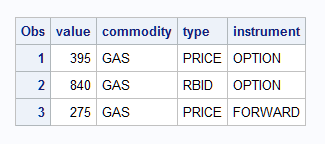
This example creates three data sets and stores the data set name in a variable named dsn. The name is split into three parts and the example prints the results.
/* Create some data sets to read */
data gas_price_option; value=395; run;
data gas_rbid_option; value=840; run;
data gas_price_forward; value=275; run;
/* Create a data set D */
data d;
   set gas_price_option gas_rbid_option gas_price_forward indsname=dsn;
   /* split the data set names into 3 parts */
   commodity = scan (dsn, 2, "._");
   type = scan (dsn, 3, "._");
   instrument = scan (dsn, 4, "._");
   run;
proc print data=d;
run;
Data Set Name Split into Three Parts
Example 13: Using Data Set Lists
This example uses a numbered range list to read in the data sets.
data dept008; emp=13; run;
data dept009; emp=9; run;
data dept010; emp=4; run;
data dept011; emp=33; run;
data _null_;
  set dept008-dept010;
  put _all_;
run;
The program writes these lines to the SAS log.
Using a Data Set List with the SET Statement
1    data dept008; emp=13; run;
NOTE: The data set WORK.DEPT008 has 1 observations and 1 variables.
NOTE: DATA statement used (Total process time):
      real time           0.06 seconds
      cpu time            0.03 seconds

2    data dept009; emp=9; run;
NOTE: The data set WORK.DEPT009 has 1 observations and 1 variables.
NOTE: DATA statement used (Total process time):
      real time           0.00 seconds
      cpu time            0.00 seconds

3    data dept010; emp=4; run;
NOTE: The data set WORK.DEPT010 has 1 observations and 1 variables.
NOTE: DATA statement used (Total process time):
      real time           0.00 seconds
      cpu time            0.00 seconds

4    data dept011; emp=33; run;
NOTE: The data set WORK.DEPT011 has 1 observations and 1 variables.
NOTE: DATA statement used (Total process time):
      real time           0.00 seconds
      cpu time            0.00 seconds

5
6   data _null_;
7     set dept008-dept010;
8     put _all_;
9   run;
emp=13 _ERROR_=0 _N_=1
emp=9 _ERROR_=0 _N_=2
emp=4 _ERROR_=0 _N_=3
NOTE: There were 1 observations read from the data set WORK.DEPT008.
NOTE: There were 1 observations read from the data set WORK.DEPT009.
NOTE: There were 1 observations read from the data set WORK.DEPT010.
NOTE: DATA statement used (Total process time):
      real time           0.00 seconds
      cpu time            0.00 seconds
In addition, you could use data set lists to find missing data sets. This example uses a numbered range list to locate the missing data sets. An error occurs for each data set that does not exist. When you know which data sets are missing, you can correct the SET statement to reflect the data sets that actually exist.
data dept008; emp=13; run;
data dept009; emp=9; run;
data dept011; emp=4; run;
data dept014; emp=33; run;
data _null_;
  set dept008-dept014;
  put _all_;
run;
The program writes these lines to the SAS log.
Finding Missing Data Sets Using the SET Statement
1    data dept008; emp=13; run;
NOTE: The data set WORK.DEPT008 has 1 observations and 1 variables.
NOTE: DATA statement used (Total process time):
      real time           0.04 seconds
      cpu time            0.04 seconds

2    data dept009; emp=9; run;
NOTE: The data set WORK.DEPT009 has 1 observations and 1 variables.
NOTE: DATA statement used (Total process time):
      real time           0.00 seconds
      cpu time            0.00 seconds

3    data dept011; emp=4; run;
NOTE: The data set WORK.DEPT011 has 1 observations and 1 variables.
NOTE: DATA statement used (Total process time):
      real time           0.03 seconds
      cpu time            0.01 seconds

4    data dept014; emp=33; run;
NOTE: The data set WORK.DEPT014 has 1 observations and 1 variables.
NOTE: DATA statement used (Total process time):
      real time           0.00 seconds
      cpu time            0.00 seconds

5    data _null_;
6    set dept008-dept014;
ERROR: File WORK.DEPT010.DATA does not exist.
ERROR: File WORK.DEPT012.DATA does not exist.
ERROR: File WORK.DEPT013.DATA does not exist.
7    put _all_;
8    run;
NOTE: The SAS System stopped processing this step because of errors.
NOTE: DATA statement used (Total process time):
      real time           0.00 seconds
      cpu time            0.00 seconds
Example 14: Finding the Current Observation Number
This example uses the CUROBS option to return the number of the current observation.
data women;
  set sashelp.class curobs=cobs;
  where sex = 'F';
  orig_obs = cobs;
run;
Example 15: Using the KEYRESET Option
This example uses the KEYRESET= option to look up all the values when I=3 two times.
data a(index=(i));
   do i = 1,2,3,3,3,4,5;
      j=ranuni(4);
      output;
   end;
run;
data _null_;
   input i;
   reset = 1;
   do while (_iorc_ = 0);
      set a key=i keyreset=reset;
      put _all_;
   end;
   _error_ = 0; _iorc_ = 0;
   datalines;
3
3
;
See Also
-
Definition of Data Set Options in SAS Data Set Options: Reference
-
Reading, Combining, and Modifying SAS Data Sets in SAS Language Reference: Concepts
-
Rules for Words and Names in the SAS Language in SAS Language Reference: Concepts
-
SAS Macro Language: Reference
-
Statements: