MERGE Statement
Joins observations from two or more SAS data sets into a single observation.
| Valid in: | DATA step |
|---|---|
| Categories: | CAS |
| File-Handling | |
| Type: | Executable |
| Note: | The variables read using the MERGE statement are retained in the PDV. The data types of the variables that are read are also retained. For more information, see DATA Step Processing in SAS Programmer’s Guide: Essentials and the . RETAIN StatementRETAIN Statement. |
| See: | One-to-One Merging in SAS Programmer’s Guide: Essentials |
| Match-Merging in SAS Programmer’s Guide: Essentials | |
| One-to-One Reading versus One-to-One Merging in SAS Programmer’s Guide: Essentials | |
| Comparison of SAS Language Elements for Combining Data Sets in SAS Programmer’s Guide: Essentials | |
| Processing BY-Groups in the DATA Step in SAS Programmer’s Guide: Essentials | |
| Examples: | Examples: Match-Merge Data in SAS Programmer’s Guide: Essentials |
| Examples: Merge Data One-to-One in SAS Programmer’s Guide: Essentials |
Table of Contents
- Syntax
- Arguments
- Details
- Overview
- Using Data Set Lists with MERGE
- One-to-One Merging
- Match-Merging
- Comparisons
- Examples
- Example 1: One-to-One Merging
- Example 2: Match-Merging
- Example 3: Merging with a Data Set List
- Example 4: Three Table Merge with BY Values and the IN= Data Set Option
- Example 5: Two Table Merge with a BY Variable and the IN= Data Set Option
- See Also
Syntax
SAS-data-set-2 <(data-set-options) >
<...SAS-data-set-n <(data-set-options)> >
<END=variable>;
Arguments
SAS-data-set
specifies at least two existing SAS data sets from which observations are read. You can specify individual data sets, data set lists, or a combination of both.
| Tips | Instead of using a data set name, you can specify the physical pathname to the file, using syntax that your operating system understands. The pathname must be enclosed in single or double quotation marks. |
|---|---|
| You can specify additional SAS data sets. | |
| See | Using Data Set Lists with MERGE |
(data-set-options)
specifies one or more SAS data set options in parentheses after a SAS data set name.
| Note | The data set options specify actions that SAS is to take when it reads observations into the DATA step for processing. For a list of data set options, see SAS Data Set Options: Reference |
|---|---|
| Tip | Data set options that apply to a data set list apply to all of the data sets in the list. |
END=variable
names and creates a temporary variable that contains an end-of-file indicator.
| Note | The END= variable is initialized to 0 and then set to 1 when the MERGE statement processes the last observation. If the input data sets have varying numbers of observations, the END= variable is set to 1 when MERGE processes the last observation from all data sets. |
|---|---|
| Tip | The END= variable is not added to any SAS data set that is being created. |
Details
Overview
The MERGE statement is flexible and has a variety of uses in SAS programming. This section describes basic uses of MERGE. Other applications include using more than one BY variable, merging more than two data sets, and merging a few observations with all observations in another data set.
For more information, see How to Prepare Your Data Sets in SAS Language Reference: Concepts.
Using Data Set Lists with MERGE
You can use data set lists with the MERGE statement. Data set lists provide a quick way to reference existing groups of data sets. These data set lists must be either name prefix lists or numbered range lists.
Name
prefix lists refer to all data sets that begin
with a specified character string. For example, merge
SALES1:; tells SAS to merge all data sets starting with
"SALES1" such as SALES1, SALES10, SALES11, and SALES12.
Numbered range lists require you to have a series of data sets with the same name, except for the last character or characters, which are consecutive numbers. In a numbered range list, you can begin with any number and end with any number. For example, these lists refer to the same data sets:
sales1 sales2 sales3 sales4
sales1-sales4Some other rules to consider when using numbered data set lists are as follows:
- You can specify groups
of ranges.
merge cost1-cost4 cost11-cost14 cost21-cost24; - You can mix numbered
range lists with name prefix lists.
merge cost1-cost4 cost2: cost33-37; - You can mix single data
sets with data set lists.
merge cost1 cost10-cost20 cost30; - Quotation marks around
data set lists are ignored.
/* these two lines are the same */ merge sales1-sales4; merge 'sales1'n-'sales4'n; - Spaces in data set names
are invalid. If quotation marks are used, trailing blanks are ignored.
/* blanks in these statements will cause errors */ merge sales 1-sales 4; merge 'sales 1'n - 'sales 4'n; /* trailing blanks in this statement will be ignored */ merge 'sales1'n - 'sales4'n; - The maximum numeric
suffix is 2147483647.
/* this suffix will cause an error */ merge prod2000000000-prod2934850239; - Physical pathnames are
not allowed.
/* physical pathnames will cause an error */
%let work_path = %sysfunc(pathname(WORK));
merge "&work_path\dept.sas7bdat"-"&work_path\emp.sas7bdat" ;
One-to-One Merging
One-to-one merging combines observations from two or more SAS data sets into a single observation in a new data set. To perform a one-to-one merge, use the MERGE statement without a BY statement. SAS combines the first observation from all data sets that are named in the MERGE statement into the first observation in the new data set, the second observation from all data sets into the second observation in the new data set, and so on. In a one-to-one merge, the number of observations in the new data set is equal to the number of observations in the largest data set named in the MERGE statement. See Example 1 for an example of a one-to-one merge. For more information, see Reading, Combining, and Modifying SAS Data Sets in SAS Language Reference: Concepts.
CAUTION
Use care when you combine data sets with a one-to-one merge. One-to-one merges can sometimes produce undesirable results. Test your program on representative samples of the data sets before you use this method.
Match-Merging
Match-merging combines observations from two or more SAS data sets into a single observation in a new data set according to the values of a common variable. The number of observations in the new data set is the sum of the largest number of observations in each BY group in all data sets. To perform a match-merge, use a BY statement immediately after the MERGE statement. The variables in the BY statement must be common to all data sets. Only one BY statement can accompany each MERGE statement in a DATA step. The data sets that are listed in the MERGE statement must be sorted in order of the values of the variables that are listed in the BY statement, or they must have an appropriate index. See Example 2 for an example of a match-merge. For more information, see Reading, Combining, and Modifying SAS Data Sets in SAS Language Reference: Concepts.
Comparisons
- MERGE combines observations from two or more SAS data sets. UPDATE combines observations from exactly two SAS data sets. UPDATE changes or updates the values of selected observations in a master data set as well. UPDATE also might add observations.
- Like UPDATE, MODIFY combines observations from two SAS data sets by changing or updating values of selected observations in a master data set.
- The results that are obtained by reading observations using two or more SET statements are similar to the results that are obtained by using the MERGE statement with no BY statement. However, with the SET statements, SAS stops processing before all observations are read from all data sets if the number of observations are not equal. In contrast, SAS continues processing all observations in all data sets named in the MERGE statement.
Examples
Example 1: One-to-One Merging
This example shows how to combine observations from two data sets into a single observation in a new data set.
data benefits.qtr1;
   merge benefits.jan benefits.feb;
run;
Example 2: Match-Merging
This example shows how to combine observations from two data sets into a single observation in a new data set. The matching is done based on the values of a variable that is specified in the BY statement.
data inventry;
   merge stock orders;
   by partnum;
run;
Example 3: Merging with a Data Set List
This example uses a data list to define the data sets that are merged.
data d008; job=3; emp=19; run;
data d009; job=3; sal=50; run;
data d010; job=4; emp=97; run;
data d011; job=4; sal=15; run;
data comb;
   merge d008-d011;
   by job;
run;
proc print data=comb;
run;
Example 4: Three Table Merge with BY Values and the IN= Data Set Option
DATA CAFE(KEEP=NAME PLACE CNUM);
   INPUT NAME $ ;
   PLACE = 'CAFE   ';
   CNUM = 'C' || LEFT(PUT(_N_,2.));
   DATALINES;
ANDERSON
COOPER
DIXON
FREDERIC
FREDERIC
PALMER
RANDALL
RANDALL
SMITH
SMITH
SMITH
;
RUN;

DATA VENDING (KEEP=NAME PLACE VNUM);
   INPUT NAME $ ;
   PLACE = 'VENDING ';
   VNUM = 'V' || LEFT(PUT(_N_,2.));
   DATALINES;
CARTER
DANIELS
GARY
GARY
HODGE
PALMER
RANDALL
RANDALL
SMITH
SMITH
SPENCER
SPENCER
SPENCER
SPENCER
;
RUN;

DATA SNACK (KEEP=NAME PLACE SNUM);
   INPUT NAME $ ;
   PLACE = 'SNACK   ';
   SNUM = 'S' || LEFT(PUT(_N_,2.));
   DATALINES;
BARRETT
COOPER
DANIELS
DIXON
DIXON
FREDERIC
GARY
HODGE
HODGE
PALMER
RANDALL
RANDALL
SMITH
SMITH
SMITH
SMITH
SPENCER
SPENCER
;
RUN;

DATA ALL;
   MERGE CAFE(IN=CAFEIN) SNACK(IN=SNACKIN) VENDING(IN=VENDIN);
   BY NAME;
   CIN=CAFEIN; SIN=SNACKIN; VIN=VENDIN;
RUN;

PROC PRINT;
     TITLE 'MERGED DATA';
RUN;
Example 5: Two Table Merge with a BY Variable and the IN= Data Set Option
data have_a;
   input ID amount_a;
   datalines;
1 10
3 15
4 20
7 15
9 12
10 14
;

data have_b;
   input ID amount_b;
   datalines;
2 15
3 20
4 10
5 12
7 20
8 15
9 10
11 20
;

data want;
  merge have_a(in=inA) have_b(in=inb);
  by id;
  length joinType $ 2;
  joinType = cats(inA, inB);
run;

proc print data=want;
run;
quit;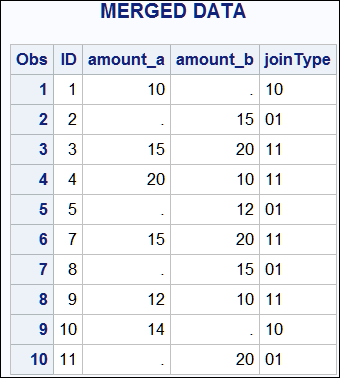
See Also
-
Overview of Combining Data in SAS Programmer’s Guide: Essentials
-
Examples: Match-Merge Data in SAS Programmer’s Guide: Essentials
-
Examples: Merge Data One-to-One in SAS Programmer’s Guide: Essentials
-
Statements: