BY Statement
Controls the operation of a SET, MERGE, MODIFY, or UPDATE statement in the DATA step and sets up special grouping variables.
| Valid in: | DATA step or PROC step |
|---|---|
| Categories: | CAS |
| File-Handling | |
| Type: | Declarative |
| See: | SAS Cloud Analytic Services: DATA Step Programming |
| Example: |
|
| Example: | Group and Sort Variables in Descending Order in SAS Cloud Analytic Services: DATA Step Programming |
Table of Contents
- Syntax
- Required Argument
- Optional Arguments
- Details
- How SAS Identifies the Beginning and End of a BY Group
- Using a BY Statement in a DATA Step
- Using a BY Statement in a PROC Step
- Using a BY Statement with SAS Views
- How SAS Processes BY Groups
- Examples
- Example 1: Specifying One or More BY Variables
- Example 2: Specifying Sort Order
- Example 3: BY-Group Processing with Nonsorted Data
- Example 4: Grouping Observations by Using Formatted Values
- Example 5: Combining Multiple Observations and Grouping Them Based on One BY Value
- See Also
Syntax
Required Argument
variable
names each variable by which the data set is sorted or indexed. These variables are referred to as BY variables for the current DATA or PROC step.
| Requirement | If you designate a
name literal as the BY variable in BY-group processing and you want
to refer to the corresponding FIRST. or LAST. temporary variable,
you must include the FIRST. or LAST. portion of the two-level variable
name within single quotation marks. For example:
|
|---|---|
| Tip | The data set can be sorted or indexed by more than one variable. |
| Examples | Specifying One or More BY Variables |
| Specifying Sort Order | |
| BY-Group Processing with Nonsorted Data | |
| Grouping Observations by Using Formatted Values |
Optional Arguments
DESCENDING
specifies that the data sets are sorted in descending order by the variable that is specified. DESCENDING means largest to smallest numerically, or reverse alphabetical for character variables.
| Restrictions | Beginning in SAS Viya 3.5, the DESCENDING option is supported in a DATA step that runs in CAS. When running in CAS, the DESCENDING option cannot be used on the first variable in the BY statement. |
|---|---|
| You cannot use the DESCENDING option with data sets that are indexed because indexes are always stored in ascending order. | |
| Example | Group and Sort Variables in Descending Order in SAS Cloud Analytic Services: DATA Step Programming |
GROUPFORMAT
uses the formatted values, instead of the internal values, of the BY variables to determine where BY groups begin and end. GROUPFORMAT also determines how FIRST.variable and LAST.variable are assigned. Although the GROUPFORMAT option can appear anywhere in the BY statement, the option applies to all variables in the BY statement.
| Restrictions | You must sort the observations in a data set based on the value of the BY variables before using the GROUPFORMAT option in the BY statement. |
|---|---|
| You can use the GROUPFORMAT option in a BY statement only in a DATA step. | |
| Interaction | If you also use the NOTSORTED option, you can group the observations in a data set by the formatted value of the BY variables without requiring that the data set be sorted or indexed. |
| Note | BY-group processing in the DATA step using the GROUPFORMAT option is the same as BY-group processing with formatted values in SAS procedures. |
| Tips | Using the GROUPFORMAT option is useful when you define your own formats to display data that is grouped. |
| Using the GROUPFORMAT option in the DATA step ensures that BY groups that you use to create a data set match the BY groups in PROC steps that report grouped, formatted data. | |
| See | |
| Example | Grouping Observations by Using Formatted Values |
NOTSORTED
specifies that observations with the same BY value are grouped together but are not necessarily sorted in alphabetical or numeric order.
| Restriction | You cannot use the NOTSORTED option with the MERGE and UPDATE statements. |
|---|---|
| Tips | The NOTSORTED option can appear anywhere in the BY statement. |
| Using the NOTSORTED option is useful if you have data that falls into other logical groupings such as chronological order or categories. | |
| Example | BY-Group Processing with Nonsorted Data |
Details
- How SAS Identifies the Beginning and End of a BY Group
- Using a BY Statement in a DATA Step
- Using a BY Statement in a PROC Step
- Using a BY Statement with SAS Views
- How SAS Processes BY Groups
How SAS Identifies the Beginning and End of a BY Group
SAS identifies the beginning and end of a BY group by creating two temporary variables for each BY variable: FIRST.variable and LAST.variable. The value of these variables is either 0 or 1. SAS sets the value of FIRST.variable to 1 when it reads the first observation in a BY group, and sets the value of LAST.variable to 1 when it reads the last observation in a BY group. These temporary variables are available for DATA step programming but are not added to the output data set.
For a complete explanation of how SAS processes grouped data and how to prepare your data, see BY-Group Processing in the DATA Step in SAS Language Reference: Concepts.
Using a BY Statement in a DATA Step
The BY statement applies only to the SET, MERGE, MODIFY, or UPDATE statement that precedes it in the DATA step. Only one BY statement can accompany each of these statements in a DATA step.
The data sets that are listed in the SET, MERGE, or UPDATE statement must be sorted by the values of the variables that are listed in the BY statement or that have an appropriate index. As a default, SAS expects the data sets to be arranged in ascending numeric order or in alphabetical order. The observations can be arranged by using one of these methods:
- sort the data set
- create an index for the variables
- read in the observations in order
For more information, see How to Prepare Your Data Sets in SAS Language Reference: Concepts.
Using a BY Statement in a PROC Step
You can specify the BY statement with some SAS procedures to modify their action. For more information, see the individual procedures in Base SAS Procedures Guide for a discussion of how the BY statement affects processing for SAS procedures.
Using a BY Statement with SAS Views
If you create a DATA step view by reading from a DBMS and the SET, MERGE, UPDATE, or MODIFY statement is followed by a BY statement, the BY statement might cause the DBMS to sort the data in order to return the data in sorted order. Sorting the data could increase execution time.
How SAS Processes BY Groups
SAS assigns these values to FIRST.variable and LAST.variable:
- FIRST.variable has
a value of 1 under these conditions:
- when the current observation is the first observation that is read from the data set.
- when you do not use
the GROUPFORMAT option and the internal value of the variable in the
current observation differs from the internal value in the previous
observation.
If you use the GROUPFORMAT option, FIRST.variable has a value of 1 when the formatted value of the variable in the current observation differs from the formatted value in the previous observation.
- FIRST.variable has
a value of 1 for any preceding variable in the BY statement.
In all other cases, FIRST.variable has a value of 0.
- LAST.variable has
a value of 1 under these conditions:
- when the current observation is the last observation that is read from the data set.
- when you use the GROUPFORMAT
option and the internal value of the variable in the current observation
differs from the internal value in the next observation.
If you use the GROUPFORMAT option, LAST.variable has a value of 1 when the formatted value of the variable in the current observation differs from the formatted value in the next observation.
- LAST.variable has
a value of 1 for any preceding variable in the BY statement.
In all other cases, LAST.variable has a value of 0.
Examples
Example 1: Specifying One or More BY Variables
- Observations are in
ascending order of the variable DEPT.
by dept; - Observations are in
alphabetical (ascending) order by CITY and, within each value of CITY,
in ascending order by ZIPCODE.
by city zipcode;
Example 2: Specifying Sort Order
- Observations are in
ascending order of SALESREP and, within each SALESREP value, in descending
order of the values of JANSALES.
by salesrep descending jansales; - Observations are in
descending order of BEDROOMS, and, within each value of BEDROOMS,
in descending order of PRICE.
by descending bedrooms descending price;
Example 3: BY-Group Processing with Nonsorted Data
Observations are ordered by the name of the month in which the expenses were accrued.
by month notsorted;Example 4: Grouping Observations by Using Formatted Values
This example illustrates the use of the GROUPFORMAT option.
proc format;
   value range
      low -55 = 'Under 55'
      55-60   = '55 to 60'
      60-65   = '60 to 65'
      65-70   = '65 to 70'
      other   = 'Over 70';
run;
proc sort data=sashelp.class out=sorted_class;
   by height;
run;
data _null_;
   format height range.;
   set sorted_class;
      by height groupformat;
   if first.height then
      put 'Shortest in ' height 'measures ' height:best12.;
run;
SAS writes the following output to the SAS log:
Shortest in Under 55 measures 51.3
Shortest in 55 to 60 measures 56.3
Shortest in 60 to 65 measures 62.5
Shortest in 65 to 70 measures 65.3
Shortest in Over 70 measures 72
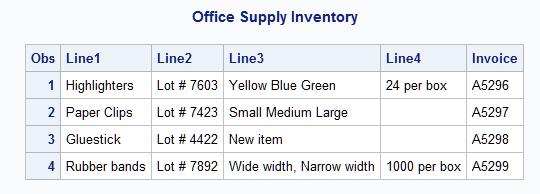
Example 5: Combining Multiple Observations and Grouping Them Based on One BY Value
This example shows how to use FIRST.variable and LAST.variable with BY-group processing.
data Inventory;
   length RecordID 8 Invoice $ 30 ItemLine $ 50;
   infile datalines;
   input RecordID Invoice ItemLine &;
   drop RecordID;
   datalines;
A74  A5296  Highlighters
A75  A5296  Lot # 7603
A76  A5296  Yellow Blue Green
A77  A5296  24 per box
A78  A5297  Paper Clips
A79  A5297  Lot # 7423
A80  A5297  Small Medium Large
A81  A5298  Gluestick
A82  A5298  Lot # 4422
A83  A5298  New item
A84  A5299  Rubber bands
A85  A5299  Lot # 7892
A86  A5299  Wide width, Narrow width
A87  A5299  1000 per box
;
data combined;
   array Line{4} $ 60 ;
   retain Line1-Line4;
   keep Invoice Line1-Line4;
   set Inventory;
   by Invoice;

   if first.Invoice then do;
      call missing(of Line1-Line4);
      records = 0;
   end;

   records + 1;
   Line[records]=ItemLine;

   if last.Invoice then output;
run;
proc print data=combined;
   title 'Office Supply Inventory';
run;
Output from Combining Multiple Observations
See Also
-
Statements: